For a single pattern, DXF AAMA and DXF ASTM are nearly the same thing. ASTM D6673 is the formal standard that grew out of the AAMA convention: same DXF container, same idea of one block per pattern piece, same numbered layers. The practical differences are in details such as how grading data and some piece attributes are written, and in how strictly each CAD vendor follows either version. If the receiving program offers "AAMA/ASTM" as one option, you rarely need to worry; if it offers both separately, export what the recipient asks for, and AAMA when nobody specifies.
A short history
AAMA: the industry convention
In the 1990s the American Apparel Manufacturers Association (AAMA, now part of the American Apparel & Footwear Association) brought CAD vendors and manufacturers together to agree on how pattern pieces should be written into Autodesk's DXF format. The result became known as DXF AAMA. It defined the block-per-piece structure, the numbered layers and the piece text that make a DXF readable as a pattern. If you want the basics of the format first, start with what a DXF AAMA file is.
ASTM D6673: the formal standard
ASTM International's Committee D13 on Textiles later published the convention as ASTM D6673, Standard Practice for Sewn Products Pattern Data Interchange—Data Format. According to ASTM's own description, it covers the exchange of two-dimensional pattern piece data between CAD systems using DXF, plus grade rule tables in a separately formatted ASCII file. Its scope is limited to pattern pieces within a style and the related piece and style information.
ASTM lists the 2010 edition of D6673 as withdrawn in 2019. That does not make ASTM-flavoured DXF files disappear: CAD programs still export and import them, and "AAMA/ASTM" remains the label you see in menus. The withdrawal simply means there is no current, maintained edition of the standard to cite.
What actually differs inside the file
Both variants share the core that matters for almost all everyday work: closed cut lines, notches, grain line, internal lines and piece names. The differences sit at the edges.
| Aspect | DXF AAMA | DXF ASTM (D6673) |
|---|---|---|
| Origin | Industry association convention | Formal ASTM standard built on the AAMA work |
| Container | DXF, one BLOCK per piece | DXF, one BLOCK per piece |
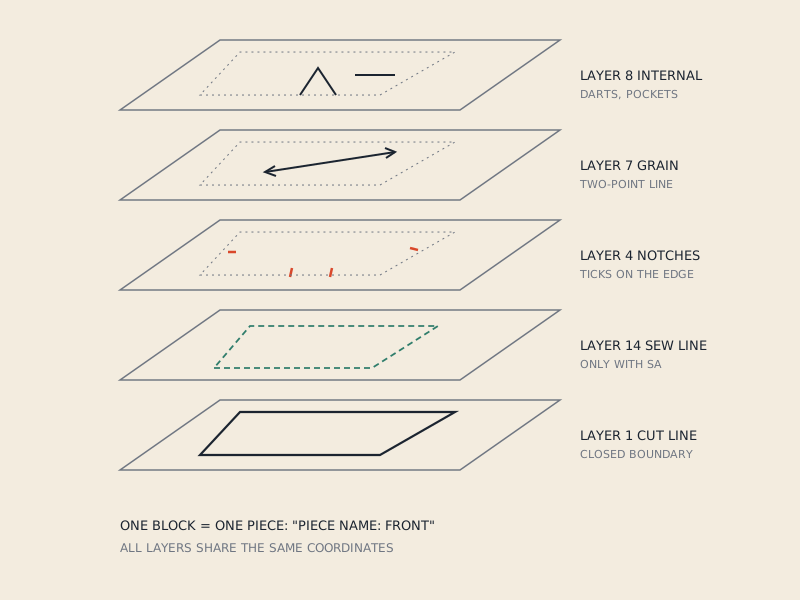
| Layer numbering | Numbered layers (1 cut, 4 notches, 7 grain, 8 internal, 14 sew…) | Same scheme |
| Grading | Grade rules can travel in a separate rule file | Grade rule table format defined in the standard |
| Piece attributes | Text labels in each block | Same idea, more formally specified |
| Typical label in CAD menus | "AAMA" | "ASTM" or combined "AAMA/ASTM" |
In practice, vendors interpret both specs slightly differently. Two "AAMA" files from two CAD systems can differ more than an AAMA and an ASTM file from the same system. That is why receiving programs are usually tolerant and many offer a single combined import.
Grading and rule tables
This is where the variants differ most. A graded pattern contains a base size plus rules that say how each grade point moves for other sizes. AAMA and ASTM both allow the rule table to travel alongside the DXF, but the expected file layout and how the DXF refers to it are not identical between implementations. If you exchange graded nests between two industrial systems, test with one style before sending a season's worth.
For single-size patterns, which covers most 3D work and every pattern converted from a PDF, the grading difference does not apply at all.
What each kind of program does
The exact wording of menus changes between versions, so treat this as the general pattern rather than a menu reference.
- CLO3D and Marvelous Designer import via File > Import > DXF (AAMA/ASTM), one combined option. Export offers the same family.
- Industrial 2D CAD (Gerber AccuMark, Lectra Modaris, Optitex, TUKAcad and similar) typically offer AAMA and ASTM as separate choices on export, sometimes with sub-options for the DXF version and units. On import they usually accept both.
- Seamly2D and Valentina export pattern pieces in AAMA-style DXF; they are drafting programs and are not designed to import DXF pieces back.
- General CAD and drawing programs (AutoCAD, LibreCAD, Inkscape) open either variant as plain drawings. They show the layers and text but do not interpret them as pattern pieces.
Which should you export
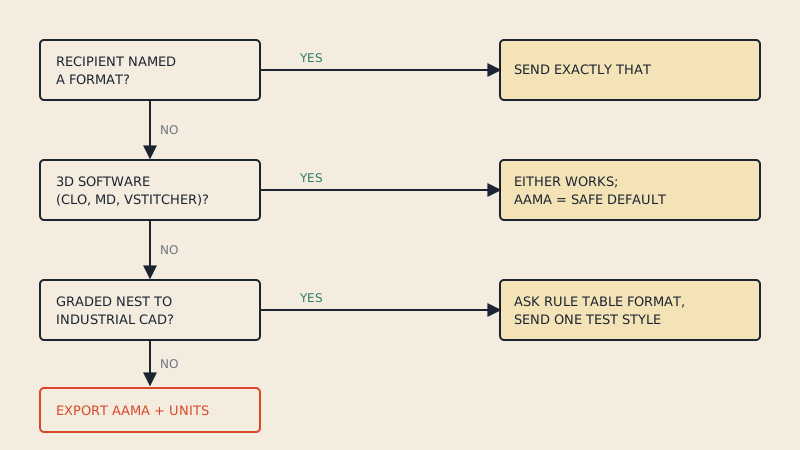
Use this decision list:
- The recipient told you. Export exactly what the factory, grader or 3D studio asked for, including the DXF version and units if they mention them.
- The recipient uses CLO3D, Marvelous Designer or Browzwear. Either works; AAMA is the safer default because it is the more widely tested path.
- You send graded nests between industrial systems. Ask which rule table format the receiving system expects. Send a test style first.
- Nobody specified. Export AAMA, in the units of the pattern (usually millimetres or centimetres in Europe, inches in the US), and say in your message which format and units you used.
How to tell which one you have
Open the file in a text editor and look at the header text near the start of the ENTITIES section or in the first block. Many exporters write a line naming the standard or the program that produced the file. You may also find a reference to a rule table file name if the pattern is graded.
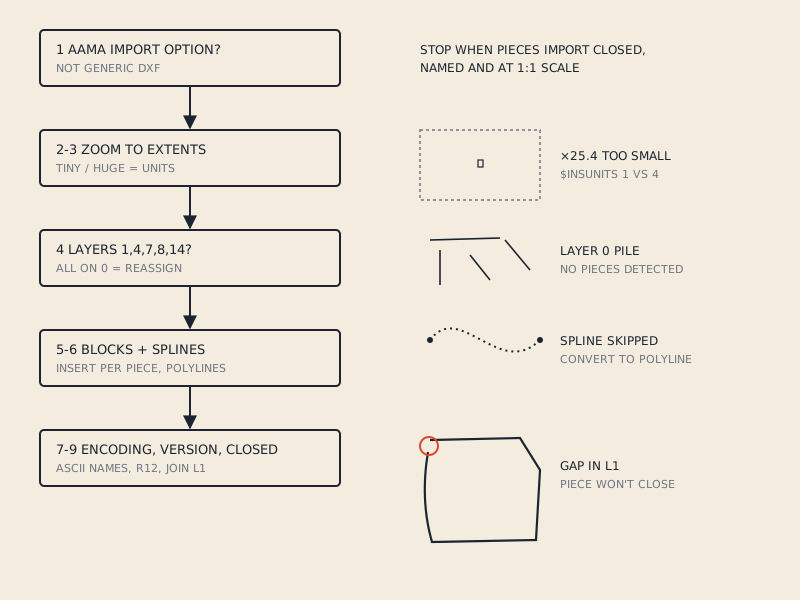
If the file carries no hint, it does not matter much for single-size work: import it with the combined AAMA/ASTM option. If pieces arrive broken, the problem is more likely layers, units or entity types than the AAMA/ASTM label; see the fixes in DXF pattern won't open.
Common misunderstandings
"ASTM is newer, so it is better." ASTM formalised the AAMA ideas; it did not replace the pattern structure with something different. Newer does not mean more compatible.
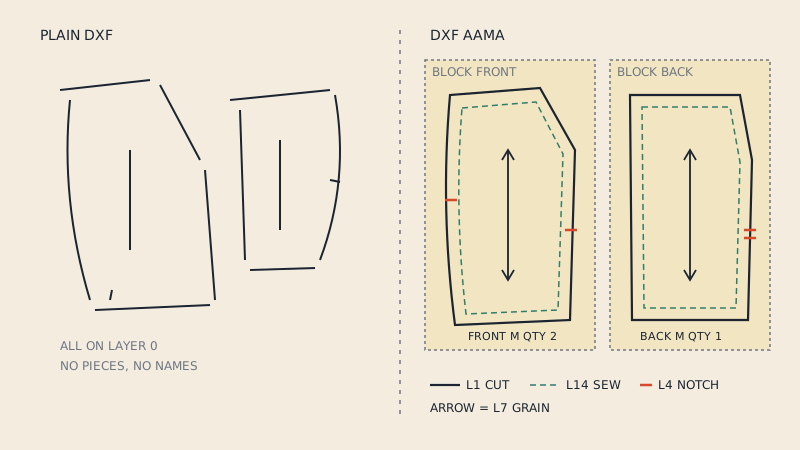
"My CAD only says DXF, so it cannot read AAMA." AAMA files are valid DXF. A program without AAMA support will still open the lines; it just will not build pattern pieces from them.
"An AAMA file must be graded." No. A single-size AAMA file is normal. Grading is optional.
"Converting AAMA to ASTM requires special software." For single-size patterns, importing into any pattern CAD and exporting with the other option is enough. In most cases you do not need to convert at all.
Where converted files fit
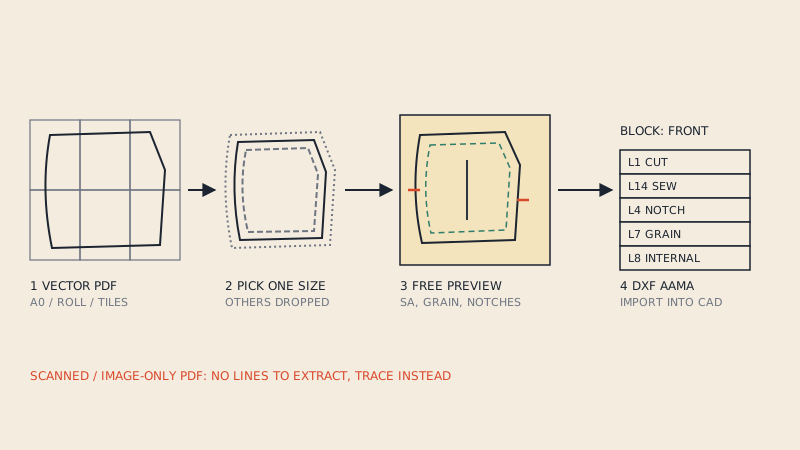
When a pattern starts as a PDF, there is no CAD export menu to choose from; the DXF has to be built from the drawing. Our converter writes single-size DXF AAMA files, which CLO3D, Marvelous Designer and the major pattern systems import with their AAMA or combined AAMA/ASTM option. For how the layers are used inside, see the AAMA DXF layers, one by one; for the conversion process itself, see how to convert a PDF sewing pattern to DXF.
FAQ
Is DXF ASTM the same as DXF AAMA?
They are close relatives. ASTM D6673 is the formal standard built on the AAMA convention and uses the same DXF container, block-per-piece structure and numbered layers; the differences are mainly in grading data and how strictly attributes are specified.
Which format does CLO3D use, AAMA or ASTM?
CLO3D offers a combined DXF (AAMA/ASTM) option under File > Import, so it reads both. Either variant works for single-size pieces.
Is ASTM D6673 still a current standard?
ASTM lists the 2010 edition of D6673 as withdrawn in 2019. Pattern software still reads and writes AAMA/ASTM-style DXF files, so the format remains in everyday use.
What should I send a factory if they just ask for DXF?
Send DXF AAMA unless they say otherwise, and state the units and whether seam allowance is included. Better still, ask which CAD system they use and send a test piece first.
Do the differences matter for a single-size pattern?
Very little. The main differences concern grade rule tables, which a single-size file does not have, so both variants import the same pieces.