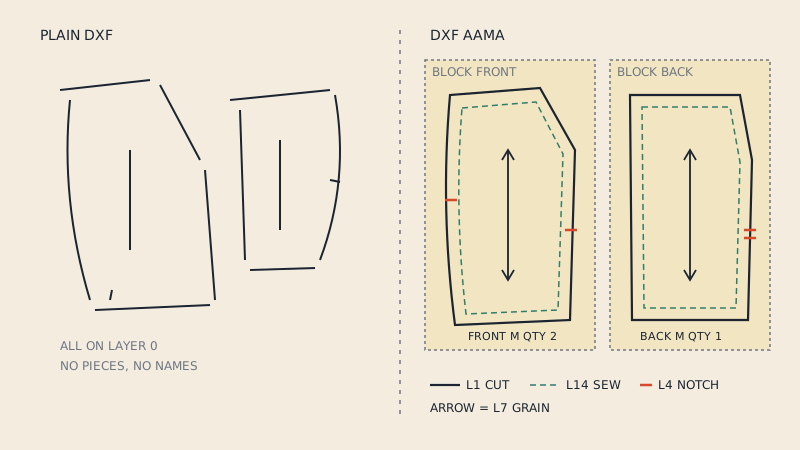
A DXF AAMA file is an ordinary DXF drawing written to a set of conventions agreed by the apparel industry, so that one pattern CAD system can hand pattern pieces to another. Plain DXF only knows about lines and curves. DXF AAMA adds meaning: each pattern piece is a separate block, every line sits on a numbered layer that says what it is (cut line, notch, grain line, internal line), and each piece carries text with its name, size and quantity.
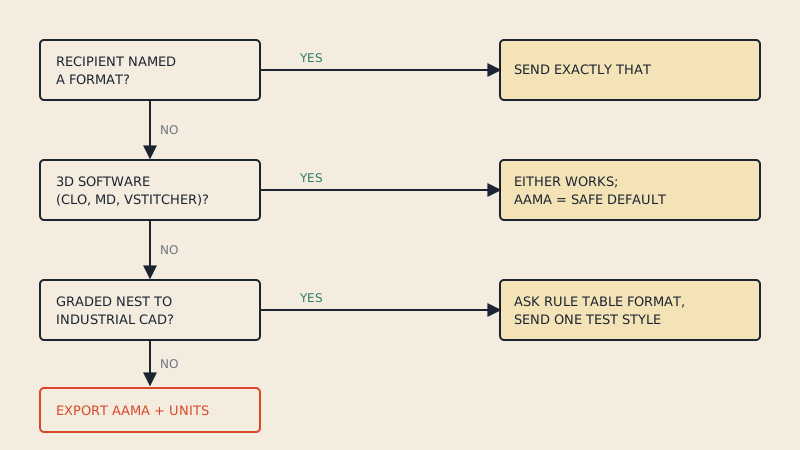
That extra structure is why CLO3D, Gerber AccuMark, Lectra, Optitex and most other pattern programs ask for "DXF AAMA" or "DXF AAMA/ASTM" rather than just "DXF".
Where the format comes from
DXF itself is Autodesk's Drawing Exchange Format, a text-based file that almost every CAD program can read. It was designed for architects and engineers, not for garments. By the 1990s apparel companies were running pattern CAD from several vendors, and each one wrote DXF differently. A front bodice exported from one system could arrive in another as a pile of disconnected lines with no idea which line was the cut edge and which was a dart.
The American Apparel Manufacturers Association (AAMA, today part of the American Apparel & Footwear Association, AAFA) published a convention for writing pattern data into DXF. ASTM later turned the same ideas into a formal standard, ASTM D6673. The two are close relatives; if you need to choose between the two export options, see DXF AAMA vs ASTM.
What AAMA adds to a plain DXF
A plain DXF from a drawing program is a flat list of entities. AAMA organises the same entities into a structure a pattern program can interpret without guessing.
| Feature | Plain DXF | DXF AAMA |
|---|---|---|
| Grouping | Loose lines, maybe on layer 0 | One BLOCK per pattern piece |
| Line meaning | Layer names are arbitrary | Numbered layers with fixed meaning |
| Cut outline | Any closed or open shape | Closed boundary on layer 1 |
| Notches | Usually drawn as tiny lines mixed with the outline | Separate entities on layer 4 |
| Grain line | An arrow drawn like any other line | A two-point line on layer 7 |
| Piece information | Free text, if any | Text such as "Piece Name:", "Size:", "Quantity:" |
| Units | Often unstated | Declared in the file header text |
One block per piece
In DXF, a BLOCK is a named group of entities that can be placed (inserted) in the drawing. AAMA uses one block for each pattern piece: the front, the back, the sleeve, the collar, the facing. When a pattern program imports the file, it reads each block as one piece. Lines from the sleeve cannot accidentally join the outline of the front, because they live in different blocks.
Numbered layers
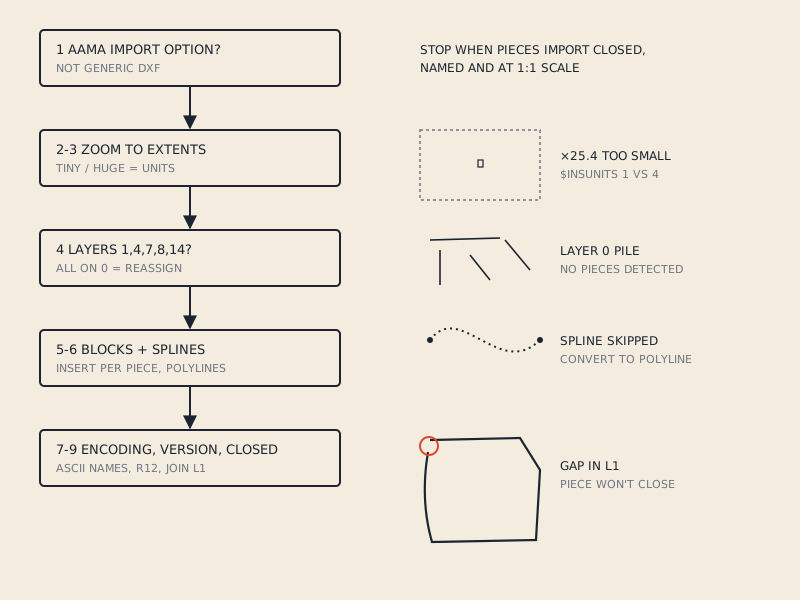
Inside each block, every entity sits on a layer whose number tells the importing program what the line is. Layer 1 is the boundary (cut line), layer 4 holds notches, layer 7 the grain line, layer 8 internal lines such as darts and pocket placements, layer 14 the sew line. There are more; the full list with what each one does is in the AAMA DXF layers, one by one.
Piece text
Each block also contains text entities that describe the piece. Typical labels are "Piece Name:", "Size:", "Quantity:" and sometimes "Category:" or "Material:". The file as a whole usually has header text such as "Style Name:", "Sample Size:" and "Units:". Pattern CAD reads these labels into its own piece properties, so after import the sleeve is already called SLEEVE and the software knows to cut two.
What a DXF AAMA file does not contain
It helps to know the limits so you do not expect too much from the file.
- No fabric or 3D data. Fabric type, colour, stitching, avatar and seam pairing in CLO3D are not part of the format. You set those up after import.
- No sewing instructions. The file describes shapes, not construction order.
- No guarantee of grading. A graded AAMA file can carry several sizes with grade rules, but many files, including most converted ones, contain a single size. A single-size file is perfectly valid.
- No print layout. It is not a printable document. To print a DXF you lay it out on a roll or tiles first.
Who uses DXF AAMA
The format is the common language between groups that otherwise use very different tools.
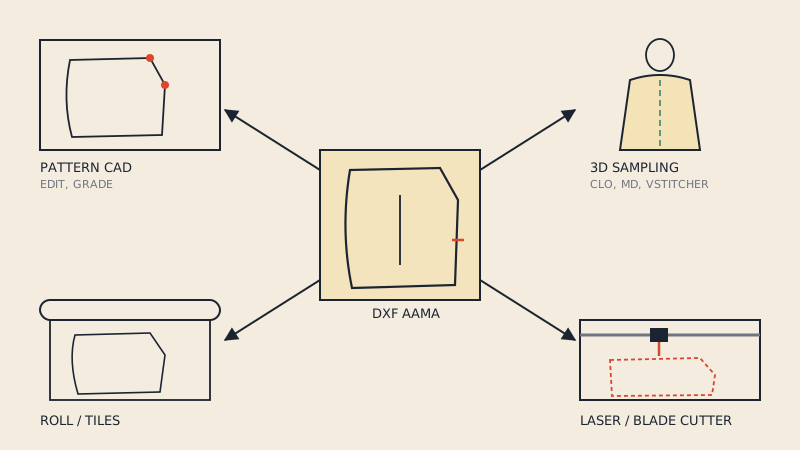
- Factories and cutting rooms receive patterns as DXF AAMA so they can make markers and cut on automatic cutters, whatever CAD the brand used.
- Pattern makers export DXF AAMA to send work to clients, graders or production partners.
- 3D designers in CLO3D, Marvelous Designer and Browzwear import DXF AAMA to get accurate flat pieces they can sew onto an avatar.
- Small brands keep DXF AAMA as the master copy of their patterns, separate from the PDF they might sell or print.
- Home sewists and cosplayers increasingly ask for DXF when they start with 3D software and want to test a pattern they already own before cutting fabric.
If you are new to the idea of DXF patterns in general, DXF sewing patterns: where they come from and how to use them covers the practical side.
How to recognise a DXF AAMA file
The extension is simply .dxf, so the name does not tell you. A few quick checks:
- Open it in a text editor. DXF is plain text. Search for
BLOCK; an AAMA file has one block definition per piece. Search forPiece NameorQuantity; an AAMA file has these strings. - Look at the layer names. In an AAMA file you will see layers called
1,4,7,8and so on, not0,Layer 1orCut. - Import it into pattern CAD. If each piece arrives as a separate, closed pattern piece with a grain line, the structure is right. If you get one huge object or loose lines, the file is plain DXF, or AAMA written badly.
If a file opens empty or as a tangle of lines, the causes and fixes are collected in DXF pattern won't open (or opens empty)?.
Why the structure matters in practice
Consider a simple shirt with eight pieces. As plain DXF, the importing program receives a few hundred line segments. Somebody has to select the segments that form the front, join them into a closed outline, decide which short lines are notches, find the grain arrow and type the piece name. Multiply that by every pattern and every size and you see why the industry wanted a convention.
As DXF AAMA, the same shirt arrives as eight named pieces, each with a closed cut line, notches in the right places, grain line set and quantity filled in. In CLO3D that means you can go straight to arranging pieces around the avatar. In a cutting room it means the marker maker can nest pieces with grain constraints immediately.
Where DXF AAMA files come from
- Exported from pattern CAD. Any professional 2D pattern system can export it, and so can the open-source Seamly2D and Valentina.
- Bought as DXF. Some pattern sellers offer DXF alongside PDF, for 3D designers and small producers.
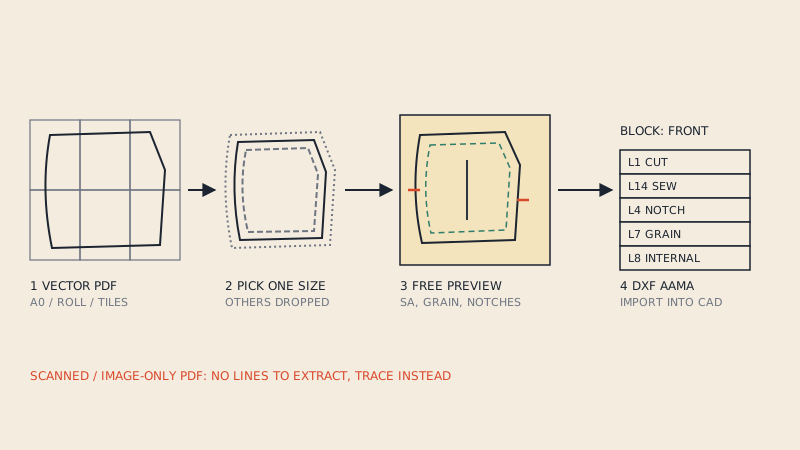
- Converted from a vector PDF. Most patterns sold to home sewists are PDFs. If the PDF was drawn as vectors (not scanned), its lines can be read and rebuilt into AAMA pieces. Generic PDF-to-DXF tools only copy the lines, which is why the result usually fails in pattern CAD; how to convert a PDF sewing pattern to DXF explains the routes.
- Digitised from paper. A digitizer board, photo calibration or tracing turns paper pieces into CAD pieces, which can then be exported as AAMA.
Our PDF to DXF AAMA converter takes the vector PDF route: it finds the pieces, puts the cut line on layer 1, the sew line on layer 14 when the pattern has seam allowance, notches on layer 4, grain on layer 7 and internal lines on layer 8, and writes the piece name, size and quantity into each block. You see a free preview of every detected piece before paying.
FAQ
What does AAMA stand for in DXF AAMA?
AAMA stands for the American Apparel Manufacturers Association, the trade body that defined how pattern data should be written into DXF files. The association is now part of the American Apparel & Footwear Association (AAFA).
Is a DXF AAMA file different from a normal DXF?
It uses the same DXF file format, so any DXF reader can open it. The difference is the structure inside: each pattern piece is a block, lines sit on numbered layers with fixed meanings, and pieces carry text with name, size and quantity.
Can I open a DXF AAMA file in AutoCAD or Inkscape?
Yes, generic CAD and drawing programs can display the lines and text. They do not understand the pattern meaning, so you will see shapes on layers 1, 4, 7 and so on rather than pattern pieces with properties.
Which programs import DXF AAMA?
Most pattern and 3D garment programs do, including CLO3D, Marvelous Designer, Browzwear VStitcher, Gerber AccuMark, Lectra Modaris, Optitex and TUKAcad. CLO3D and Marvelous Designer import it via File > Import > DXF (AAMA/ASTM).
Does a DXF AAMA file have to contain all sizes?
No. A DXF AAMA file can contain a single size or a graded set. A single-size file is common and imports normally into pattern and 3D software.