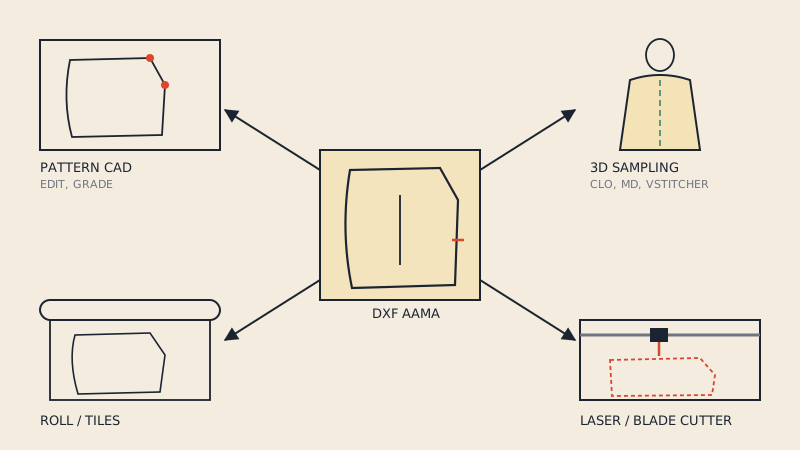
DXF sewing patterns are pattern pieces saved as CAD files instead of printable pages. They come from four places: exports from pattern-making software, designers who sell DXF alongside PDF, made-to-measure services, and conversions of vector PDF patterns. Once you have one, you can open it in pattern CAD, sew it in 3D software such as CLO3D, plot it at full size, or send it to a laser or automatic cutter. What you are allowed to do with it is set by the licence, not by the file format.
Where DXF patterns come from
Pattern CAD exports
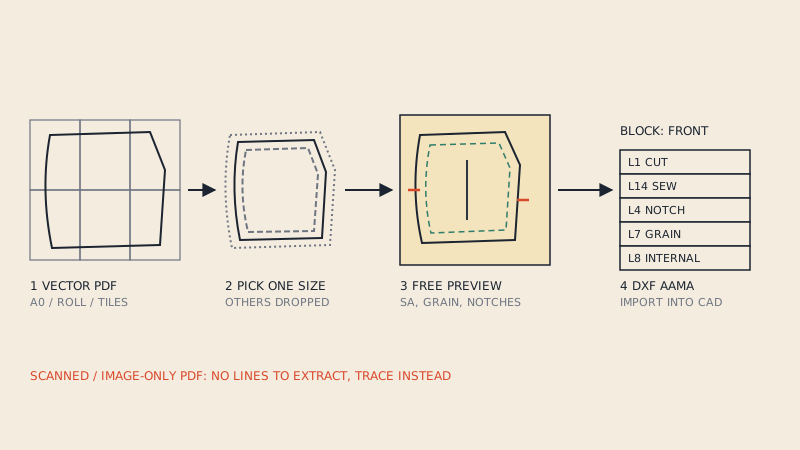
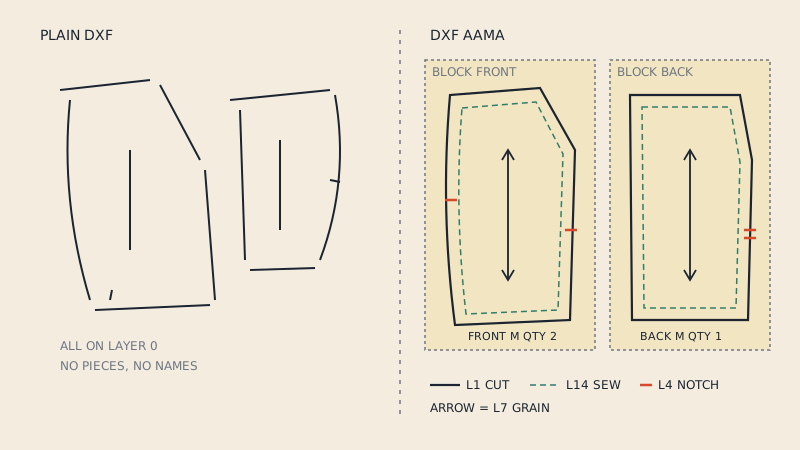
Every professional 2D pattern system exports DXF, usually in the apparel-specific DXF AAMA or ASTM variant. Pattern makers, graders and in-house design teams produce most of the DXF patterns that exist this way; they rarely reach the public, because they are production files for a specific brand. Open-source drafting programs such as Seamly2D and Valentina export DXF too. The format itself is explained in what is a DXF AAMA file.
Designers who sell DXF
A growing number of independent pattern designers offer a DXF file next to the usual PDF, often as a separate product or a "pro" bundle. The buyers are mainly 3D designers, small brands producing in short runs, and cosplayers working in 3D software. Some marketplaces for 3D garment assets also sell patterns in DXF or in the native file format of a 3D program.
When a listing says "DXF", check the details:
- Is it DXF AAMA or a plain DXF exported from a drawing program?
- Which sizes are included? One size, a size range in separate files, or a graded nest?
- Is seam allowance included?
- Which programs has the seller tested it in?
Made-to-measure services
Online made-to-measure services that draft a pattern from your measurements sometimes deliver DXF in addition to PDF. Because the pattern is drafted for one body, it is naturally a single size.
Converted from PDF
Most patterns sold to home sewists only come as PDF. If the PDF is vector, its pieces can be rebuilt into DXF; the routes are compared in how to convert a PDF sewing pattern to DXF. This is how many sewists get a DXF of a pattern they already own and like.
Digitised from paper
Paper patterns, including vintage ones, can be digitised with a digitizer board, a calibrated photo or by tracing a scan, and then exported from CAD as DXF.
What you can do with a DXF pattern
| Use | Software or machine | What the DXF must provide |
|---|---|---|
| Edit, alter, grade | Pattern CAD (industrial or open source) | Closed pieces, notches, grain, AAMA layers |
| 3D sampling and fitting | CLO3D, Marvelous Designer, Browzwear | Closed pieces, grain line, correct scale |
| Full-size printing | Plotter or wide-format printer, via a print layout | Correct scale; layout on a roll |
| Markers and nesting | Marker software | Pieces with grain and quantity |
| Automatic cutting | Cutting-room cutters, laser cutters, hobby cutting machines | Closed cut line, sometimes notches |
| Embroidery or print placement | Placement in a design program | Correct outline and grain |
Pattern CAD
The DXF opens as editable pieces. You can lengthen a bodice, move a dart, add seam allowance with the CAD's own tool, true seams and export again. If you are not used to CAD, open-source options are a reasonable place to start; just remember that Seamly2D and Valentina are drafting programs and are not designed to import DXF pieces for editing.
3D sampling
This is the most common reason home sewists and small brands want DXF. In CLO3D or Marvelous Designer you import the pieces with File > Import > DXF (AAMA/ASTM), arrange them around an avatar, define the seams and simulate a fabric. You can check fit, balance and proportions before cutting fabric. For a full workflow, see from flat pattern to 3D sample in CLO3D.
Printing at full size
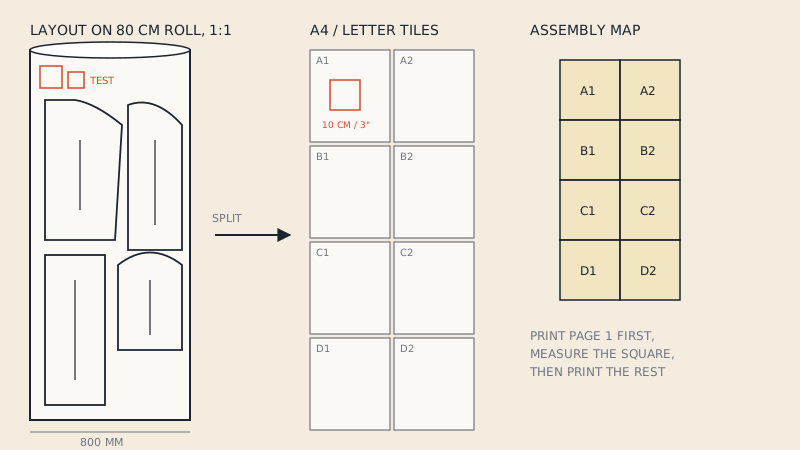
A DXF is not a page layout, so a print shop cannot print it as-is. It has to be laid out on a roll width or split into tiles first, with a test square to verify scale. How to do that is covered in how to print a DXF pattern. Our service also does this: a DXF AAMA from pattern CAD is laid out at 1:1 on an 80 cm roll and split into A0 to A4 and US Letter sheets for €5.
Cutting machines
Cutting machines need a clean, closed outline. Industrial cutters also use notches and drill holes, and they cut along layer 1, the boundary. For laser and hobby blade cutters:
- Check whether the cutter's software reads DXF directly or wants SVG.
- Decide whether you are cutting on the cut line (seam allowance included) or the sew line.
- Notches are often cut as short slits; check that your machine handles them, or remove them before cutting.
- Text and grain lines should usually be turned off or set to "draw" rather than "cut".
Single size or all sizes
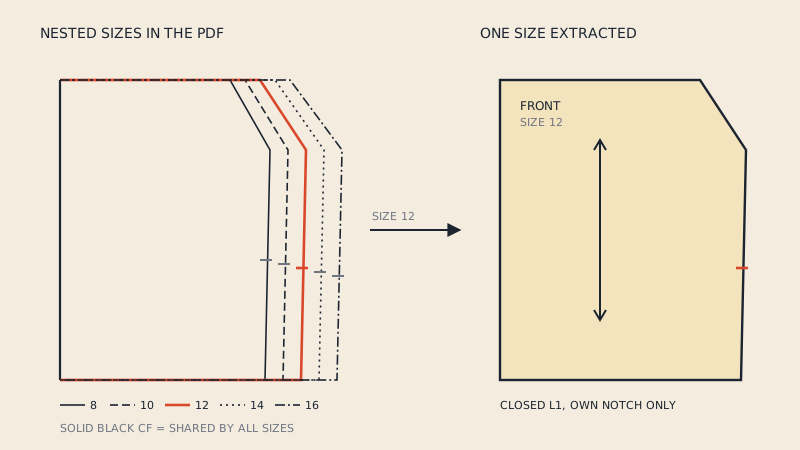
DXF patterns sold to individuals are often one size per file, because a graded nest of ten outlines is awkward to use in 3D software and cutters. Production files are more often graded. If you only have a multi-size PDF and want a DXF, decide which size you need first; converting a multi-size PDF pattern to DXF explains why extracting one size usually works better than keeping all of them.
Licence notes
The format does not change the rules. A DXF is a copy of the pattern, just like a printed sheet. The following is general information, not legal advice; for the broader topic see sewing pattern copyright.
- Personal use. Many pattern licences allow you to make garments for yourself. Whether converting your own PDF to another format for personal use is covered depends on the licence wording; many are silent on it.
- Sharing the file. Sending a DXF to friends or posting it online is distribution and is almost always prohibited by the licence.
- Commercial production. Making garments to sell often requires a separate commercial or small-business licence from the designer, especially in production quantities.
- 3D assets. Selling or sharing a 3D garment built from someone else's pattern can be treated as sharing the pattern itself; check before you publish.
- Factories. Sending a pattern you do not own to a factory for production is the case most likely to conflict with a licence. Use patterns you drafted, commissioned, or licensed for that purpose.
When you convert a pattern with our PDF to DXF converter, you confirm you own the pattern or have the right to convert it, and the converted file must not be shared.
Checking a DXF pattern you received
- Import it into the software you will actually use, not just a viewer.
- Measure a known dimension to confirm the scale.
- Count pieces against the cutting list.
- Check that each piece has a grain line and its notches.
- Find out whether seam allowance is included: two outlines (cut line and sew line) mean it is, with a single outline, check the original instructions.
FAQ
Where can I get DXF sewing patterns?
From pattern CAD exports, from designers who sell DXF alongside PDF, from made-to-measure services, by converting a vector PDF pattern you own, or by digitising a paper pattern.
Can I print a DXF sewing pattern at home?
Not directly. A DXF has no page layout, so it first has to be laid out on a roll or split into A4 or US Letter tiles, with a test square to check the scale.
Can I use a DXF pattern with a laser or fabric cutter?
Yes, if the outline is closed and your cutter's software reads DXF. Decide whether to cut on the cut line or the sew line, and set text and grain lines to draw or hide rather than cut.
Is it legal to convert my PDF pattern to DXF?
It depends on the pattern licence and on local law. Converting for personal use is a different situation from sharing or selling files; read the licence and treat this as general information, not legal advice.
Do DXF patterns include all sizes?
Some do as a graded nest, but many are one size per file. A single-size DXF is easier to use in 3D software and on cutters.