A vector PDF pattern stores its lines as geometry, so they stay perfectly sharp at any zoom and can be converted to DXF or rescaled without loss. A scanned or photographed pattern stores each page as a picture, so its lines turn into blurry pixels when you zoom in. The quickest check: zoom to 1600 % or more on a pattern line. Sharp and thin means vector; soft, jagged or grainy means raster.
That one test is usually enough. If you want to be certain, the other checks below take a few seconds each.
Why it matters
Vector or raster decides what you can do with the file.
| You want to | Vector PDF | Scanned / image PDF |
|---|---|---|
| Print at 100 % | Yes | Yes, if it was scanned at true scale |
| Print only one size via layers | If the designer made layers | No |
| Convert to DXF for CAD or 3D | Yes | No, must be traced or digitised |
| Re-tile to another paper size | Yes, losslessly | Possible, but quality drops |
| Edit lines in Illustrator or Inkscape | Yes | Only by tracing |
Converting to DXF is the big one. A converter can only read lines that exist as lines; pixels have no coordinates to extract. That is why the first step in converting a PDF sewing pattern to DXF is always this check.
Test 1: zoom (10 seconds)
- Open the PDF in any reader: Adobe Acrobat Reader, your browser, Preview on a Mac.
- Find a curved pattern line, for example an armhole or crotch curve.
- Zoom in as far as the reader allows.
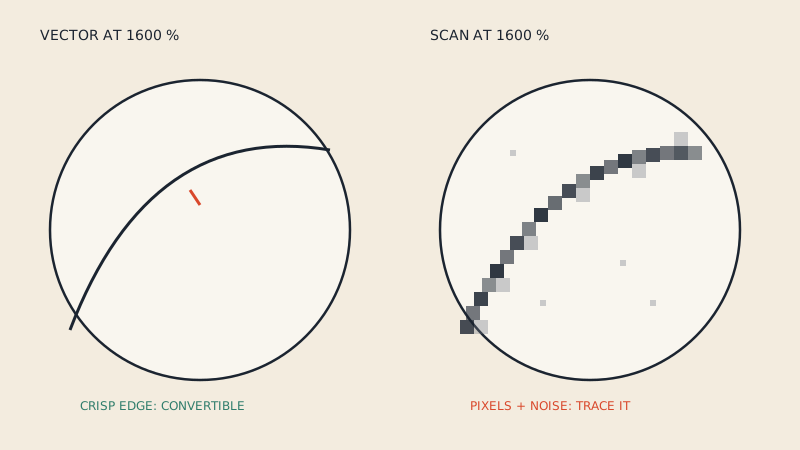
Vector: the line stays a crisp, even stroke however far you zoom. Its thickness on screen stays the same relative to the window or grows with clean edges.
Raster: the line becomes a band of grey or coloured squares, with fuzzy or stair-stepped edges. You may see paper texture, faint shadows, or a slight tilt in lines that should be straight.
Test 2: select text (5 seconds)
Use the text selection tool and drag across a piece name or the size chart.
- If individual words highlight and you can copy them into a text editor, the text is real text, which strongly suggests the whole file is vector.
- If dragging draws a box over the whole page, or nothing selects, the page is probably an image.
There is one catch. Some designers convert all text to outlines before publishing, so text will not select even though the lines are vector. And some scans have been run through text recognition (OCR), which adds an invisible text layer over the image. So treat this test as supporting evidence and rely on the zoom test.
Test 3: file size and page count (5 seconds)
Look at the file size relative to the number of pages.
- Vector pattern files are commonly small for what they contain: a multi-page A4 pattern or an A0 sheet is often a few megabytes.
- Scans grow with page area and resolution. A scanned A0 sheet or a few dozen scanned A4 pages is often tens of megabytes.
This is a rough hint, not a rule. A vector pattern with embedded photos on the cover can be large, and a heavily compressed scan can be small. Use it alongside the zoom test.
Test 4: layers panel (10 seconds)
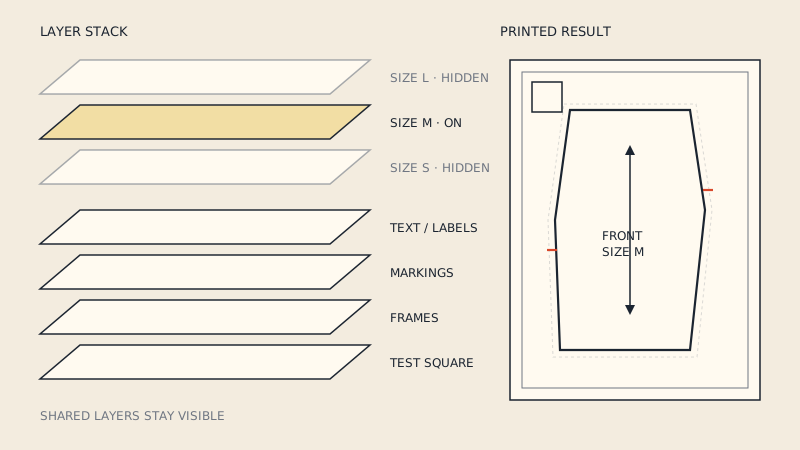
Many vector multi-size patterns include PDF layers (also called optional content) so you can switch sizes on and off. In Adobe Acrobat Reader they appear in the Layers panel in the left-hand navigation pane.
- If there is a list of sizes you can hide and show, and lines disappear when you untick a size, the file is vector.
- If there are no layers, that proves nothing; many vector patterns have none.
Printing a single size this way is described in PDF pattern layers: how to print only your size.
Test 5: document properties (optional)
Open Document Properties (Ctrl+D on Windows, Cmd+D on Mac in Acrobat Reader) and look at the Application and PDF Producer fields.
- Names of drawing or pattern software (vector editors, pattern CAD) point to a vector file.
- Names of scanner software, scanning apps or "image to PDF" tools point to a scan.
Fields can be empty or generic, so this is a hint, not proof.
Test 6: open it in a vector editor (if you have one)
Open the PDF in Inkscape or Illustrator. Click on a pattern line.
- Vector: you select a path, can see its nodes and change its stroke colour.
- Raster: you select one rectangle the size of the page; it is an embedded image.
This is the most definitive test, because it shows you exactly what is in the file.
Mixed files
Some PDFs are partly vector. Common cases:
- Vector pages with a scanned cover or instructions. The pattern pages are fine for conversion.
- A vector frame around a scanned pattern. Some sellers add a vector title block or page number to scanned pages. Zoom on the pattern lines themselves, not the border.
- Flattened files. A file saved through "print to PDF" with certain settings, or exported as an image to reduce file size, may have turned every page into a picture even though the original was vector.
If you bought a pattern and it turned out to be a flattened file, it is worth asking the designer whether a vector version exists, especially if you need it for CAD.
What to do if your pattern is a scan
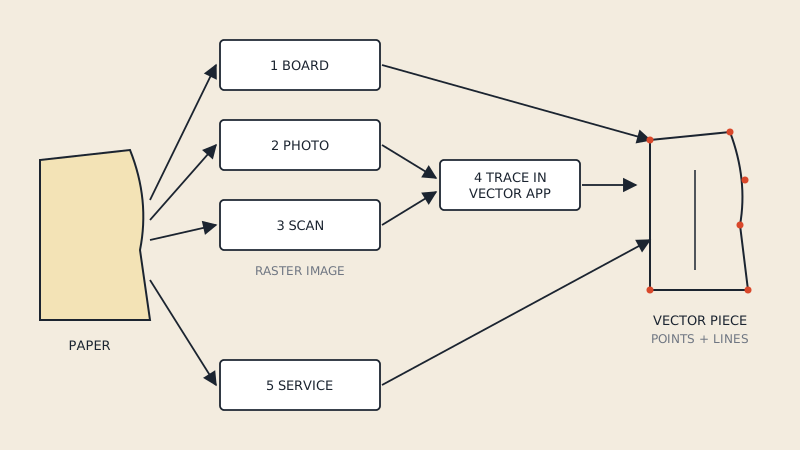
A scanned pattern can still be used for printing at true scale, if it was scanned flat and at the right size; check it with the test square. To get it into CAD or 3D software you need to rebuild the lines.
- Trace in a vector program. Place the scan, scale it using a known dimension, and draw over it with the pen tool.
- Digitise the paper original. If you have the physical pattern, a digitizer board or calibrated photo is usually more accurate than tracing a scan. Methods are compared in how to digitize paper sewing patterns.
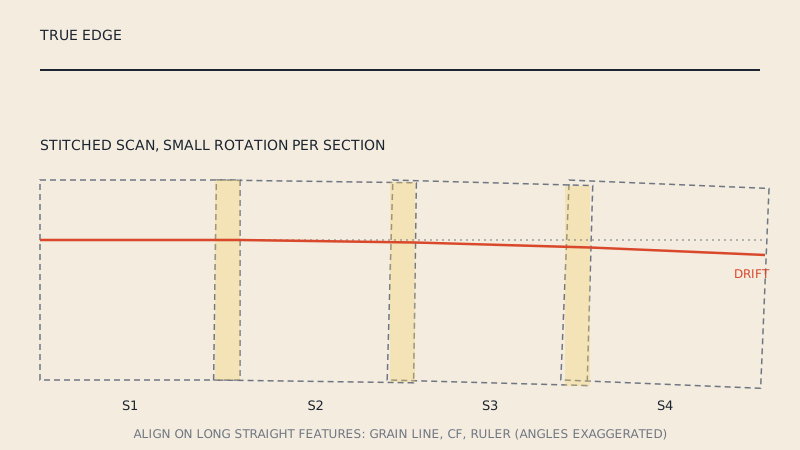
- Rescan properly. If the scan is skewed or distorted, rescanning on a large-format flatbed may be easier than fixing it. See how to scan a sewing pattern for why scans need care before they are CAD-ready.
Automatic "image to vector" tracing exists in many programs, but on patterns it tends to produce double edges around each line, wobbly curves and lost notches, so expect to clean it up.
If it is vector
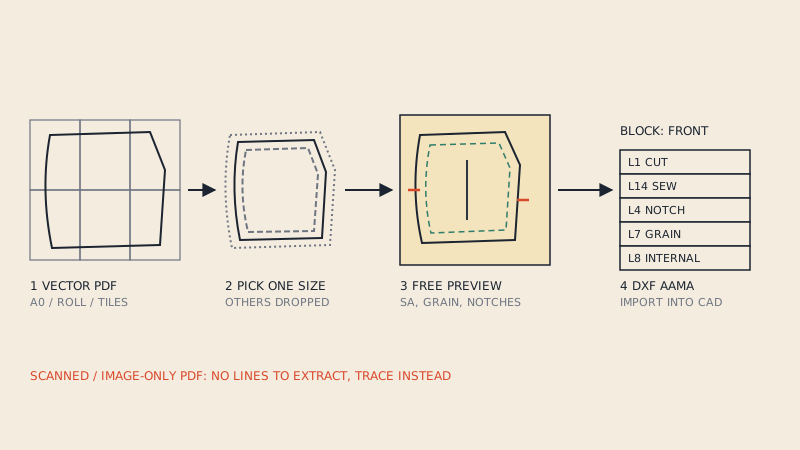
A vector pattern can go straight into a pattern-aware converter. Our PDF to DXF AAMA converter accepts vector PDFs (A0, large-format and A4 / US Letter tiles) up to 60 MB and shows a free preview of every detected piece; scanned, photographed and password-protected PDFs are not supported. If you are unsure, the preview will tell you: an image-only file produces no pieces.
FAQ
How can I tell if a PDF pattern is vector?
Zoom in as far as possible on a pattern line. A vector line stays sharp and clean at any magnification; a scanned line breaks into pixels with fuzzy edges.
Are most PDF sewing patterns vector?
Patterns sold as downloadable PDFs by current designers are commonly vector, because they are exported from drawing or pattern software. Vintage patterns, patterns shared as scans and some flattened files are raster.
Can a scanned PDF pattern be converted to DXF?
Not directly, because a scan contains pixels, not lines. The pattern has to be traced or digitised first, then exported as DXF.
Why can't I select text in my vector pattern?
The designer may have converted text to outlines before publishing. The lines are still vector; use the zoom test to confirm.
Does a large file size mean the pattern is scanned?
Not necessarily. Scans are often large, but vector files with photos or very complex artwork can be large too. File size is a hint; the zoom test is the reliable check.