Pattern grading is the process of turning one base-size pattern into a range of sizes by moving specific points on each piece by planned amounts. It is not enlarging or shrinking the pattern by a percentage: a size larger usually needs more width at the bust and hip than at the shoulder, more length in the body than in the collar, and some measurements, such as button spacing or pocket size, may not change at all. Those planned movements are called grade rules, the points they apply to are grade points, and all sizes stacked together form the nest.
Why grading is not scaling
If you scale a size 10 bodice by 5 % to get a size 12, every measurement grows by 5 %. The shoulder gets 5 % wider, the neckline 5 % bigger, the dart 5 % longer and the buttonholes 5 % longer. Bodies do not change like that between sizes. Girth changes more than shoulder width, and length changes differently from girth.
Grading moves each point independently. A side seam point might move 1 cm outwards; the shoulder point a few millimetres; the neck point less. The shape of the piece stays consistent with the base pattern while its dimensions follow the size chart.
Core terms
| Term | Meaning |
|---|---|
| Base size (sample size) | The size the pattern was drafted and fitted in; all other sizes are derived from it |
| Size range | The sizes produced, for example 6 to 18 |
| Grade point | A point on the piece that moves between sizes, usually corners and key curve points |
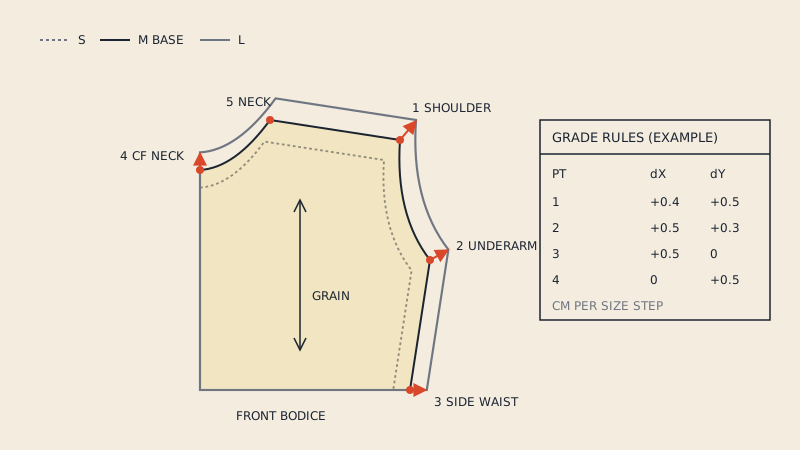
| Grade rule | The movement of a grade point per size step, given as x and y values |
| Increment | The change in a body or garment measurement from one size to the next |
| Break | A point in the size range where increments change, for example larger steps above a certain size |
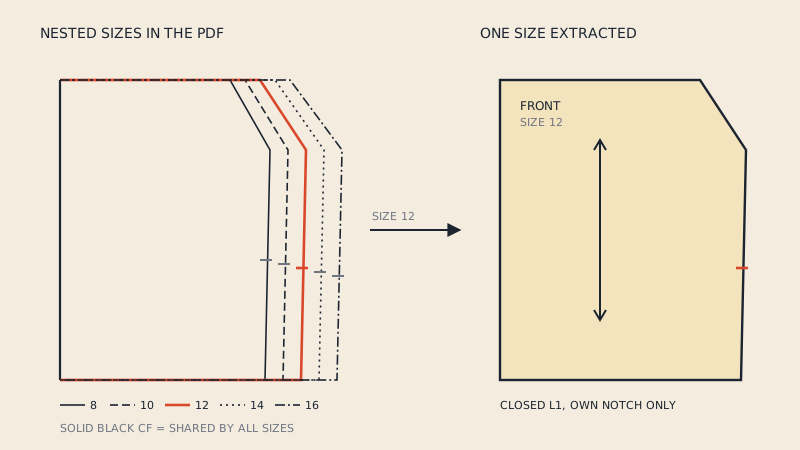
| Nest | All graded sizes of a piece drawn on top of each other |
| Grade reference line | A line used to align sizes in the nest; in DXF AAMA files it has its own layer (5) |
Increments and breaks come from the size chart. How a chart turns into numbers per point is covered in grading rules and size charts.
Grade points and grade rules
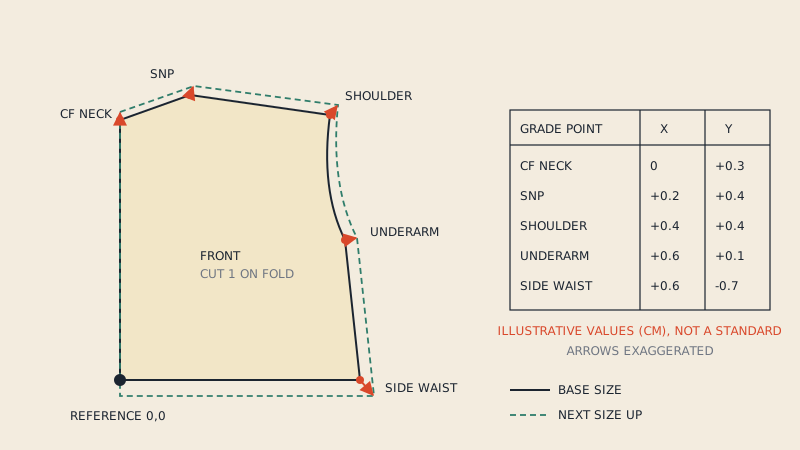
Each grade point gets a rule: how far it moves horizontally (x) and vertically (y) per size step. The rule is relative to a fixed reference, commonly the intersection of the grain line with a horizontal line, or a corner of the piece such as centre front at the waist.
For a simple front bodice, typical grade points are:
- centre-front neck
- side neck point
- shoulder point
- underarm (side seam at the armhole)
- side seam at the waist
- centre-front waist
- dart point and dart legs
Curves between grade points are not graded point by point. The software, or the pattern maker, redraws them through the moved points, keeping the base shape. That is why grade point placement matters: a point missing at the deepest part of the armhole lets the curve change shape in ways nobody intended.
Distributing the girth increment
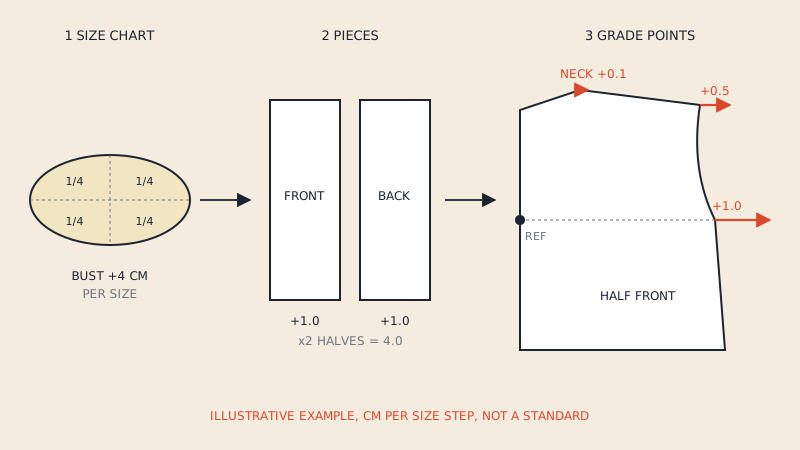
Suppose the size chart says the bust grows by 4 cm per size. A front bodice is usually a quarter of the body (half front, cut on the fold), so that piece receives a quarter of the increment, 1 cm, across its width. That 1 cm is then split between grade points: some at the side seam, some at the shoulder or neck area, depending on the grading system. The same logic applies to waist, hip and other girths.
The split is a design decision, and it is where grading systems differ. One studio might move the side seam the full amount; another spreads it to keep the armhole and neck in proportion. Neither is "the standard".
The nest
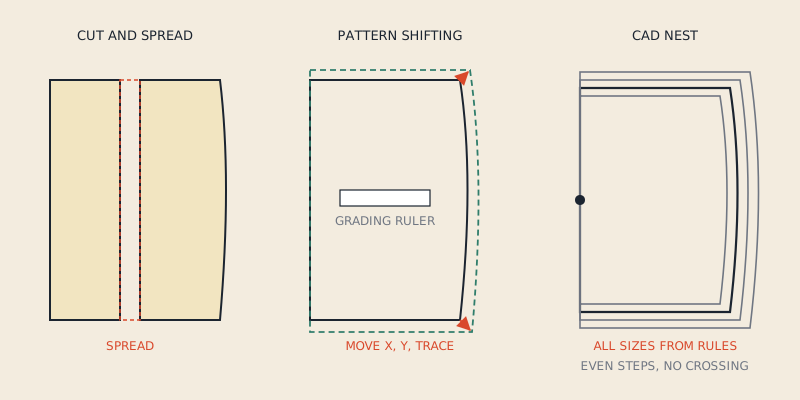
When all sizes are drawn on top of each other, aligned on the reference point, you get the nest. It is the quickest way to check a grade:
- Lines should be evenly spaced between equal size steps, unless there is a deliberate break.
- Lines should not cross, except where a measurement stays constant across sizes.
- Curves should keep their character: the armhole of the smallest and the largest size should still look like the same armhole.
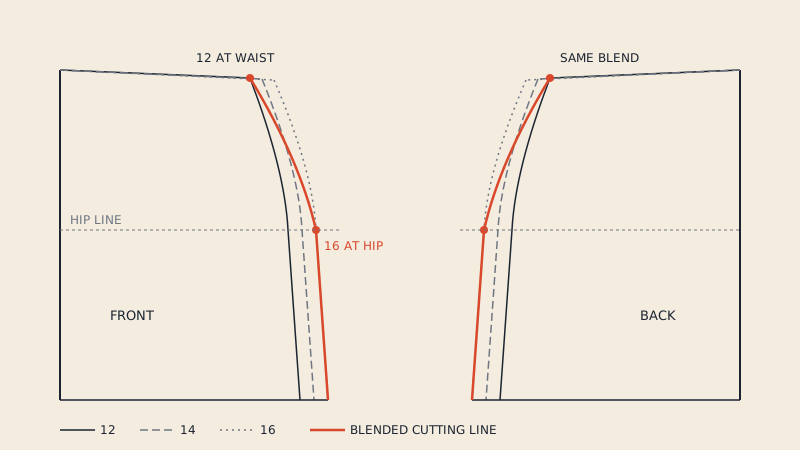
Multi-size home sewing patterns are printed nests. That is also why they are convenient for home sewists (choose a line, or blend between lines) and less convenient for CAD, where each size is a separate piece. Using printed nests is covered in multi-size sewing patterns, and extracting one size into a CAD file in converting multi-size PDFs to DXF.
Grading methods
Cut and spread
The base pattern is cut along planned lines and spread apart (for larger sizes) or overlapped (for smaller) by the increment. It is intuitive and shows clearly where size is added. It is slow for a full range, and every size is a new paper pattern.
Pattern shifting (track grading)
The base pattern is moved along x and y by the grade rule at each grade point, and the new outline is traced segment by segment. It is the manual version of what CAD does. A grader with a grading ruler and a table of rules can produce a nest this way; it requires care but no cutting.
Grade-rule grading in CAD
Each grade point carries a rule from a rule table. The software calculates every size at once and redraws curves through the moved points. Changing a rule updates every size. Most production grading today is done this way.
Measurement-based or parametric
Some programs, including parametric tools, draft each size from body measurements with formulas rather than grading a base pattern. The result is a size range, but technically it is drafting per size, not grading. It works well when the drafting system was built for it.
| Method | Tools | Speed for a full range | Typical use |
|---|---|---|---|
| Cut and spread | Scissors, paper, tape | Slow | Learning, single extra sizes |
| Pattern shifting | Grading ruler, table of rules | Medium | Manual production grading |
| CAD grade rules | Pattern CAD, rule tables | Fast once rules exist | Production |
| Parametric drafting | Formula-based CAD | Fast once system is built | Made-to-measure, open-source tools |
Which is better depends on volume and tools rather than accuracy alone; grading by hand vs in CAD compares them in more depth.
Proportional grading and its limits
"Proportional grading" usually means increments are spread across the range so each size relates to the next in the same way, or that every dimension grows in proportion. Purely proportional grading is easy to set up and works for a narrow range around the base size.
Across a wide range it tends to fail: the largest sizes get shoulders and necklines that are too wide, while the bust and hip do not get enough room. This is why size charts often have breaks, and why plus-size ranges are frequently drafted from their own base size instead of being graded up from a small sample.
What a graded pattern file contains
In CAD, a graded piece is usually stored once with its grade rules, and each size is calculated when needed. When exchanged as DXF AAMA, the file can carry graded data in several ways, depending on the exporting system: a graded nest with a grade reference line, or each size exported as its own set of pieces. Check with whoever receives the file which form they need.
Our service and grading
Apparel Pattern Service does not grade patterns. Our converter extracts one size at a time from a vector PDF into DXF AAMA; you can switch to another size of the same pattern for free after paying. It does not create new sizes or rules.
FAQ
What is pattern grading in simple terms?
It is making the other sizes of a pattern from one base size by moving key points on each piece by planned amounts. The amounts come from a size chart and are applied per point, not as a percentage of the whole piece.
What is the difference between grading and scaling a pattern?
Scaling enlarges every dimension by the same percentage. Grading changes girths, lengths and details by different amounts, so the garment fits a larger or smaller body while details such as collars and pockets stay in proportion.
What is a nest in pattern grading?
A nest is all the graded sizes of one piece drawn on top of each other, aligned on a reference point. It is used to check that size steps are even and that curves keep their shape.
Can I grade a pattern without CAD?
Yes. Cut-and-spread and pattern shifting with a grading ruler are manual methods. They take longer than CAD for a full size range but follow the same principles.
Do multi-size sewing patterns contain grade rules?
Usually not as data. A printed multi-size pattern shows the result of grading as nested lines; the rules used to produce them are not included in the PDF.