Pattern grading software makes a full size range faster and more repeatable than grading by hand, but it does not make the decisions for you: someone still has to write the grade rules. Hand grading costs almost nothing in tools and is perfectly accurate for a few sizes of a simple style; CAD wins once you have many sizes, many styles or a factory that expects DXF files. Most small studios end up somewhere in between, and some simply outsource the job.
This article compares the two routes on the things that actually decide the choice: how each method works, how long it takes, where errors creep in and what it costs to set up.
What grading has to achieve, whichever tool you use
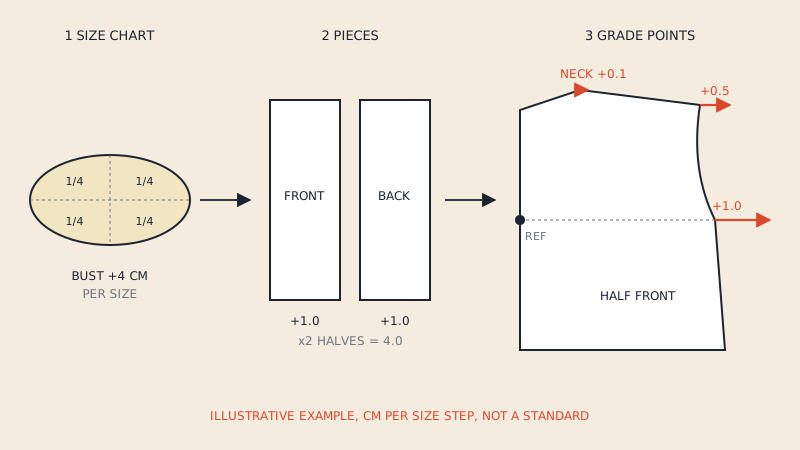
Grading takes one approved base pattern and produces the other sizes so that they fit the same way the sample does. The base size carries the design decisions; the increments carry the size chart. If you need the background first, the pattern grading basics article covers grade points, nests and proportional vs track grading, and grading rules and size charts shows how increments are derived from measurements.
Whatever the method, the result is judged by the same checks:
- Seams that join still match in length in every size (side seam front vs back, sleeve cap vs armhole with its planned ease).
- Notches land on matching positions after grading.
- Curves stay smooth, with no kinks where two grade points pull in different directions.
- Grain lines, drill holes and pocket placements move with the piece, not stay behind.
- The size progression is even, unless a size break is planned (for example a jump between a regular and a plus range).
How grading by hand works
Hand grading uses paper, a ruler and patience. There are three common techniques.
Shift (or slide) grading
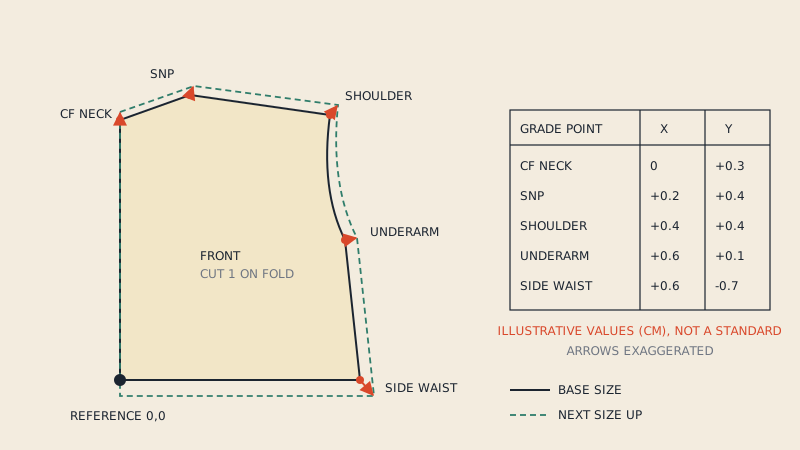
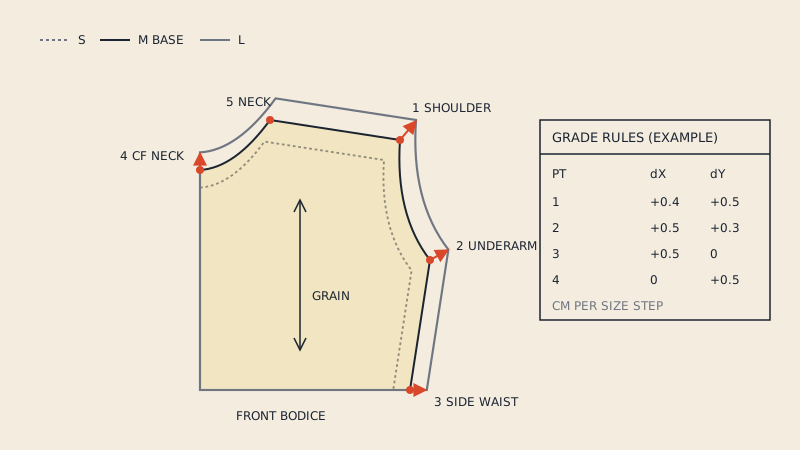
The base pattern is placed under pattern paper and moved by the increment at each grade point, in x and y, while you trace the section of outline between points. A grading ruler with a printed grid makes the moves precise. Shift grading is the hand equivalent of what CAD does with grade rules, which is why pattern makers who learned it pick up rule-based CAD grading quickly.
Cut-and-spread
The pattern is cut along planned lines and spread (or overlapped) by the increment, then the outline is redrawn. It is intuitive for beginners and good for understanding where a size gains width, but every cut and every retrace adds a small error.
Nested tracing
For a small range, some designers draft the smallest and largest sizes and connect the corresponding points with straight lines, dividing them evenly to get the sizes in between. It is fast and works well for simple shapes; it breaks down when sizes do not progress linearly.
Where hand grading struggles
- Accumulated error. A 1 mm (1/32") tracing error per step becomes a few millimetres by the fifth size.
- Rework. If the base pattern changes after grading, every size has to be graded again.
- Truing curves. Armholes and necklines need to be redrawn smoothly in each size, which is skilled, slow work.
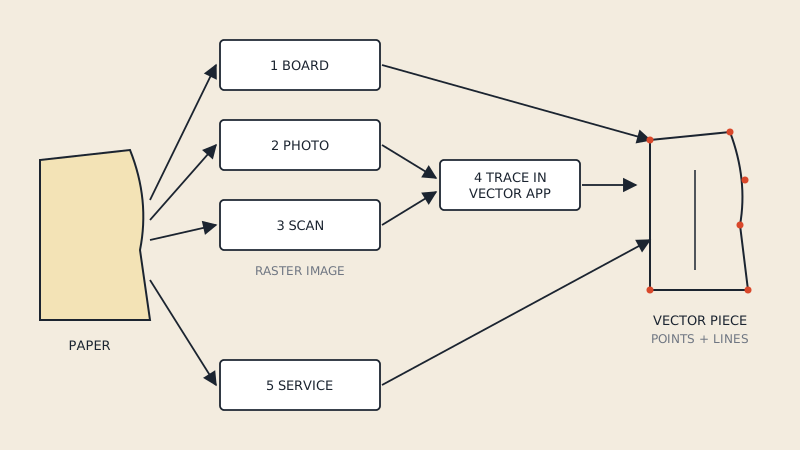
- Digital output. A hand-graded nest still has to be digitized if the factory or 3D designer needs files. See how to digitize sewing patterns for the options.
How grading in CAD works
Pattern grading software stores the base pattern as points and curves, then applies increments to selected points. The size outlines are calculated, not drawn, so they are always consistent with the base.
Rule-based (point) grading
The industry standard approach. Each grade point (a corner, a notch, a curve point) gets a rule: an x and y increment per size step. Rules are kept in a table or library, so a rule written once for "side waist" can be reused on every bodice. Gerber AccuMark, Lectra Modaris, Optitex and TUKAcad all work this way, though their screens and terms differ.
Incremental or measurement-driven grading
Some systems let you grade by entering a size chart and linking points to measurements. Parametric open-source programs such as Seamly2D and Valentina go further: the pattern is drafted from formulas, so changing the measurement file redraws the pattern. That is not grading in the factory sense (there is no base pattern with rules), but for made-to-measure and small ranges it replaces grading entirely. The Seamly2D vs Valentina comparison covers both.
Line or cut-and-spread grading in CAD
Several CAD programs offer a digital version of cut-and-spread: you place grading lines through the piece and assign the spread for each size. It is useful for pieces where point rules get awkward, such as yokes or asymmetric panels.
What CAD gives you beyond the outlines
- Seam length checks across all sizes at once.
- Notches and internal lines graded with the piece.
- Change the base, regenerate the nest.
- Export of the graded nest as DXF AAMA or ASTM for the factory, the marker maker or 3D software.
Side-by-side comparison
| Criterion | By hand | In CAD |
|---|---|---|
| Setup cost | Grading ruler, paper, pencils | Software licence or subscription, training, a digitizer or digital base pattern |
| Time for the first style | Hours per style for a full range | Longer at first: rules must be written |
| Time for later styles | Same as the first | Much shorter: rules are reused |
| Repeatability | Depends on the person and the day | Same input gives the same output |
| Accuracy limit | Tracing and cutting error, grows with each size | Limited by the rules, not the drawing |
| Changing the base | Regrade everything | Regenerate the nest |
| Seam checks | Measure with a tape, size by size | Measure tools across the nest |
| Output | Paper nest (needs digitizing) | DXF, PDF, plotter files, markers |
| Best for | Learning, 2 to 4 sizes, one-off styles | Ranges, repeated blocks, factory work |
There are no universal time figures worth quoting: a simple skirt graded into four sizes is a short job either way, while a lined jacket in ten sizes is a long job by hand and a reasonable one in CAD once the rules exist.
Accuracy: where errors really come from
People often assume CAD is "more accurate" in every sense. It is more consistent, which is not the same thing.
- Wrong rules give wrong sizes, perfectly. If the shoulder increment is too big, CAD applies it faithfully to every size. A hand grader might notice the shape looks off; software will not.
- Base pattern quality carries through. An inaccurate digitized base produces an inaccurate nest. Check the base first, using the pattern pieces checklist.
- Curve handling differs. CAD redraws curves through graded points; with too few points, a curve can flatten or bulge in the extreme sizes. Placing curve points thoughtfully matters as much as the rules.
- Hand error is random, CAD error is systematic. Random errors are small but everywhere; systematic errors are fixable once, then gone.
For a small brand, the practical lesson is: whichever method you use, sew or 3D-simulate the smallest and largest sizes, not just the base.
Cost: what you actually pay for
There is no honest single price to compare, because software licensing varies by vendor, region and contract, and changes often. The cost factors are:
- Software. Industry CAD is usually licensed per seat, by subscription or perpetual licence with maintenance. Open-source tools cost nothing but have no factory-style rule grading.
- Training. Rule-based grading is a skill. Budget time to learn it, even if the software is free.
- Getting the base pattern in. If your base exists on paper, it has to be digitized. If it exists as a vector PDF, it can be converted.
- Your time. For a designer who grades two styles a year, hand grading or outsourcing is cheaper than any licence. For ten styles a season, CAD pays for itself in hours.
The pattern making software comparison goes through the main CAD packages and their licensing models, and the free pattern making software roundup lists what you can try at no cost.
When to outsource grading
Outsourcing to a freelance grader or a pattern service makes sense when:
- You have a fitted, approved base and a size chart, but no CAD and no wish to learn it.
- The factory asks for a graded DXF AAMA nest and you only have paper.
- You need a size range extended (adding plus sizes, for instance) and want someone experienced with size breaks.
To get a good result, send:
- The base pattern, as a DXF AAMA if you have one, or a clean paper or PDF pattern.
- Your size chart, with the base size marked.
- Grade rules if you have them, or a reference garment or brand whose grading you want to follow.
- Notes on fixed dimensions: things that must not grade, such as button spacing, pocket size or zip length.
- The output you need: graded DXF AAMA nest, per-size PDFs, plotter files.
If your sizes already exist as a PDF
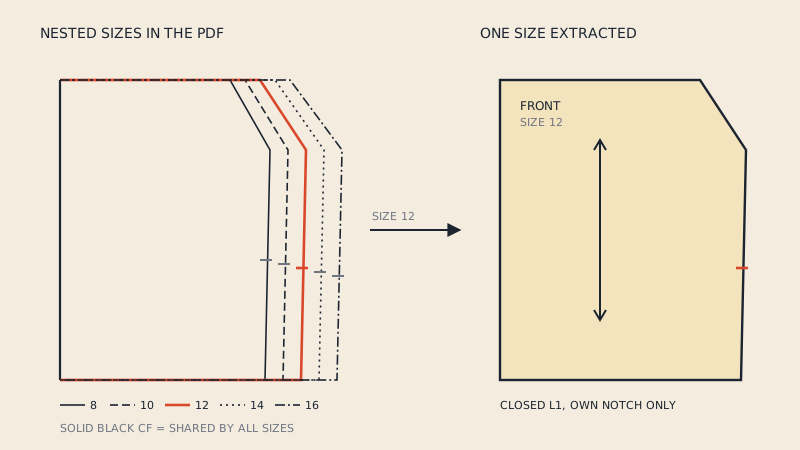
Many designers and small brands already own a graded pattern, just not in a form CAD can use: a multi-size PDF from their own past work or a pattern they have licensed for production. In that case there is nothing to grade; the job is extraction. A pattern-aware converter can pull one size at a time out of the nest into a DXF AAMA file. Our PDF to DXF converter does this: you pick the size, and only that size's lines go into the file; switching to another size after paying is free. The multi-size PDF to DXF article explains why one size per file is usually more useful than the whole nest. Note that our service does not grade or add seam allowance; it converts what the PDF contains.
A practical decision path
- You are learning pattern making: grade by hand first. You will understand what the software is doing later.
- 2 to 4 sizes, a few styles a year: hand grading or outsourcing.
- Full ranges, repeated blocks, a factory: CAD, with a rule library you build once and reuse.
- Made-to-measure: parametric software, not grading.
- Sizes already drafted in a PDF: convert, do not regrade.
FAQ
Is pattern grading software worth it for a small brand?
It is worth it once you grade several styles per season in full ranges, because grade rules are written once and reused. For one or two styles a year, hand grading or outsourcing is usually cheaper.
Is CAD grading more accurate than hand grading?
CAD grading is more consistent: the same rules always give the same result and there is no tracing error. It is only as accurate as the rules and the base pattern, so wrong rules produce wrong sizes in every size.
Can free software grade patterns?
Open-source programs such as Seamly2D and Valentina generate sizes from measurements and formulas rather than grading a base with rules. That works well for made-to-measure and small ranges, but it is a different workflow from factory rule-based grading.
What do I send to someone who will grade my pattern?
Send the approved base pattern (ideally DXF AAMA), the size chart with the base size marked, any grade rules you have, and notes on dimensions that must stay fixed. Say which output files you need back.
Can I convert a multi-size PDF into graded DXF files?
You can extract each size from a vector multi-size PDF into its own DXF AAMA file. The sizes are already graded in the PDF, so no grading happens during conversion.