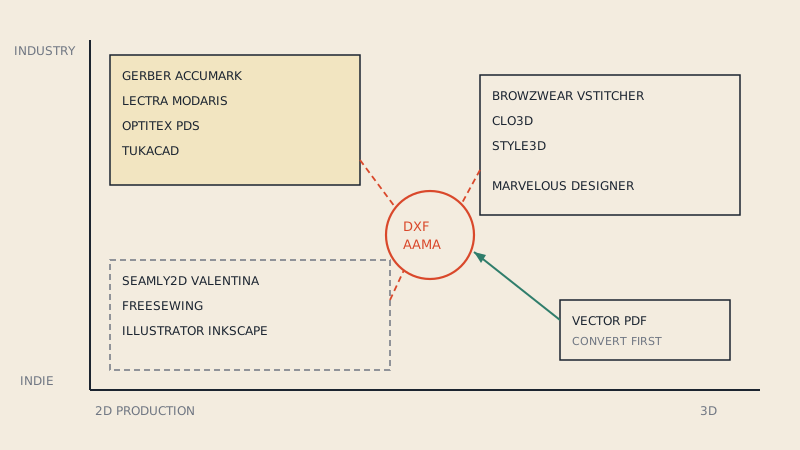
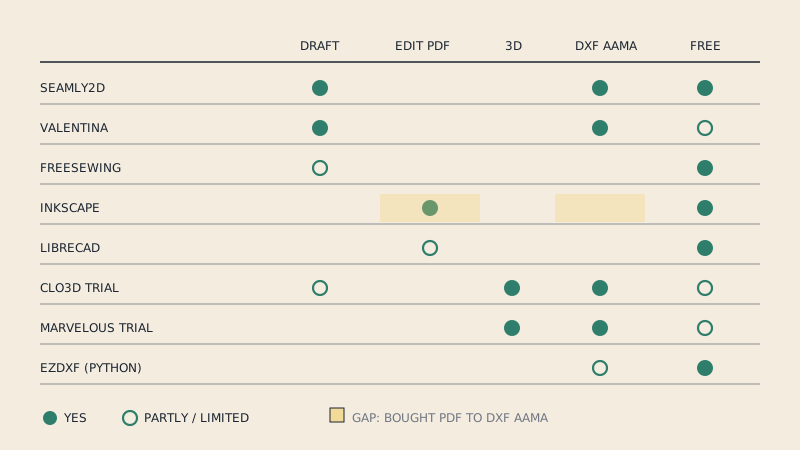
There is good free pattern making software, but no single free program does everything. Seamly2D drafts parametric patterns from measurements, FreeSewing generates made-to-measure patterns in the browser, Inkscape edits vector PDF patterns, LibreCAD handles DXF geometry, and the trials of CLO3D and Marvelous Designer let you test a pattern in 3D for a limited time. The right pick depends on whether you want to draft, adjust, simulate or prepare files for a cutter.
Below are eight options, what each is good at, where each stops, and which file formats it can hand on to the next step.
The eight at a glance
| Tool | What it is | Cost | Best for | DXF |
|---|---|---|---|---|
| Seamly2D | Parametric pattern drafting | Free, open source | Drafting blocks from measurements | Exports AAMA |
| Valentina | Parametric pattern drafting | Source free; official 1.0+ installers by subscription | Same, with plotter-oriented export | Exports AAMA / ASTM |
| FreeSewing | Browser pattern generator | Free, open source | Ready designs made to your measurements | Not its focus |
| Inkscape | Vector graphics editor | Free, open source | Editing vector PDF patterns, tiling, SA by offset | Plain DXF only |
| LibreCAD | 2D CAD | Free, open source | Precise geometry in DXF | Plain DXF |
| CLO3D (trial) | 3D garment simulation and pattern tools | Time-limited trial | Testing a pattern on an avatar | Imports / exports AAMA |
| Marvelous Designer (trial) | 3D garment simulation | Time-limited trial | 3D garments for visuals | Imports / exports AAMA |
| ezdxf (Python) | Programming library | Free, open source | Scripting checks and fixes on DXF files | Reads / writes |
"Free" means different things in this list: free and open source, free source but paid installers, or free for a trial period. Each section says which.
1. Seamly2D
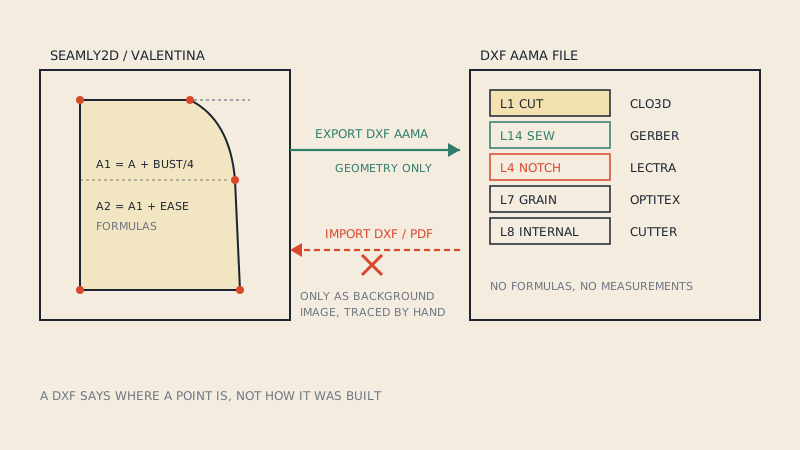
Seamly2D is an open-source parametric drafting program. You build a pattern from points defined by measurements and formulas, so changing the measurement file redrafts the pattern. It includes SeamlyMe for measurement files, a piece mode for seam allowance, notches and grain lines, and a layout mode for export. Official binaries are free for Windows, macOS and Linux.
Good at: personal blocks, made-to-measure drafting, learning drafting systems properly. Stops at: importing patterns (it cannot), 3D, production grading. The DXF side is covered in Seamly2D and Valentina DXF export.
2. Valentina
Valentina is the project Seamly2D forked from in 2017, still developed by its original author. It drafts the same way and adds a separate layout tool (Puzzle) and export options including PLT and DXF AAMA/ASTM. The source code is GPL; since version 1.0, official installers come through a subscription, while older binaries are archived and free. Seamly2D vs Valentina compares them in detail.
Good at: the same as Seamly2D, with more export polish. Stops at: free installers for current versions.
3. FreeSewing
FreeSewing is an open-source, community-run project that generates patterns from its library of designs to your measurements, in the browser. You choose a design, enter measurements, adjust options and export the result, including as PDF. Underneath, patterns are rendered as SVG.
Good at: getting a fitted pattern of an existing design quickly without learning drafting. Stops at: designing your own styles unless you write code (designs are programmed), and CAD exchange formats are not its focus.
4. Inkscape
Inkscape is a free vector editor. Because most PDF patterns are vector, you can open one in Inkscape, isolate a size, adjust lines, add seam allowance with path offset and tile the result for printing. Its DXF export writes plain DXF, not AAMA, so pieces arrive in pattern CAD as loose lines. The details are in using Inkscape for sewing patterns.
Good at: editing and printing vector patterns. Stops at: parametric drafting, AAMA output, notches and grain lines as pattern objects.
5. LibreCAD
LibreCAD is a free 2D CAD program, based on the community edition of QCAD, that uses DXF as its native format and runs on Windows, macOS and Linux. It is precise: you can draw to exact dimensions, measure, and check geometry. It knows nothing about pattern pieces, so it does not write AAMA blocks or layers by itself.
Good at: inspecting a DXF, measuring, small geometric fixes. Stops at: anything pattern-specific (seam allowance, notches, grading).
6. CLO3D trial
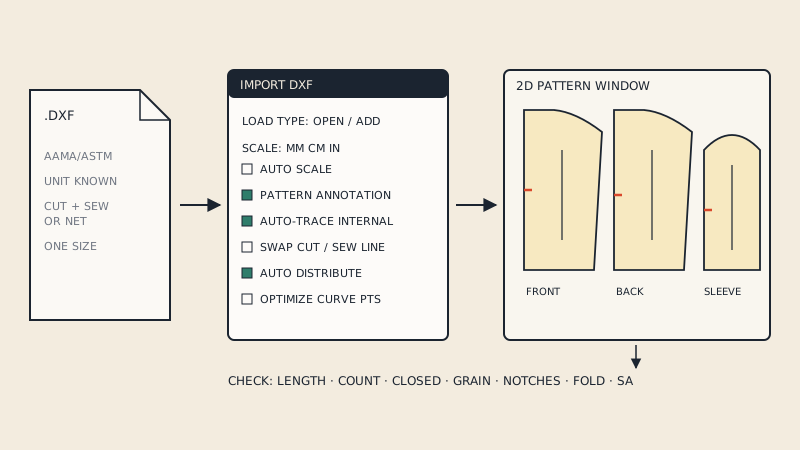
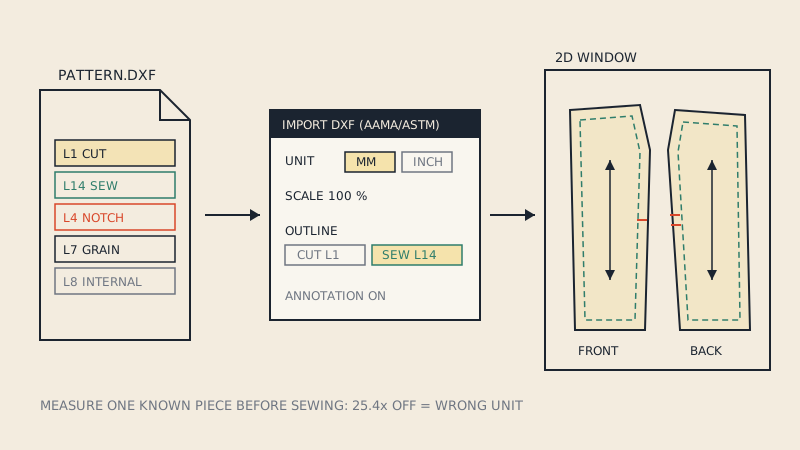
CLO3D is commercial 3D garment software with pattern tools aimed at fashion production. A time-limited free trial is offered; check the current length and terms on the vendor's site. During the trial you can import a DXF AAMA pattern, sew it on an avatar and check fit and drape.
Good at: seeing whether a pattern works before cutting fabric. Stops at: the end of the trial. Start with importing a DXF into CLO3D.
7. Marvelous Designer trial
Marvelous Designer comes from the same company as CLO3D and shares its simulation core, but it is aimed at 3D artists for games, film and visualisation. It also offers a free trial. It imports the same DXF AAMA files; see importing a DXF into Marvelous Designer.
Good at: 3D garments for visuals. Stops at: production pattern features and the end of the trial.
8. ezdxf (for people who code)
ezdxf is an open-source Python library that reads and writes DXF files. It is not an application, but for a technical user it is the free way to inspect what a DXF contains (blocks, layers, units), batch-rename layers, or check that every piece outline is closed before sending files on.
Good at: automation and diagnosis. Stops at: anything visual; you need another program to look at the result.
How to combine them
Free tools work best as a chain rather than a single program:
| Starting point | Free route | Where it gets stuck |
|---|---|---|
| Your measurements, no pattern | FreeSewing or Seamly2D, print the PDF | Nowhere for home sewing |
| Your own design | Seamly2D, export DXF AAMA, test in a CLO3D trial | Trial length |
| A vector PDF you bought | Inkscape to edit and print | Getting a proper DXF AAMA for 3D or a cutter |
| A DXF from someone else | LibreCAD or ezdxf to inspect, CLO3D trial to test | Editing as pattern pieces |
The gap that comes up most often is the third row: a bought PDF pattern that someone wants in CLO3D, Marvelous Designer or a cutting service. Free tools can open the PDF, but turning it into a DXF with pieces as blocks, cut and sew lines, notches and grain lines on the right layers means redrawing. That is the one step where a paid service can save hours: our converter does that for vector PDFs at €15 per pattern file, with a free preview of the detected pieces first. For a look at the paid end of the market, see pattern making software compared.
FAQ
What is the best free pattern making software?
For drafting your own patterns, Seamly2D is the most complete free option with free installers. For made-to-measure versions of existing designs, FreeSewing is quicker; for editing PDF patterns, Inkscape.
Is Valentina still free?
Its source code is free under the GPL, and older binaries remain free. Since version 1.0, official installers are distributed through a subscription.
Can I use CLO3D for free?
CLO3D offers a time-limited free trial; after that it requires a paid licence. Check the vendor's site for current trial terms.
Can free software export DXF AAMA?
Yes. Seamly2D and Valentina export DXF AAMA from patterns drafted in them. Inkscape and LibreCAD export plain DXF without the AAMA piece structure.
Can I edit a PDF sewing pattern with free software?
Yes, if the PDF is vector. Inkscape can open it, let you edit lines and add seam allowance by path offset, and tile it for printing.