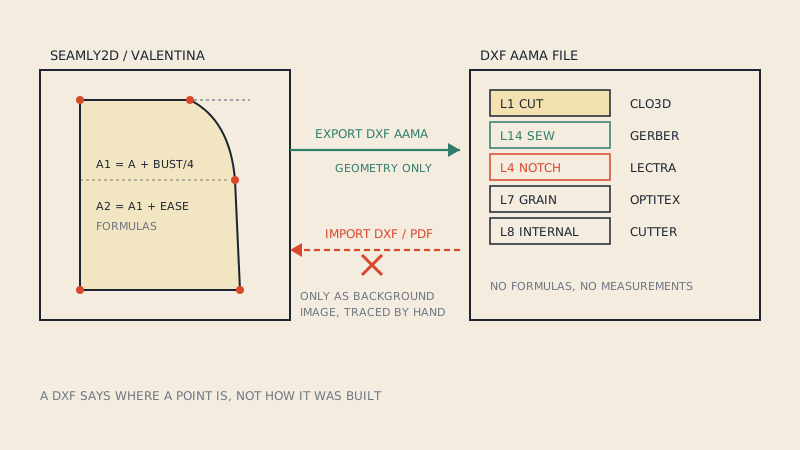
Seamly2D and Valentina both export patterns as DXF, including the AAMA flavour that pattern CAD and 3D software expect, so a pattern drafted in either can travel to CLO3D, Gerber, Lectra or a cutting service. What neither can do is import a DXF as editable pattern pieces. They are parametric drafting tools: a pattern is a set of formulas built on measurements, and a DXF holds only finished geometry with no formulas to rebuild.
This article covers both directions: how to get a good DXF out, and what your options are when you need to work on a DXF or PDF that someone else made.
Why "export yes, import no"
In Seamly2D or Valentina you do not draw a line; you define a point at a distance and angle from another point, using measurements such as bust or waist and increments you choose. Change the measurement file and the whole pattern redrafts itself. That is the main reason people choose these programs.
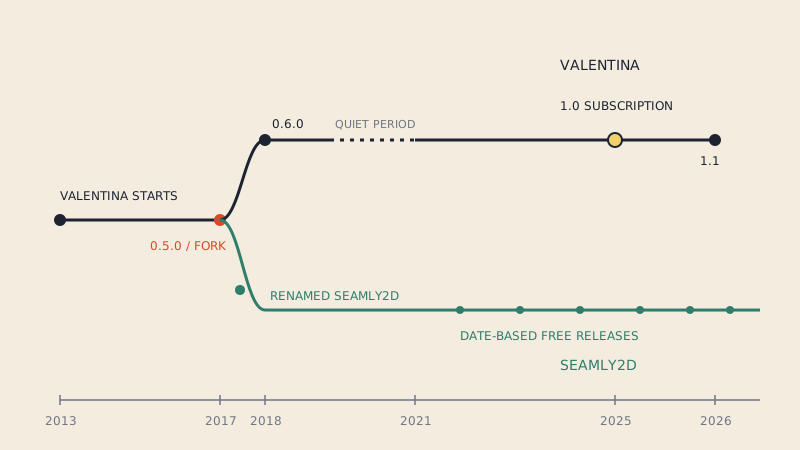
A DXF file cannot carry that logic. It says "there is a line from here to here", not "this point is half the hip measurement from centre front". So the developers, and the forum answers to the question that comes up regularly, are consistent: DXF is an output format for these programs, not an input. The two programs share their history (Seamly2D began as a fork of Valentina in 2017), which is why they behave so similarly here; Seamly2D vs Valentina covers how they have diverged since.
Exporting a DXF: the general flow
Both programs separate drafting from pieces and layout. You draft the construction, define pattern pieces from it (with seam allowance, notches, grain line and labels), and then export either the pieces or a layout of them.
- Finish the pieces. Every piece needs a closed main path, seam allowance if you want one, notches at seam match points, a grain line and a label with name and quantity.
- Create a layout or choose the pieces to export. A layout arranges the pieces; for CAD and 3D use, arrangement does not matter, but every piece must be included.
- Choose the export format. Pick one of the AAMA DXF variants rather than plain DXF. Valentina also offers an ASTM variant.
- Choose the DXF version. Seamly2D lists AAMA variants from R10 up to 2013. Older versions such as R12 are often the safest choice for pattern software, because they avoid newer entity types that some importers ignore.
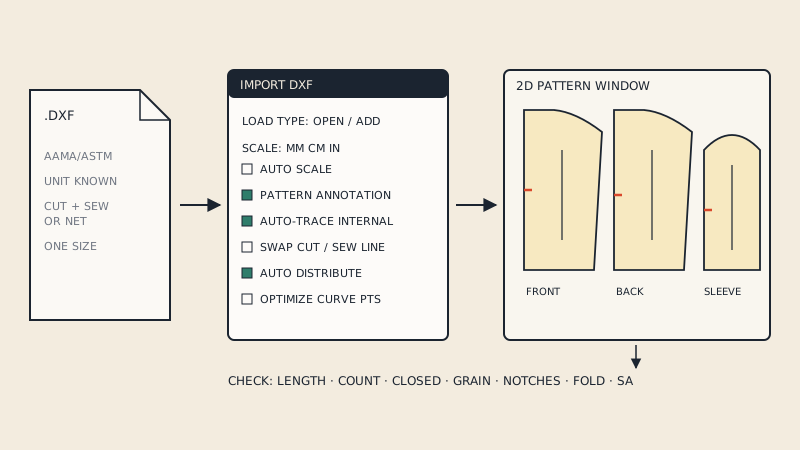
- Export, then test in the destination program before sending the file to anyone.
Exact menu names change between releases of both programs, so follow the export dialog of your version; the options above are what you are looking for in it.
What lands where in the AAMA file
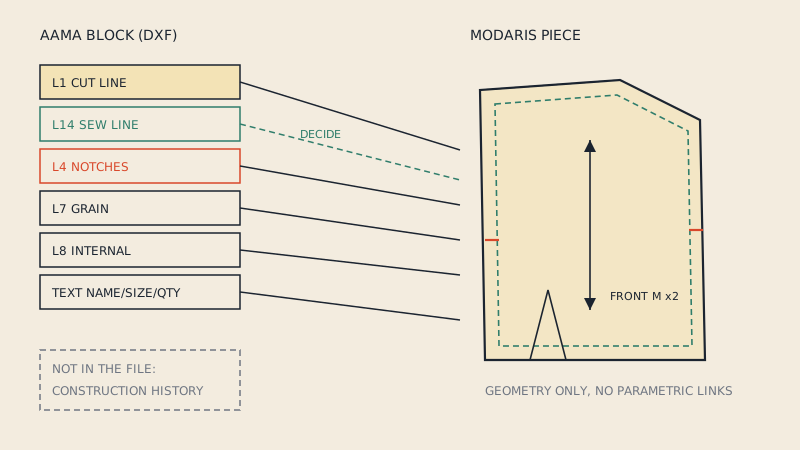
When the export works as intended, the pieces arrive as blocks with standard layers, which is what makes them usable in CAD. Use this as a checklist when you open the file in the destination program:
| Element in Seamly2D / Valentina | Expected in the AAMA DXF | Check in the destination |
|---|---|---|
| Piece outline with seam allowance | Cut line, layer 1 | Closed outline, right size |
| Main path (seam line) | Sew line, layer 14 | Present when seam allowance is on |
| Notches (passmarks) | Layer 4 | Present on both sides of each seam |
| Grain line | Layer 7 | Present and pointing the right way |
| Internal paths (darts, pockets) | Layer 8 | Present, not turned into separate pieces |
| Piece label | Text in the block | Name and quantity readable |
The full layer reference is in the AAMA DXF layers, one by one.
Known rough edges
Open-source exporters are maintained by small teams, and users report issues in the forums:
- Label text. A 2026 forum report for a Seamly2D release describes text scaling breaking in DXF AAMA export and label text being placed relative to the piece corner instead of the label position. If text matters to the recipient, check it.
- AAMA vs ASTM expectations. Some destination programs are stricter about one flavour. If a file fails, try the other flavour or a different DXF version before changing the pattern.
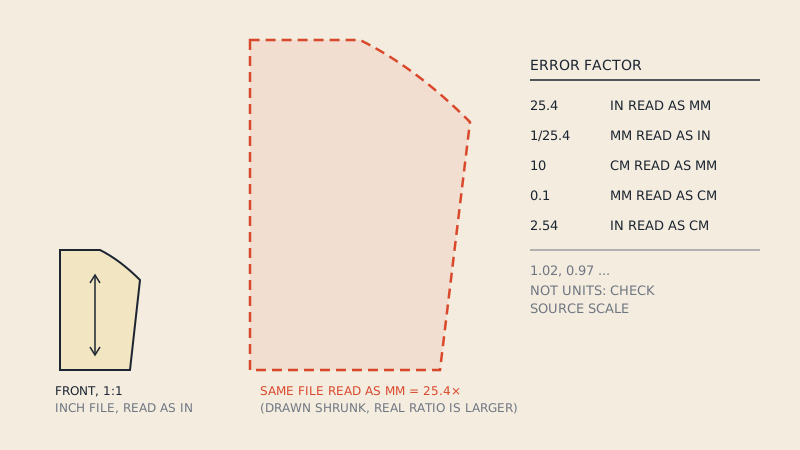
- Scale. Always measure a known piece in the destination; a factor of 25.4 is a unit mismatch, explained in DXF units in pattern files.
For a destination-specific checklist, see importing a DXF into CLO3D or, for industry systems, Lectra Modaris.
Working with a DXF or PDF someone else made
Since you cannot import it, you have three realistic options.
| Option | What you get | Effort |
|---|---|---|
| Trace it in Seamly2D / Valentina over a background image | A parametric pattern you can regrade to any measurements | High: every point redrafted |
| Edit it in a vector or CAD program instead | Quick fixes to the existing geometry | Low, but no parametric behaviour |
| Use it directly in the program that needs it (CLO3D, a cutter, a print service) | The pattern as it is | None, if it is already AAMA DXF |
Background images: forum answers describe placing an image (and in some versions an SVG) under the draft and tracing over it by hand. There is no automatic tracing; every point is placed by you, because the program needs to know how each point relates to the measurements. This is a good method when you want a parametric version of a block you trust, and a poor one when you only need the file in another program.
If what you have is a PDF pattern and what you need is a DXF for CLO3D or industry CAD, tracing is the long way round. A vector PDF can be converted directly to DXF AAMA, with one size extracted, tiles assembled, and cut line, sew line, notches, grain and internal lines on the standard layers. That gives you the file; it does not give you a parametric draft, which only redrafting can.
Printing what you drafted
Both programs can export tiled PDFs for home printing. If you want copy-shop sheets or several paper sizes from one export, a DXF AAMA file from Seamly2D or Valentina can also be laid out at 1:1 and split into A0 to A4 and US Letter sheets with test squares; see how to print a DXF pattern.
FAQ
Can Seamly2D import a DXF file?
No. Seamly2D exports DXF but cannot open or import one as pattern pieces, because its patterns are built from formulas and measurements that a DXF does not contain. You can trace over a background image instead.
Which DXF format should I export from Seamly2D for CLO3D?
Choose an AAMA DXF variant rather than plain DXF; older versions such as R12 are often the most compatible. Test the import in CLO3D and measure a known piece.
Does Valentina export DXF AAMA and ASTM?
Yes. Valentina lists DXF AAMA and ASTM among its export formats, along with PLT, SVG, PDF and CSV.
Can I convert a PDF pattern into a Seamly2D pattern?
Not automatically. You can place the pattern as a background image and redraft it point by point, which gives you a parametric pattern but takes time.
Will notches and grain lines export to DXF?
They should, when they are defined on the pattern pieces before export. Check for notches on layer 4 and grain lines on layer 7 in the destination program.