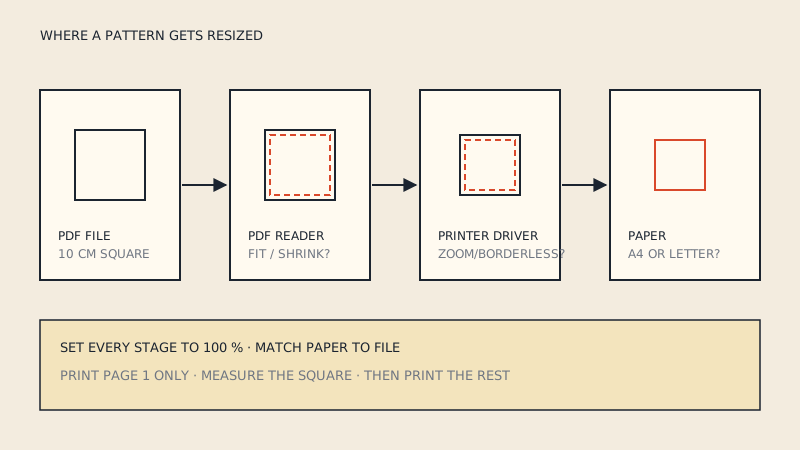
A4 is 210 × 297 mm (8.27 × 11.69"); US Letter is 215.9 × 279.4 mm (8.5 × 11"). Letter is about 6 mm wider and A4 about 18 mm taller, so a pattern made for one paper size does not print correctly on the other at 100 % scale: either part of each tile is cut off, or the reader shrinks the page and the pattern comes out 3–6 % too small. Many designers solve it with a combined A4/Letter file or two separate files; if yours has only one, you need to match the paper or rebuild the tiles.
The two sizes side by side
| A4 (ISO 216) | US Letter (ANSI A) | |
|---|---|---|
| Width | 210 mm (8.27") | 215.9 mm (8.5") |
| Height | 297 mm (11.69") | 279.4 mm (11") |
| Area | 623.7 cm² | 603.2 cm² |
| Where it is standard | Europe, most of the world | USA, Canada, parts of Latin America, the Philippines |
| Large-format family | A0, A1, A2, A3 | Tabloid (11 × 17"), 24", 36" rolls |
| Typical test square | 10 cm, often also 1" or 3" | 1" or 3", often also 10 cm |
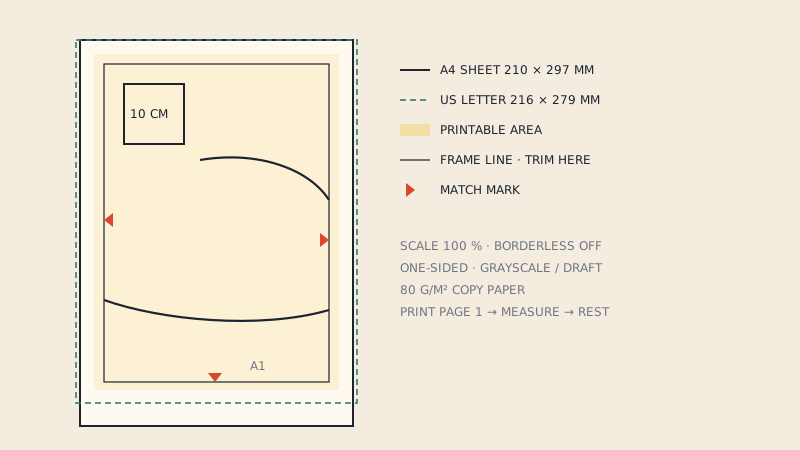
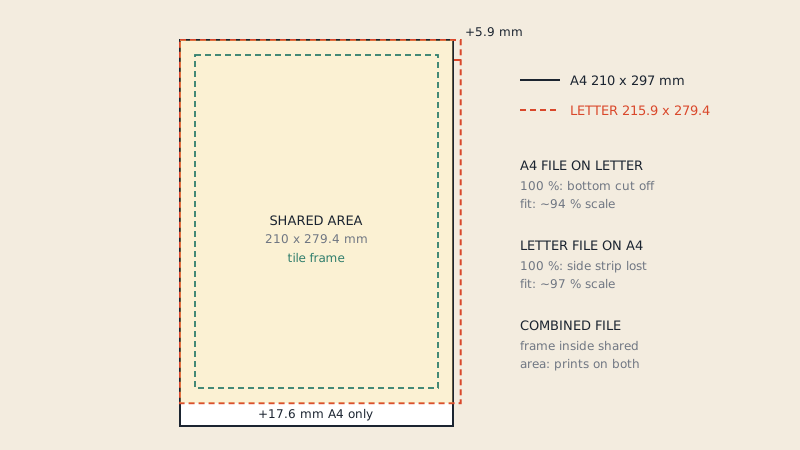
The common area of both sheets is 210 × 279.4 mm. A tile that fits inside that rectangle, plus the printer's margins, prints correctly on either paper. This is the idea behind combined files.
What happens when you print the wrong file
A4 file on US Letter paper
The page is 17.6 mm taller than the paper. Two things can happen depending on the print settings:
- At 100 % or Actual size, the bottom of every tile (plus the bottom margin) is cut off. Pattern lines and match marks near the lower edge disappear, and the tiles no longer join.
- With Fit or Shrink to page, the reader scales the page to fit the height: 279.4 / 297 is about 94 %. Minus printer margins it is often closer to 92 %. Every piece is then 6–8 % small, which on a 100 cm hip is 6–8 cm.
US Letter file on A4 paper
The page is 5.9 mm wider than the paper.
- At 100 %, a strip down one or both side edges is lost. If the tile's drawing goes almost to the edge, you lose match marks and parts of the pattern lines.
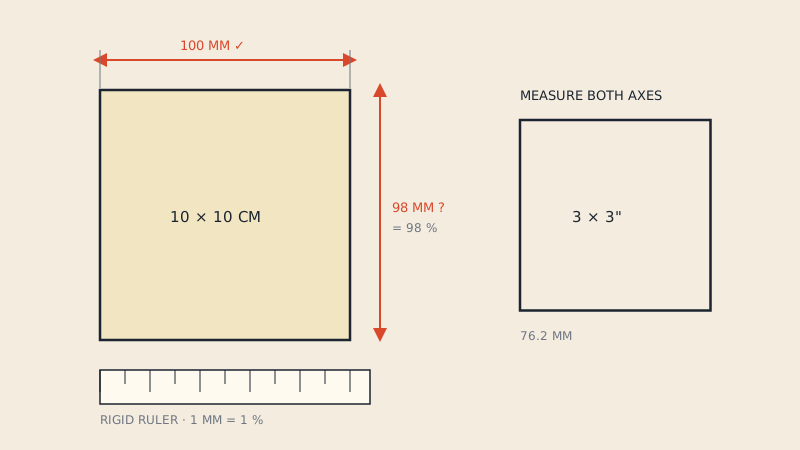
- With Fit, the scale drops to about 97 % (210 / 215.9), or less after margins. The test square measures about 9.7 cm instead of 10 cm.
A 3 % error is small enough to miss if you only glance at the test square, which is why measuring it with a ruler matters. How to read the square accurately is in the test square guide.
How pattern files handle both sizes
Designers who sell internationally usually choose one of three approaches:
- Two separate files. One A4 file and one US Letter file, each laid out for its paper. Look for "A4" and "Letter" or "US" in the file names.
- One combined file. Tiles are drawn in the area common to both sizes (210 × 279.4 mm minus margins). The file's page size may be A4 or Letter; either way, it prints at 100 % on both papers. The instructions usually say "A4/Letter" or "prints on both".
- One size only. Common with smaller or older patterns. These print correctly only on the paper they were made for.
To find out which one you have, open the PDF, go to the document properties, and read the page size. Then check the instructions for a note about A4/Letter. A combined file with A4 page size can still print fine on Letter, as long as you print at 100 % and the tile frame sits inside the shared area.
Checking a file in one minute
- Open the PDF in a desktop reader.
- Read the page size in the document properties: 210 × 297 mm is A4, 215.9 × 279.4 mm (8.5 × 11") is Letter.
- Look at the tile frame on a page. Measure the distance from the frame to the page edge on all four sides on screen; if the frame is well inside the page on all sides, it is likely a combined layout.
- Print one page with the test square at 100 % on your paper.
- Check that the whole frame printed and the square is exact.
If the frame is cut off at 100 %, you have a single-size file for the other paper.
What to do if you have the wrong file
Ask the designer
Many designers have the other size available and will send it, or have updated the pattern since you bought it. Check your account or the original download page first.
Print on the matching paper
A4 paper is sold in North America in office-supply stores and online, and Letter is available in many countries too. For one pattern, buying a ream of the matching paper is often the simplest fix.
Use a copy-shop sheet instead
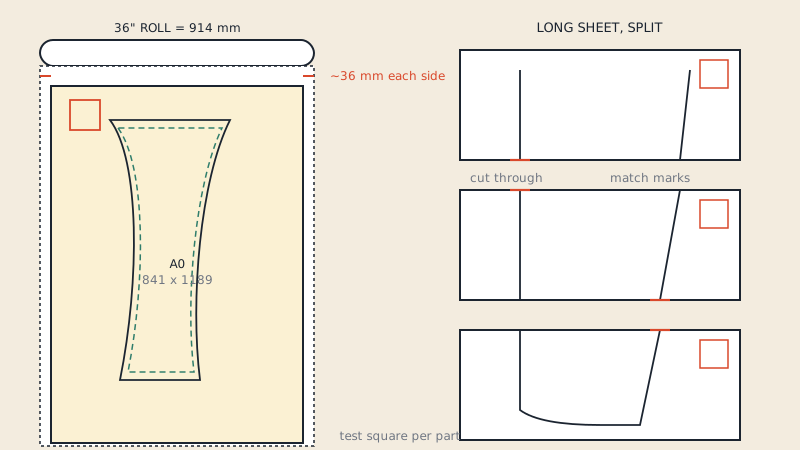
If the pattern includes an A0 or large-format file, skip tiling altogether. A0 is 841 × 1189 mm and prints on a 36" roll in North America; see printing on a 36-inch roll.
Rebuild the tiles
If you only have tiles for the wrong paper and want to print at home, the tiles need to be joined into one sheet and split again for your paper. Our service does this: it assembles the tiles, removes the original frames and page numbers, and splits the pattern into A4 and US Letter sheets, each set starting with 10 cm and 3" test squares and an assembly map.
What not to do
- Do not use Fit to page and hope it is close enough. A few percent changes the fit noticeably, and the error is not always the same in both directions, so pieces can come out slightly stretched.
- Do not scale up by a custom percentage to compensate. The printer's margins differ from page to page in some readers, and you end up with tiles that do not match.
Printer margins: the hidden third size
Home printers cannot print to the very edge. Margins of around 3–6 mm are common, sometimes more at the bottom. That is why tiles are drawn inside a frame rather than to the edge of the page. If your printer has unusually large margins, even a correct file can lose a few millimetres of the frame. Borderless printing helps on some printers, but check that it does not enlarge the page slightly, which some printers do to avoid white edges. The full set of home-printing settings is in printing sewing patterns on A4 or US Letter.
Test squares across countries
European patterns often use a 10 cm square, American ones a 1" or 3" square, and many patterns include both. Measure whichever matches your ruler, but measure it precisely. If you are not sure the problem is the paper, the wider troubleshooting guide for PDF patterns not printing to scale covers reader and driver settings too.
FAQ
What is the difference between A4 and US Letter?
A4 is 210 × 297 mm and US Letter is 215.9 × 279.4 mm (8.5 × 11"). Letter is about 6 mm wider and A4 about 18 mm taller.
Can I print an A4 sewing pattern on US Letter paper?
Only if the pattern is laid out for both sizes. A file made only for A4 loses about 18 mm at the bottom of each page at 100 %, or shrinks by about 6 % if the reader fits it to the page.
How do I know if my pattern is A4 or Letter?
Open the PDF's document properties and read the page size, then check the instructions for an "A4/Letter" note. Printing one page with the test square at 100 % confirms it.
Why is my test square 9.7 cm instead of 10 cm?
That is the typical result of a Letter file scaled down to fit A4 paper. Use the file made for your paper, or print the A4 or Letter version at 100 % scale.