When you take a sewing pattern to a copy shop, the one thing to insist on is printing at 100 % scale with no fit-to-page, on a wide-format printer whose roll is wider than your file. Send the copy-shop (large-format) PDF, say it is a sewing pattern that must print at exact size, ask for black and white on plain paper, and check the test square before you pay. Most problems at the counter come from the shop's default "fit to media" setting or from a file wider than the roll.
This guide is the practical side: how the machines work, what to check in the file, what to write in the email and what to look at when you collect the print.
How copy shops print large sheets
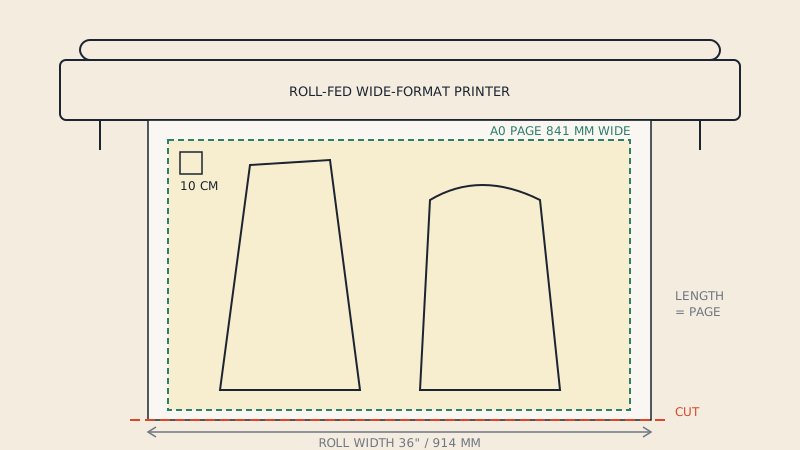
Large prints come from wide-format printers, often still called plotters. Most are roll-fed: paper comes off a roll of fixed width, the printer prints the page, and a cutter trims the sheet to the page length. A few print on pre-cut sheets such as A0 or 36 × 48".
That gives two limits:
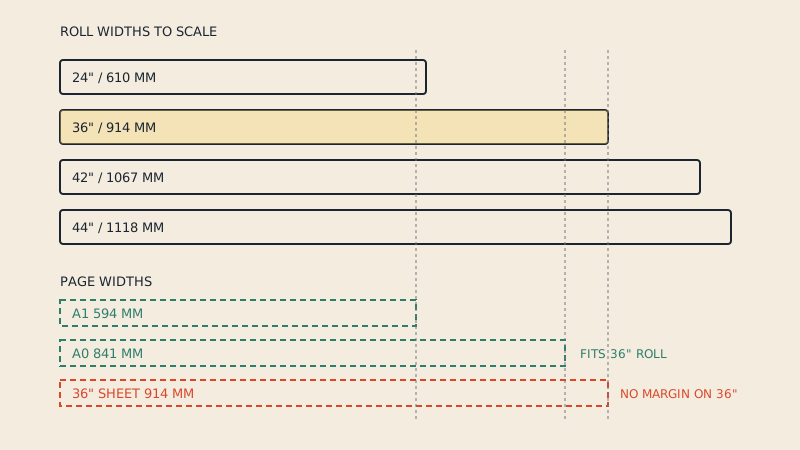
- Width is fixed by the roll loaded in the machine. Your page's shorter side must fit across the roll, minus a small margin.
- Length is flexible on a roll printer, up to the machine's maximum, so a long pattern sheet is usually fine.
| Roll width | mm | Fits |
|---|---|---|
| 24" | 610 | A1 (594 mm wide); not A0 |
| A0 roll | 841 | A0 exactly; tight with margins |
| 36" | 914 | A0 with margin; 36" pattern sheets |
| 42" | 1067 | Wide layouts; A0 still prints upright |
| 44" | 1118 | Very wide layouts |
Which rolls a shop has depends on its equipment, and the paper types and weights are a topic of their own in large-format pattern printing. For the counter, you only need to know your file's width and ask whether their roll is wider.
Before you send: five file checks
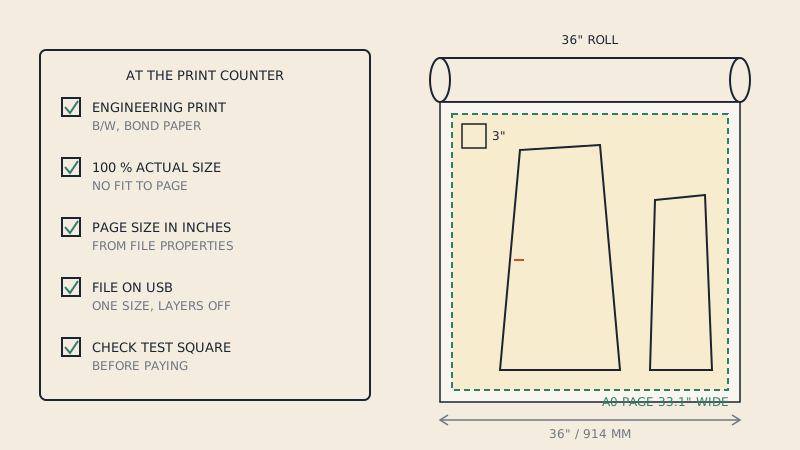
- Right file. Use the file labelled copy shop, A0, large format or plotter, not the A4 or Letter tiles.
- Page size. Open the PDF in Adobe Acrobat Reader and check File > Properties. Note the width and length of each page in mm or inches.
- Width against roll. The shorter side of the page should be less than the roll width minus a margin. A 914 mm (36") page on a 36" roll is likely to get its edges clipped or scaled.
- Layers. If the pattern has a layer per size and you want one size, hide the others, then save or print to a new PDF and open that copy to confirm. Many shop computers open files in software that shows all layers.
- Name the file clearly. For example
jacket-size12-A0-print-at-100.pdf. The file name is often the only instruction the operator sees.
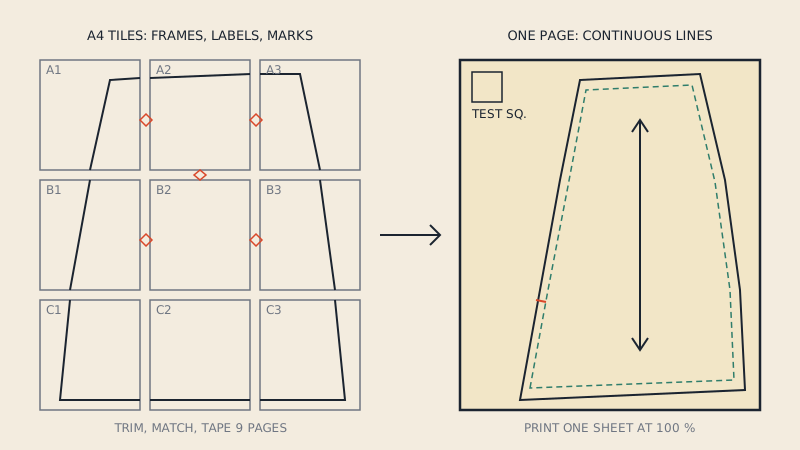
If the pattern came only as home-print tiles, a copy shop can print those pages, but you would still tape them. To give the shop a single sheet, the tiles first need assembling into one large page: see one-page PDF patterns.
What to ask for
Short and specific works best:
- Scale: 100 %, actual size, no fit to page or fit to media.
- Colour mode: black and white, unless sizes are distinguished only by colour.
- Paper: plain bond, the standard paper for line drawings.
- One copy of each page, no collating into sets, no trimming to a standard size.
- Rotation allowed if it helps the page fit the roll. Rotation does not change scale.
Avoid asking for "poster" printing. Poster workflows assume photos and often enlarge or crop to fill the sheet.
Email template
Shops that print from email or an upload form appreciate a clear request. Adapt this:
Subject: Large-format print, black and white, 100 % scale
Hello,
Please print the attached PDF, 2 pages, each 841 × 1189 mm (A0).
- Scale: 100 % / actual size. This is a sewing pattern and must print at exact size. Please do not fit to page or to the roll.
- Black and white on plain bond paper.
- One copy of each page.
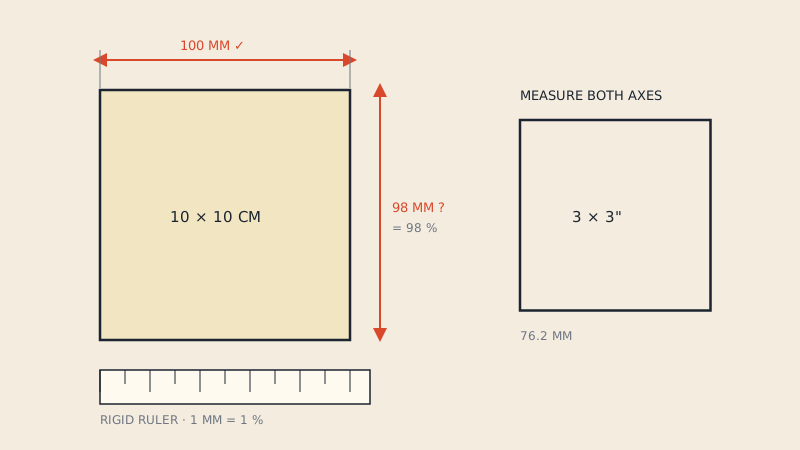
- Each page has a 10 cm test square on it; it should measure exactly 10 cm.
Could you tell me the price and when it will be ready?
Thank you, [Name, phone]
Replace the page size and count with your file's. If you work in inches, give the page size in inches and mention the 3" or 1" square instead.
At the counter
If you print in person:
- Ask which roll widths the printer has loaded.
- Show the file's page size, and say "100 %, no scaling" before they open it. Operators often apply "fit" by habit.
- Ask them to print the first page, then measure the test square together before the rest are printed.
- Check the page edges for clipping, especially notches and labels near the border.
Chain stores in North America sell this service under engineering or blueprint printing; printing at Staples, FedEx Office or Office Depot covers what to say there.
When something goes wrong
| What you see | Likely cause | What to ask |
|---|---|---|
| Test square measures 9.5 cm instead of 10 | Scaled to fit the roll or the printable area | Reprint at 100 %; rotate the page if it did not fit |
| Edge of the pattern missing | Page wider than roll minus margin | Use a wider roll, or rotate if length allows |
| Only part of the sheet printed | Printer used a fixed sheet size | Roll printing at page size |
| All sizes printed, crowded | Layers on in the shop's software | Send the flattened one-size copy |
| Grey or faint lines | Low-quality or draft mode | Standard quality line mode |
| Colour charged unexpectedly | Default colour mode | Black and white, if sizes are readable |
A test square that is off is not something to fix at home. Ask for a reprint before you leave; a scaled print is not usable for cutting. The test square article explains the tolerance.
Choosing a shop
Shops that print technical drawings for architects and engineers are usually the most reliable for patterns: they print at 100 % by default and are used to checking scale. General copy shops are fine once you have explained the requirement. If you have none nearby, online plan-printing services post sheets rolled in a tube. A broader list is in where to print sewing patterns.
Do not expect a shop to edit your file. Hiding layers, assembling tiles or splitting a long sheet are your job before sending. If the pattern exists only as tiles or only in a size that does not fit the shop's roll, our print files service makes a One Page sheet and A0 to A4 splits from a vector PDF so you can hand the shop a file that fits.
FAQ
What do I ask for when printing a sewing pattern at a copy shop?
Ask for the PDF printed at 100 % or actual size with no fit to page or fit to roll, in black and white on plain paper, one copy per page. Tell them it is a sewing pattern and must print at exact size.
What roll width do I need for an A0 pattern?
A 36" (914 mm) roll fits A0 (841 mm wide) with a margin. An A0-width roll (841 mm) is very tight, and a 24" roll is too narrow unless the page is A1 or smaller.
Why did the copy shop print my pattern too small?
The print was almost certainly scaled to fit the paper or the printer's printable area. Ask for a reprint at 100 %, rotated if the page did not fit across the roll.
Can a copy shop print only my size?
They print what the file shows when opened. Hide the other size layers yourself, save a new PDF, and send that copy, then check it opens with only your size visible.
Should I print sewing patterns in colour at a copy shop?
Usually not. Black and white is generally cheaper and fine for line drawings. Colour is worth it only when sizes are told apart by colour alone.