A one-page PDF pattern is the whole pattern on a single large sheet, made by joining the A4 or US Letter tiles of a print-at-home file back into one page and removing the tile frames. You get the copy-shop file the designer did not supply: send it to a wide-format printer, print at 100 %, and skip trimming and taping 20 or 30 pages. The things to check are the sheet's width against the shop's roll, that the pieces line up across the old tile edges, and that the test square measures true.
Why one sheet beats taped tiles
The comparison of the two formats in general is in A0 vs A4 PDF patterns. For patterns that only exist as tiles, the case for a one-page file comes down to three things:
- No assembly session. Tiled patterns need every page trimmed or overlapped, laid out in order and taped, and that is repeated each time the pattern is printed.
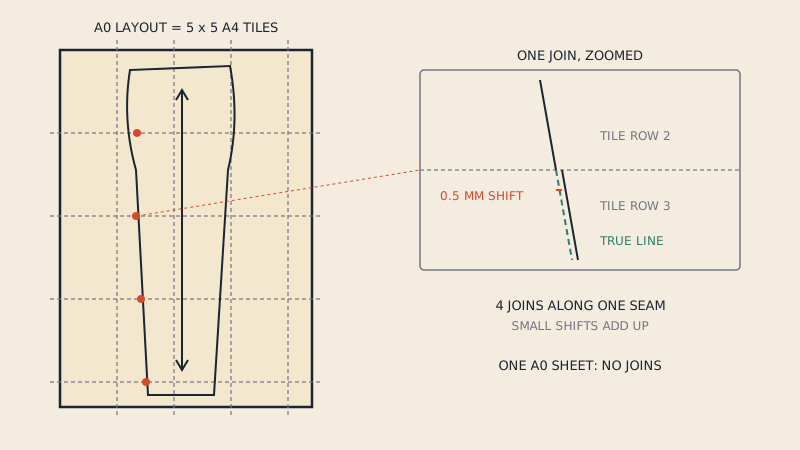
- No drift at joins. Each taped join is a small manual alignment, and small errors add up along long seams. A digitally assembled sheet places every tile at its exact position.
- A clean sheet. Tile borders, page numbers, overlap zones and alignment marks disappear from the pieces, so the lines you trace are the pattern's lines only.
It also opens other options. Once the pattern is one continuous drawing it can be re-split into a different paper size, for example A4 tiles turned into US Letter tiles for a friend in the US, or into A0 sheets for a shop that only prints cut sheets.
What is inside a tiled PDF
To understand how tiles are assembled, look at what a print-at-home page contains:
| Element | Purpose | In the one-page file |
|---|---|---|
| Pattern lines inside the tile area | The pattern itself | Kept, joined to the neighbouring tiles |
| Tile frame or border | Shows where to trim or overlap | Removed |
| Row and column labels (A1, B3…) or page numbers | Order of assembly | Removed |
| Alignment marks, diamonds, circles | Matching across joins | Removed |
| Overlap zone | Duplicate strip shared with the next tile | Counted once |
| Test square | Scale check | Kept, placed on the sheet |
| Assembly map page | Shows the tile grid | Not needed |
The designer drew the pattern as one large drawing and cut it into tiles. Assembling reverses that cut: work out where each tile sat in the original drawing, put it back there, and throw away everything that was added for printing.
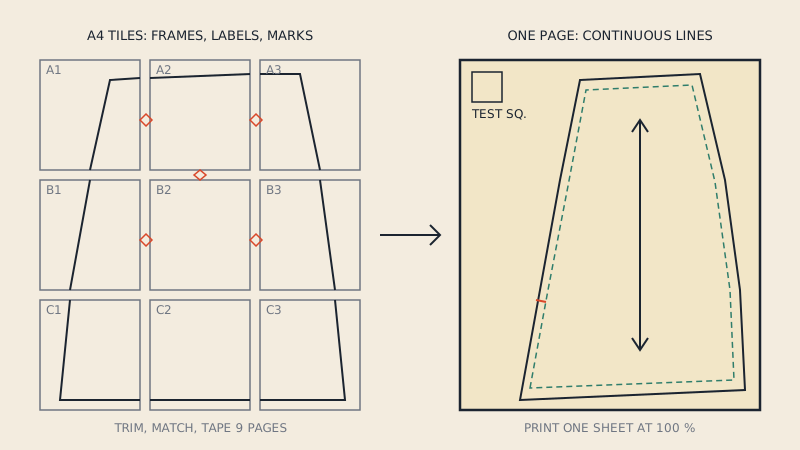
How tiles are assembled
You can do it by hand in a vector editor, or with a tool built for it. The steps are the same.
By hand in a vector editor
- Open the tiled PDF in Inkscape or Illustrator. Each page arrives as a separate page or artboard.
- Create one large page, at least the size of the full grid.
- Copy each tile's contents onto it and move it to its grid position, using the overlap or the alignment marks to place it exactly. Zoom right in on the joins.
- Delete frames, labels, marks and the duplicated overlap strips.
- Check that lines crossing old tile edges meet without a step. Where they do not, the tile is a fraction off; move it.
- Save as PDF at 1:1.
On a vector PDF this is precise but slow, typically most of an evening for a large garment. Clip masks on each page are the main nuisance; they must be released so that lines are not cut short at the old tile edges. The tool-specific details are in using Inkscape for sewing patterns and making sewing patterns in Illustrator.
Automatically
A pattern-aware tool does the same steps from the vector content: it finds the tile grid, places each page by its position, removes frames and marks, and writes one sheet. Our print files service does this for €5 per pattern. You upload the tiled PDF (vector, not scanned, up to 60 MB), and it produces a One Page sheet for the copy shop along with re-split A0, A1, A2, A3, A4 and US Letter sets, each starting with 10 cm and 3" test squares and an assembly map. Patterns supplied as several A0 sheets can be joined into one long sheet the same way.
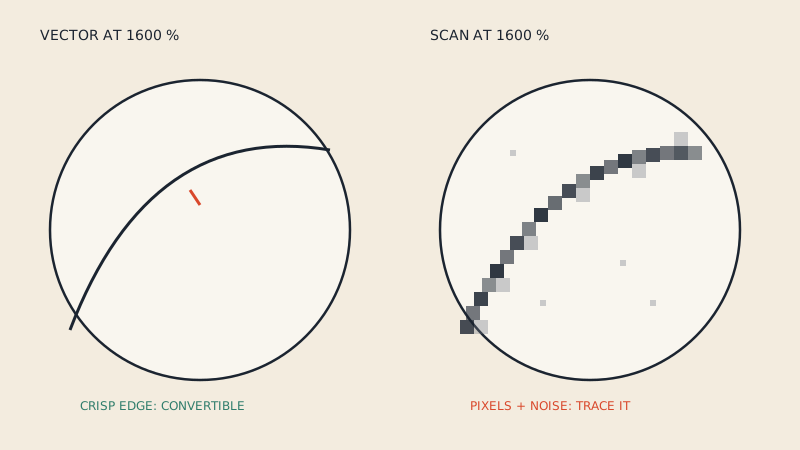
This only works on vector PDFs. A scanned or photographed pattern is an image, and there are no lines to re-join; see is my PDF pattern vector or scanned for a quick check.
Sheet width and the copy shop's roll
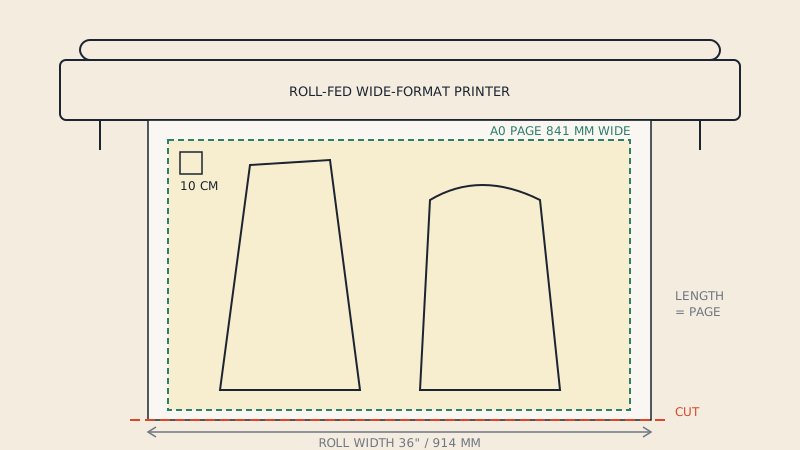
A one-page sheet is as wide as the pattern layout, which is not always a standard size. Before sending it to a shop:
- Open the PDF and check the page size (in Adobe Acrobat Reader, File > Properties).
- Compare the shorter side with the shop's roll. Up to about 900 mm fits a 36" (914 mm) roll on most printers; wider sheets need a 42" (1067 mm) or larger roll.
- If the sheet is too wide for any roll nearby, use A0 sheets instead. They print on a 36" roll and need only a few joins rather than dozens.
Our service warns in the results when the One Page sheet is wider than a 36" roll, so you can choose the A0 set instead.
What to check before printing
Open the one-page file in a PDF reader and zoom in. A careful check takes five minutes.
- Joins. Follow a few long lines that crossed tile edges (a side seam, a hem). They should run straight through with no step, gap or doubled segment.
- Nothing missing at the old edges. Notches, grain line ends and labels that sat right at a tile edge should be whole.
- No leftover frames or labels on the pattern pieces.
- All pieces present. Compare with the piece list in the instructions. Small pieces such as facings and pocket bags are easy to overlook.
- Layers. If the original had a layer per size, check that the layers still work, or that your chosen size is the one shown.
- Test square. It should be on the sheet. Measure it on the print.
Then send it to the shop with the usual instruction: 100 % scale, no fit to page, black and white. The full request, and an email template, are in copy shop printing for sewing patterns.
Common problems
| Problem | Likely cause | What to do |
|---|---|---|
| Lines step slightly at old tile edges | A tile placed a fraction off (manual), or the original tiles were not drawn on an exact grid | Re-place the tile; on automatic output, compare with the original tiles |
| Lines cut short at tile edges | Clip masks not released | Release clips before assembling |
| Pieces doubled along a strip | Overlap zone kept from both tiles | Delete the duplicate strip |
| Sheet too wide for the shop | Pattern layout wider than a 36" roll | Print the A0 split, or find a 42" roll |
| Test square wrong on the print | Printed with fit to page | Reprint at 100 % |
| File will not process | Scanned or password-protected PDF | Use the original vector file from the designer |
Is it allowed?
Assembling tiles for your own printing is the kind of personal use most pattern licences expect, and many designers suggest it themselves. Sharing or selling the assembled file is not. Check the licence of the pattern you bought, and read sewing pattern copyright for general background (not legal advice). Our service asks you to confirm that you own the pattern or have the right to convert it, and the files must not be shared.
FAQ
Can I turn an A4 PDF pattern into an A0 file?
Yes, if it is a vector PDF. The tiles are placed back into their grid on one large page and the tile frames and labels are removed, either by hand in a vector editor or with a pattern-aware tool. The result is printed at a copy shop at 100 %.
What is a one-page PDF pattern?
It is the whole pattern on a single large sheet, made for a wide-format printer, instead of many A4 or US Letter tiles. It is sometimes called a copy-shop or large-format file.
Will a one-page pattern fit an A0 printer?
It depends on the pattern layout. Check the page size: a sheet up to about 900 mm wide fits a 36" roll on most printers, and wider sheets need a 42" roll. If it is too wide, print the pattern as several A0 sheets instead.
Is a one-page file more accurate than taped tiles?
Usually, yes. Digital assembly places each tile at its exact grid position, while hand taping adds a small alignment error at every join. The print must still be made at 100 % and checked with the test square.
Can scanned patterns be turned into a one-page file?
Not with a tool that reads vector lines, because a scan contains only an image. Scanned pages can be stitched as images in photo software, but the result is a picture, not a clean pattern drawing.