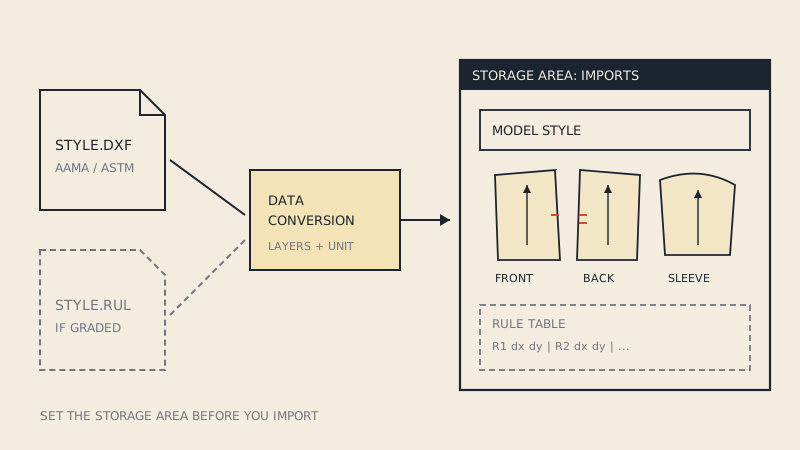
Gerber AccuMark does not open a DXF the way a drawing program opens a file. It converts it: an AAMA or ASTM DXF is read by AccuMark's data conversion tools and turned into AccuMark pieces and a model, which are stored in a storage area you choose. Once you think of the import as a conversion into AccuMark's own data structure, the steps, and most of the errors, make sense.
The menus differ between AccuMark versions, so this guide describes the flow and the decisions you make at each step rather than button names. Gerber Technology has been part of Lectra since 2021, but AccuMark remains its own product line with its own documentation; check the help for your installed version for the exact path.
How AccuMark stores pattern data
Three ideas matter for an import.
| AccuMark concept | What it is | Why it matters on import |
|---|---|---|
| Storage area | A named data location that holds pieces, models, rule tables and other data | Everything imported lands in one storage area; if you forget which, you will not find the pieces later |
| Piece and model | Each pattern piece is stored separately; a model groups the pieces of one style | The DXF becomes one model with its pieces |
| Rule table | The grade rules that tell each grade point how to move between sizes | A graded DXF needs its rules; an ungraded one only has the base size |
AccuMark users are taught early to check the active storage area every time they open a program, and the same applies here: set it before you import, not after.
AAMA or ASTM: what to ask for
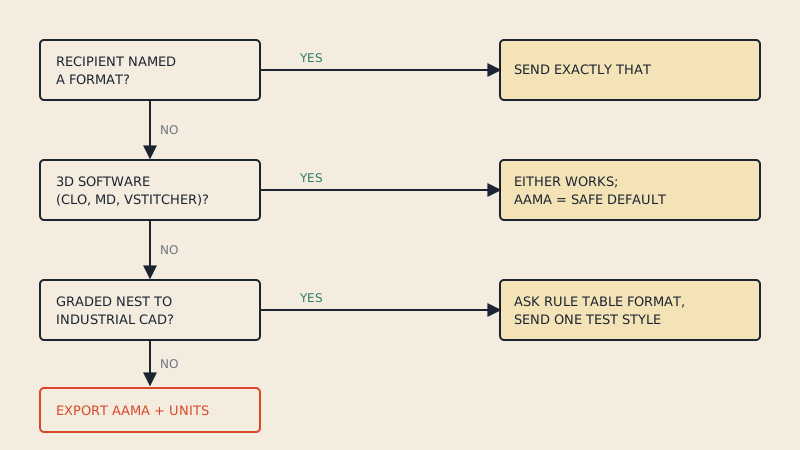
AccuMark reads both, and ASTM is widely associated with Gerber systems. Graded exports in either flavour commonly put the grade rules in a separate RUL file next to the DXF. If someone else is preparing the file for you, ask for:
- ASTM or AAMA DXF, not plain DXF.
- The RUL file if the pattern is graded.
- The unit the pattern was drafted in.
- One file per style, with piece names, sizes and quantities filled in.
The differences between the two flavours are covered in DXF AAMA vs ASTM. If the file comes from CLO3D, note that CLO exports nested sizes rather than a rule table, which is why graded CLO files sometimes arrive in AccuMark without grading; users on CLO's forum report having to adjust the AccuMark import settings to read them.
The import flow, step by step
- Create or choose a storage area for the incoming work. Many studios keep a separate area for imported files so nothing overwrites production data.
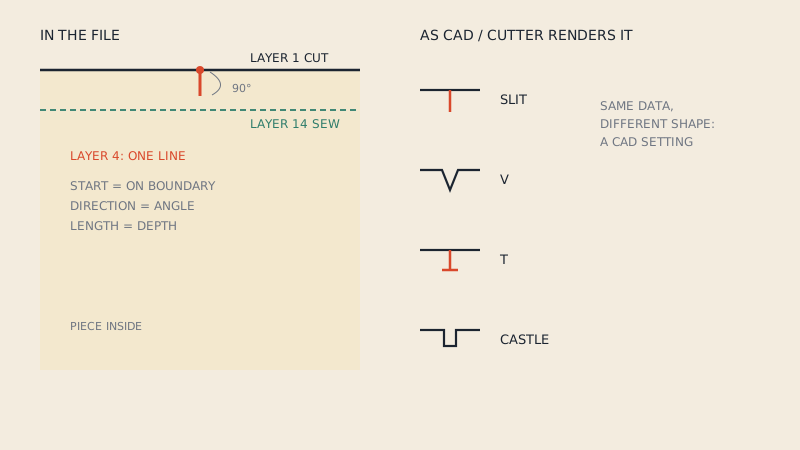
- Check the import settings. AccuMark lets you define how DXF, DXF-AAMA and DXF-ASTM layers are read, that is, which layer number becomes a boundary, a grain line, a notch or an internal line. The defaults follow the AAMA layer numbers; change them only if you know the sender's export differs.
- Run the AAMA/ASTM import or conversion from AccuMark's data conversion tools, choosing the file, its format and the target storage area.
- Choose the unit if the format does not carry it, and the rule table handling if the file is graded.
- Open the result in AccuMark Explorer, find the new model and its pieces, and open them in the pattern design program to check them.
Larger shops also automate this. Recent AccuMark releases document a batch workflow in which ASTM DXF files dropped into a watched folder are converted automatically; one detail worth knowing is that if a model with the same name already exists in the target storage area, the file is not converted again and the existing model is used. If a re-sent file seems to "not update", that is the first thing to check.
Rule tables and grading
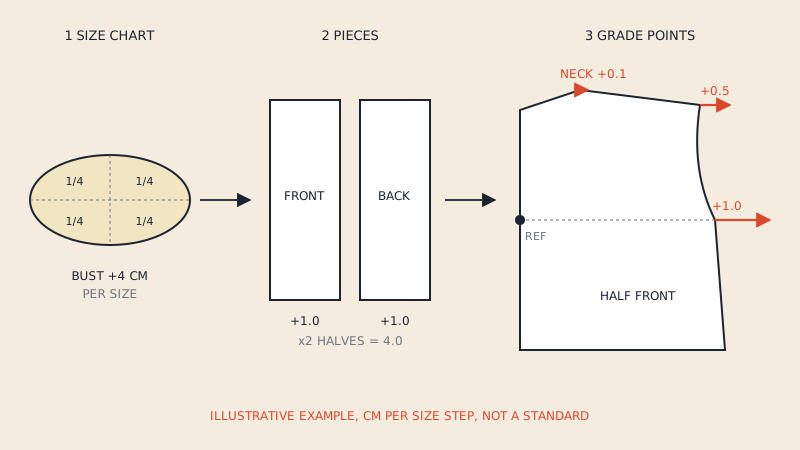
A rule table is a list of grade rules: for each rule number, how far a point moves in x and y for each size step. Pieces reference rule numbers at their grade points. When a graded AAMA file arrives with its RUL file, the import creates or uses a rule table so the sizes can be regenerated in AccuMark.
Things that go wrong with grading:
- The RUL file is missing. The pattern imports at the base size only.
- The file uses nested sizes instead of rules. Each size is drawn as its own outline. AccuMark may import them, but you will not get editable grade rules from them.
- The size names do not match. If the sender's size list differs from the one you use, map it before importing or the sizes will not line up.
If you are new to grade rules, pattern grading basics explains grade points and rules, and grading rules and size charts shows how increments are derived.
An ungraded, single-size DXF is perfectly normal input: it arrives as the base size, and you grade in AccuMark if needed. That is what you get from a converted PDF pattern, where one size is extracted.
Checks after import
Open each piece and go through this list before anything goes to a marker:
| Check | What you are looking for |
|---|---|
| Piece count | Matches the cutting list; no piece is split in two |
| Boundary | Closed, on the right line (cut line for a gross pattern) |
| Scale | A known measurement, such as a waistband length, is correct |
| Grain line | Present on every piece, correct direction |
| Notches | Present, on the boundary, matching across seams |
| Internal lines | Darts, pocket placements and drill holes present, not lost |
| Piece info | Name, size and quantity read from the file |
| Mirror / fold | Fold pieces flagged correctly so markers place them properly |
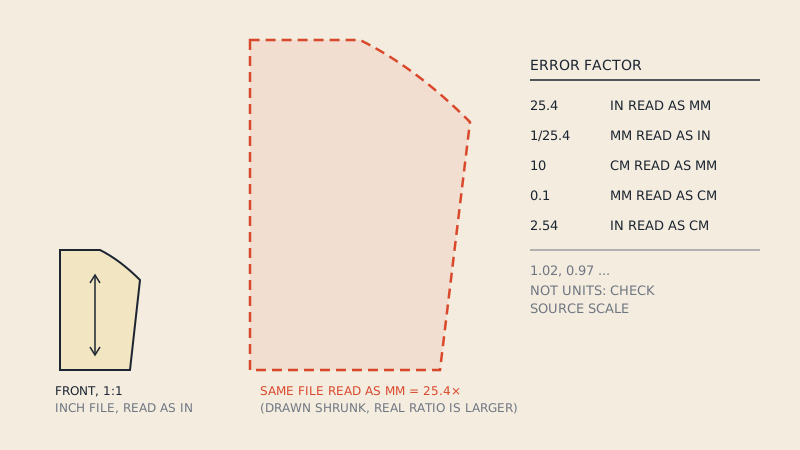
A piece that is 25.4 times too big or small means a unit mismatch on import; DXF units in pattern files explains how to spot it. Missing notches usually mean they were on a layer the import settings did not map to notches; see how notches are stored in DXF AAMA.
Seam allowance in AccuMark
Production patterns in AccuMark are normally gross: the boundary is the cut line and the allowance is part of the piece. If your DXF carries both lines (cut on layer 1, sew on layer 14), the boundary should be the cut line and the sew line becomes reference information. If you receive a net pattern, you will add allowance in AccuMark before making markers; confirm with the sender which kind you have.
Converting PDF patterns for AccuMark
Studios often need a style that exists only as a PDF: an archive pattern, a freelancer's work, or a pattern bought with a commercial licence. AccuMark cannot import a PDF as pieces. If the PDF is vector, our converter writes a single-size DXF AAMA file with the cut line on layer 1, the sew line on layer 14 when the pattern has allowance, grain on layer 7, notches on layer 4, internal lines on layer 8 and piece text. It does not create grade rules; the file imports as a base size. Check rights before converting anything you did not draft yourself.
FAQ
Can Gerber AccuMark import DXF AAMA files?
Yes. AccuMark converts AAMA and ASTM DXF files into its own pieces and models through its data conversion tools. Plain DXF without the AAMA structure is much less reliable.
Where do imported pieces go in AccuMark?
Into the storage area you selected for the import. If you cannot find a model after importing, check which storage area was active.
Why did my graded pattern import with only one size?
Usually the RUL file was missing from the export, or the file used nested size outlines instead of grade rules. Ask the sender for the rule file that belongs to the DXF.
Do I need a rule table for a single-size DXF?
Not to bring the pattern in. A single-size DXF imports as the base size; you only need grade rules when you want to generate other sizes in AccuMark.
Can AccuMark open a PDF sewing pattern?
Not as pattern pieces. A vector PDF has to be converted to DXF AAMA or ASTM first, then imported.