The open-source tools worth knowing as a pattern maker are Seamly2D and Valentina for parametric drafting, FreeSewing for code-based made-to-measure patterns, Inkscape for vector cleanup and print layout, LibreCAD for general 2D DXF editing, and the Python library ezdxf for inspecting and fixing DXF files in bulk. None of them is a full industry pattern CAD, but together they cover drafting, editing, checking and printing without licence fees.
This article is about what each tool is for and how they fit together. For a broader comparison that includes free (but not open-source) options such as trials of commercial software, see free pattern making software.
Why open source matters for patterns
Free of charge is the obvious benefit, but not the only one. Open-source tools:
- keep your files readable in the long term, since the formats and code are public;
- can be scripted and modified for your own workflow;
- run on Linux, which many commercial pattern programs don't support;
- have communities that answer questions and publish their own blocks and patterns.
The cost is time. You will usually spend more of it learning, and some production features (automatic marker nesting, vendor-specific DXF dialects) are thinner than in commercial systems.
The tools at a glance
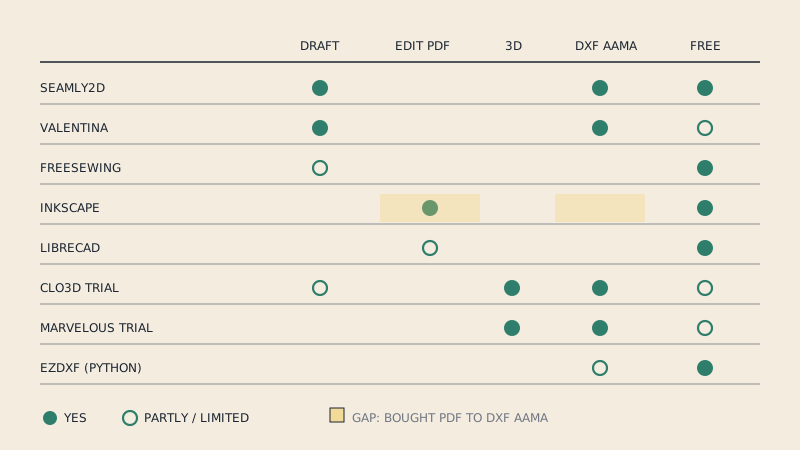
| Tool | Licence | What it does | Pattern use |
|---|---|---|---|
| Seamly2D | GPLv3 | Parametric 2D pattern drafting | Draft blocks from measurements, made-to-measure |
| Valentina | GPLv3 | Parametric 2D pattern drafting | Same family as Seamly2D, developed separately |
| FreeSewing | MIT | JavaScript library and site for patterns written as code | Made-to-measure patterns generated from measurements |
| Inkscape | GPL | General vector graphics editor | Cleanup, labels, tiling layouts, PDF output |
| LibreCAD | GPLv2 | General 2D CAD | Editing and measuring DXF geometry |
| ezdxf | MIT | Python library for reading and writing DXF | Checking, fixing and batch-processing DXF files |
Seamly2D and Valentina: parametric drafting
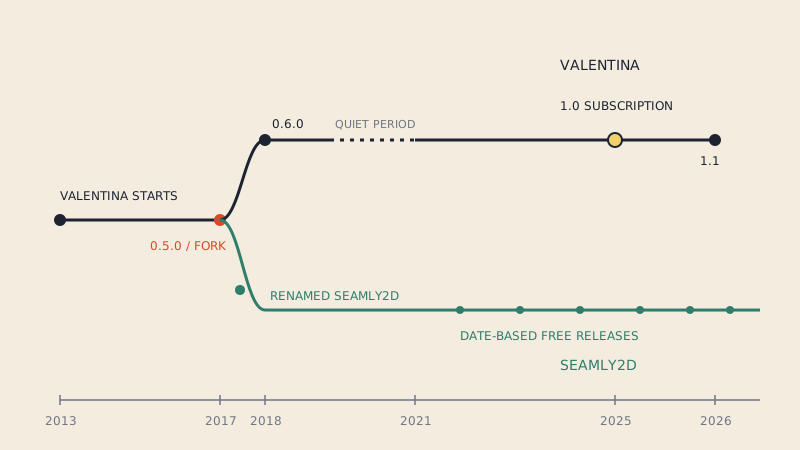
Seamly2D and Valentina share a history: Seamly2D was forked from Valentina in 2017, and both have been developed separately since. Both draft patterns the way a pattern-making textbook does, from measurements and construction steps, rather than drawing free shapes. Change a measurement file and the pattern redraws itself, which makes them good for made-to-measure and for building your own blocks.
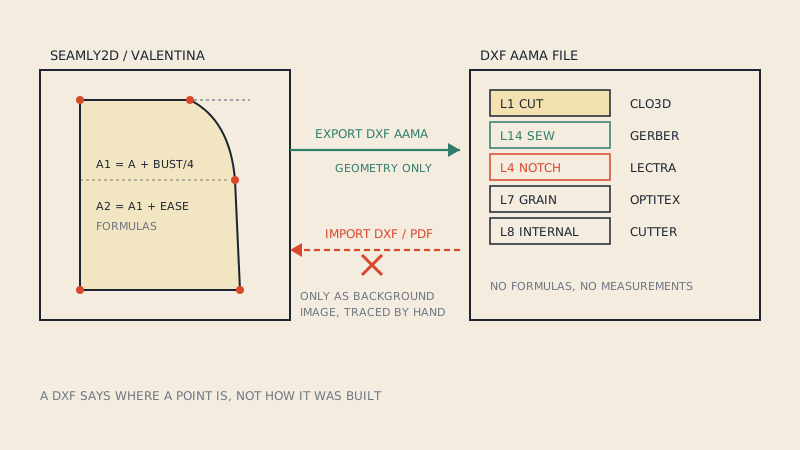
What they are not is an importer. They are built to construct patterns, not to take in a finished pattern from elsewhere and edit it. That distinction trips up many people who arrive with a PDF pattern and expect to open it. How each one exports DXF, and what you can and can't bring in, is covered in Seamly2D and Valentina: exporting and using DXF. If you are choosing between the two, the differences in community, features and platforms are in Seamly2D vs Valentina.
FreeSewing: patterns as code
FreeSewing takes a different route: each pattern design is written in JavaScript, and the pattern is generated from the user's measurements. For a sewist, that means made-to-measure patterns from a website. For a developer or a technically minded designer, it means you can write your own designs with the same library, version them like software and test them across many sets of measurements.
The output is vector (SVG and PDF), ready for printing. It is the most programmer-friendly option in this list and the least like traditional CAD.
Inkscape: the general-purpose vector tool
Inkscape is not a pattern program, but many independent designers use it for the parts of pattern work that are really graphic design: cleaning up lines, adding labels and symbols, laying out pieces on pages, and producing print PDFs. Its path offset tools can add seam allowance, with care at corners. Exporting DXF from Inkscape is possible, but the result is a generic DXF, not a pattern file with pieces and layers in the AAMA sense. The practical details are in using Inkscape for sewing patterns.
LibreCAD: plain 2D DXF editing
LibreCAD is a general 2D CAD program that works natively with DXF. For pattern makers it is useful as a precise viewer and editor: measure a seam exactly, check units, move a notch, close a gap in an outline. It doesn't know what a pattern piece is, so it won't help with grading or seam allowance logic, but it will show you exactly what is in a DXF file, layer by layer.
ezdxf: inspecting DXF files with Python
For anyone comfortable with a little Python, ezdxf is the most useful tool on this list for checking files. It reads and writes DXF, including the block structure that DXF AAMA uses for pieces. A few lines list every piece in a file with its layers:
import ezdxf

doc = ezdxf.readfile("pattern.dxf")
print("units:", doc.header.get("$INSUNITS", "not set"))
for block in doc.blocks:
    if block.name.startswith("*"):   # skip model/paper space
        continue
    layers = sorted({e.dxf.layer for e in block})
    print(block.name, len(block), "entities, layers:", layers)
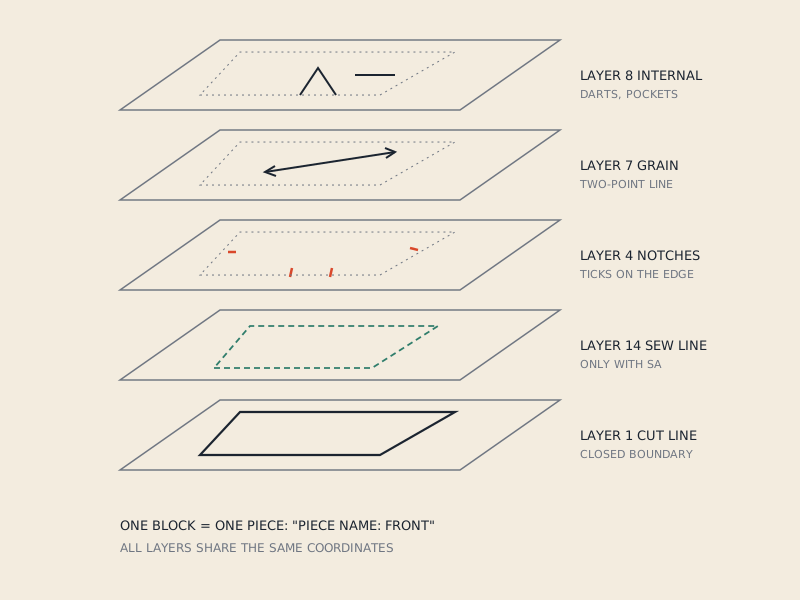
Run that on an AAMA file and you should see one block per piece with layers such as 1 (cut line), 4 (notches), 7 (grain line) and 8 (internal lines). Run it on a generic DXF and you often see everything on layer 0 and no piece blocks at all, which tells you why your CAD imported a pile of lines. The meaning of each layer number is in the AAMA DXF layers.
Typical small jobs with ezdxf:
- report units and piece counts for a folder of files before sending them on;
- rename layers from a drawing program's names to AAMA numbers;
- find open outlines (cut lines that don't close);
- extract piece names and sizes from piece text into a spreadsheet.
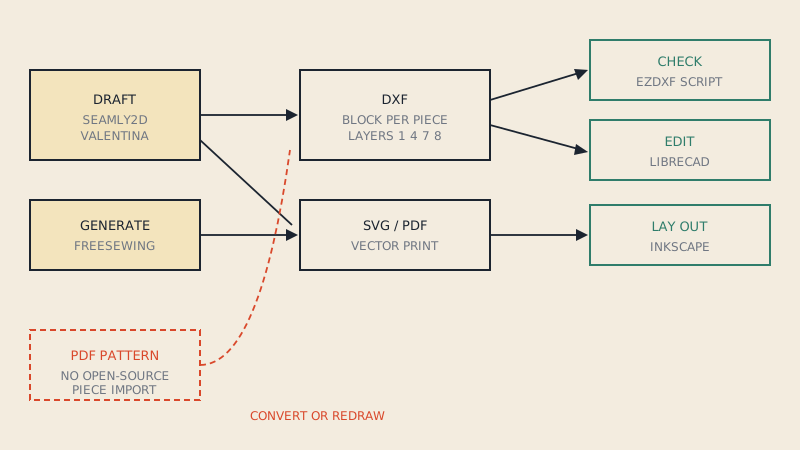
How they fit together
A realistic open-source workflow for an independent designer:
- Draft in Seamly2D or Valentina from measurements, or generate a made-to-measure pattern with FreeSewing.
- Export DXF for CAD or 3D, and SVG or PDF for print.
- Check the DXF with ezdxf or LibreCAD: units, piece count, layers, closed outlines.
- Lay out print files in Inkscape: labels, cover page, tiling.
- Test a printed piece against its measurement before releasing anything.
Where it gets harder is the reverse direction. If you start from a vector PDF pattern rather than a draft, none of these tools reconstructs pattern pieces automatically; you would redraw or clean up the lines by hand. That is the gap a PDF-to-DXF AAMA converter fills: it reads the pieces, notches and grain lines from the PDF and writes a DXF you can check with the same ezdxf script.
Limits to be honest about
- Industry exchange. Commercial CAD systems interpret AAMA and ASTM slightly differently. Files from open-source tools generally import, but test with your factory before relying on it.
- Grading. Parametric tools handle sizes through measurements rather than through grade rules in the industrial sense. That suits made-to-measure; it is a different model from a graded nest.
- Markers. Automatic marker nesting is largely the domain of commercial software.
- Support. Help comes from forums and documentation, not a support contract.
FAQ
Is there open-source pattern making software?
Yes. Seamly2D and Valentina are open-source parametric pattern drafting programs, and FreeSewing is an open-source library for made-to-measure patterns. Inkscape, LibreCAD and ezdxf help with layout, DXF editing and file checks.
Can Seamly2D or Valentina open a PDF sewing pattern?
No. They draft patterns from measurements and construction steps; they do not turn a finished PDF pattern into editable pieces. A PDF pattern has to be redrawn or converted to DXF first.
What is ezdxf used for in pattern making?
ezdxf is a Python library for reading and writing DXF files. Pattern makers use it to check units, list pieces and layers, rename layers and find problems in DXF files before importing them into CAD.
Can Inkscape export DXF AAMA?
Inkscape can export DXF, but as a generic drawing rather than a pattern file with one block per piece and numbered AAMA layers. Pattern CAD may import it as loose lines.
Is LibreCAD good for sewing patterns?
LibreCAD is good for viewing, measuring and editing DXF geometry precisely. It has no pattern-specific features such as seam allowance logic or grading.