A generic PDF to DXF converter does exactly what its name says: it takes every vector path on every page and writes it into a DXF. A sewing pattern PDF, though, is a drawing of a pattern, full of things that are not pattern geometry: tile borders, page numbers, all sizes on top of each other, legends, text, arrows. Pattern CAD needs the opposite, a small number of closed pieces with notches, grain lines and names on specific layers. The gap between those two is where generic conversions fail.
This is not a flaw in the general tools. They are built for floor plans, logos and technical drawings, where a line is just a line. A pattern needs interpretation.
What a generic converter actually outputs
Online file-conversion sites and general vector programs that export DXF tend to produce the same kinds of output from a pattern PDF. Not every tool shows every problem, but most results contain several of these.
Every line from every page
Tile frames, alignment marks, cut-here lines, the page grid of a print-at-home file, the cover page, the size chart, the cutting layout diagram from the instructions: all of it ends up in the DXF as geometry, at its position on its own page. A 40-page A4 pattern becomes 40 separate page-sized drawings side by side or stacked, not one assembled pattern.
All sizes at once
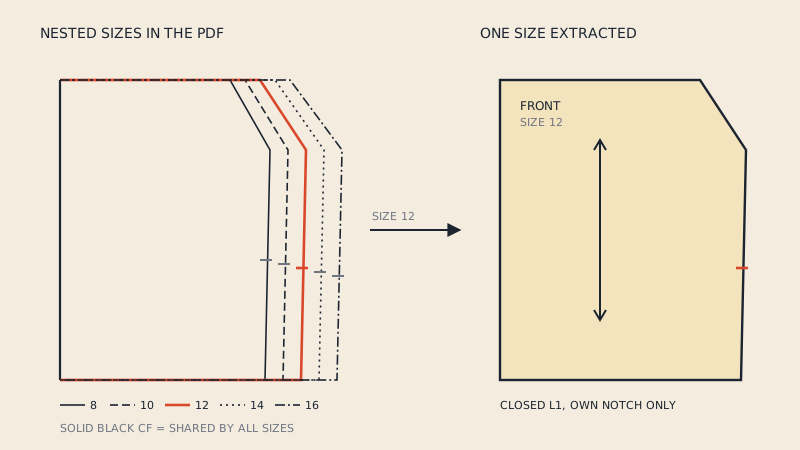
A multi-size pattern has nested outlines, one per size, distinguished by colour or dash pattern. Most generic converters drop the dash pattern, flatten colours or keep them as arbitrary colour indices. Ten nested outlines become ten nearly identical lines you have to tell apart by eye. Choosing one size properly is its own topic: converting a multi-size PDF pattern to DXF.
Outlines broken into segments
In the PDF, a piece outline is often drawn as several paths, and on tiled patterns it is cut at every page edge. The converter keeps those breaks. Pattern CAD wants one closed boundary per piece, so you have to join dozens of segments and close tiny gaps.
Dashed lines as hundreds of dashes
Some PDFs store a dashed line as one path with a dash style; others store each dash as a separate segment. In the second case, a dashed seam line becomes hundreds of short lines that cannot be joined into anything useful.
Text as curves
Piece names, size labels and instructions are often converted into outlines of letters. In CAD each letter is a set of small closed shapes. An importer that looks for closed shapes may treat every letter "O" as a pattern piece.
Everything on one layer
Generic tools write to layer 0 or to layers named after the PDF's colours. None of them use the AAMA layer meanings, so cut lines, notches, grain and darts are indistinguishable. Why that matters is covered in the AAMA DXF layers, one by one.
Scale and units surprises
PDF coordinates are in points (1/72 inch). Converters handle this differently; some output millimetres, some inches, some unitless numbers. A pattern that imports 25.4 times too large or small, or about 2.83 times off (the ratio between millimetres and points), is a common sign.
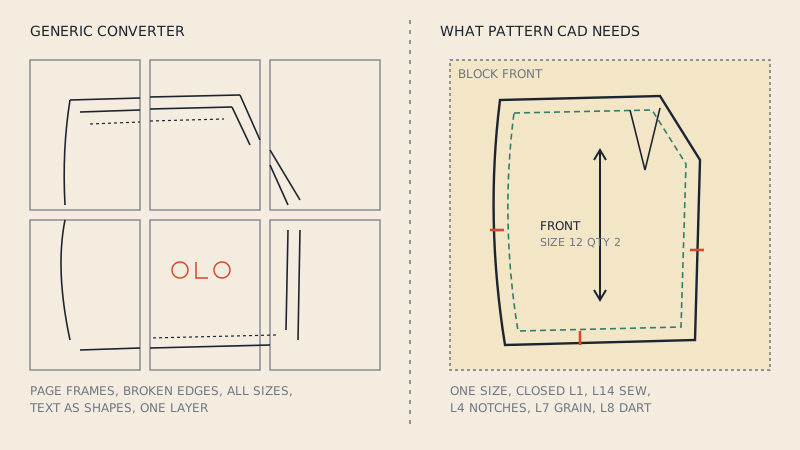
What pattern CAD needs
Compare that with what CLO3D, Marvelous Designer or an industrial pattern system expects from a DXF AAMA file:
| Pattern CAD expects | Generic converter typically gives |
|---|---|
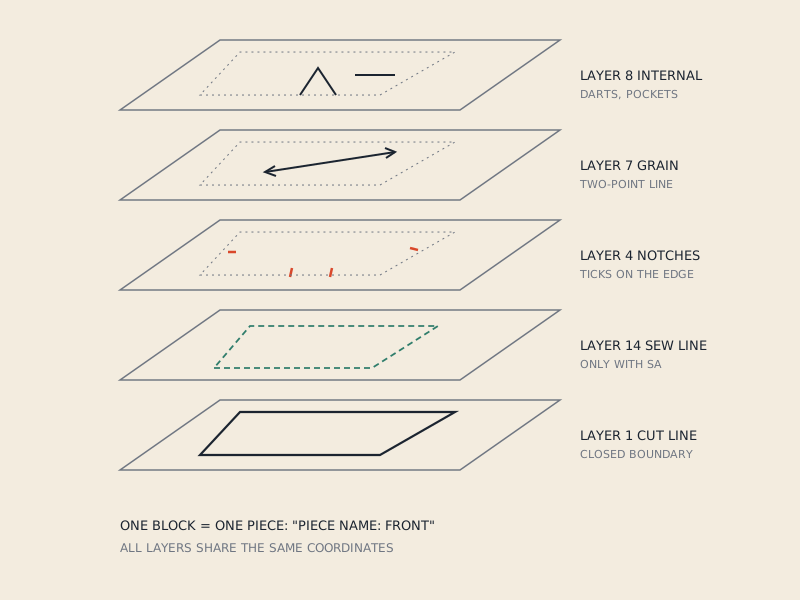
| One block per piece | One drawing per page, or everything in one space |
| Closed cut line on layer 1 | Broken segments on layer 0 |
| One size | All sizes nested |
| Notches on layer 4 | Notch ticks merged with outlines |
| Grain line on layer 7 | Arrow as several loose lines |
| Darts and placements on layer 8 | Mixed with everything else |
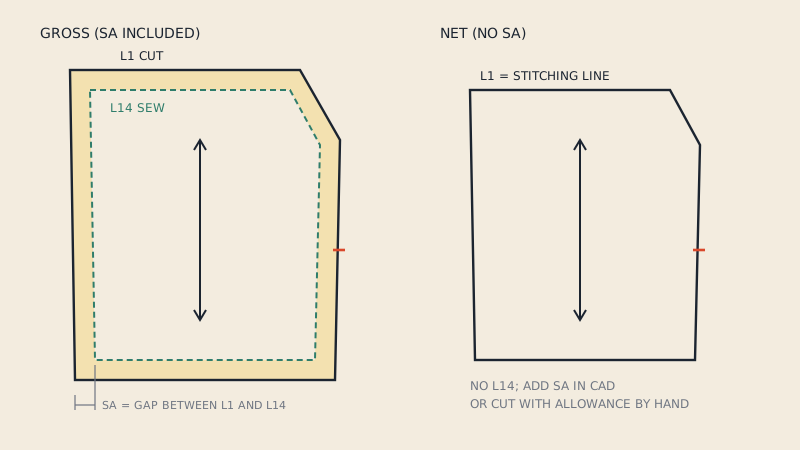
| Sew line on layer 14 if SA included | Second outline, indistinguishable from the first |
| Piece text ("Piece Name:", "Quantity:") | Letters as curves, or no text |
| Tiles assembled | Tile frames and page breaks kept |
The format behind the left column is explained in what is a DXF AAMA file.
How long the cleanup takes
Cleaning a generic conversion means, for each piece: deleting page furniture, deleting other sizes, aligning tiles, joining and closing the outline, separating notches, rebuilding the grain line, moving darts to their own layer and typing the piece name and quantity. Done carefully, it is often comparable to redrawing the piece from scratch. Done quickly, small errors creep in at tile joins and in curves, and those errors show up later as seams that do not match.
For one simple piece, such as a tote bag panel or a rectangle, generic conversion plus a few minutes of cleanup is perfectly reasonable. For a jacket with twenty pieces in eight sizes, it is not.
When a generic converter is fine
- The PDF contains a single, simple shape and you only need the outline.
- You are cutting with a laser or vinyl cutter that only needs a closed path, not pattern information.
- You are going to redraw anyway and only want an underlay at the right scale.
- The output goes into a general CAD program, not pattern or 3D software.
How to choose a converter for patterns
When you test any tool, give it a real pattern and check the output against this list:
- Does it handle your paper format? A0 sheets, large rolls and A4 / US Letter tiles are different problems. Tiles need assembling.
- Can you pick a size? The output should contain one size's lines only.
- Are pieces separated and closed? Each piece should import as one closed shape.
- Are notches and grain lines recognised? They should be on their own layers, not merged into the outline.
- Is seam allowance handled? If the pattern includes it, you should get both the cut line and the sew line on separate layers. See cut line vs sew line.
- Can you see the result before paying? A preview piece by piece saves a wasted purchase.
- Does it import into your software? Ideally the seller states which programs the file is meant for, and what happens if it does not open.
Where our converter fits
Apparel Pattern Service is built for this specific job. It reads vector PDF patterns on A0 or copy-shop sheets, large-format single sheets and A4 / US Letter tiles, assembling tiles automatically. You choose one size of a multi-size pattern and only that size is extracted. Each piece is written as its own block with the cut line on layer 1, sew line on layer 14 when there is seam allowance, notches on layer 4, grain on layer 7, internal lines on layer 8, and piece name, size and quantity as text.
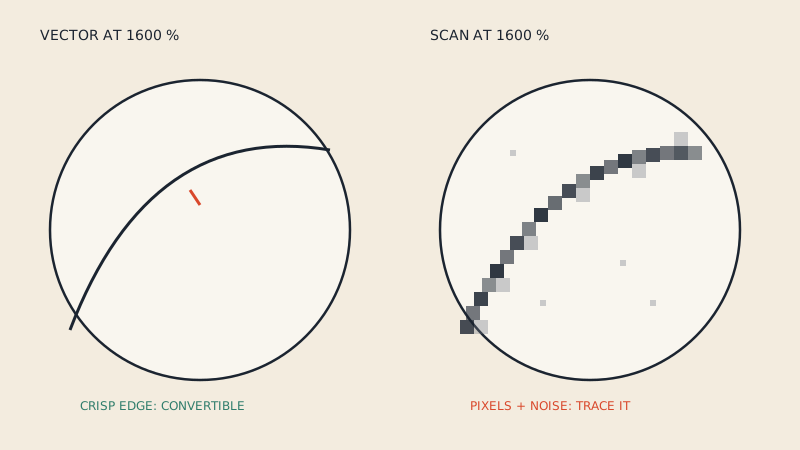
The preview of every detected piece is free; the DXF AAMA file is €15 per pattern file. It does not work on scanned or photographed patterns, which have no vector lines to read; the quick way to check yours is in is my PDF pattern vector or scanned?.
FAQ
Why does my converted DXF show all the A4 pages separately?
A generic converter copies each page as it is and does not assemble tiles. Pattern-aware converters join the tiles and remove page frames so each piece is one continuous shape.
Can I use a free PDF to DXF converter for sewing patterns?
For simple single shapes, yes, with some cleanup. For multi-piece, multi-size patterns the cleanup (joining outlines, removing sizes, separating notches and grain) usually takes as long as redrawing.
Why does my converted pattern have letters as shapes?
The converter turned text into outlines. Pattern CAD then sees each letter as small closed shapes, which can be mistaken for pieces; delete them or use a converter that writes piece names as text.
Why is my converted pattern the wrong size?
PDFs measure in points (1/72 inch), and converters translate that into millimetres, inches or unitless numbers differently. Check by measuring a known dimension, such as the test square, after import.
What is the difference between DXF and DXF AAMA output?
A plain DXF is just lines and curves. DXF AAMA organises them into one block per pattern piece with numbered layers for cut line, notches, grain and internal lines, which is what pattern and 3D software need.