In fashion, "CAD" is not one program but a chain of them. Designers use vector and textile tools to draw flats and prints; pattern makers use 2D pattern CAD to draft, grade and finish pieces; 3D software turns those pieces into virtual samples; marker and cutting software plans how fabric is cut; and PLM systems keep the data of a style together. Large companies run all of these. Small teams usually need two or three, connected by a few well-chosen file formats.
This article walks through that chain: what each kind of CAD is for, who uses it, what it produces, and where a small brand or studio sensibly begins.
The chain from idea to cut fabric
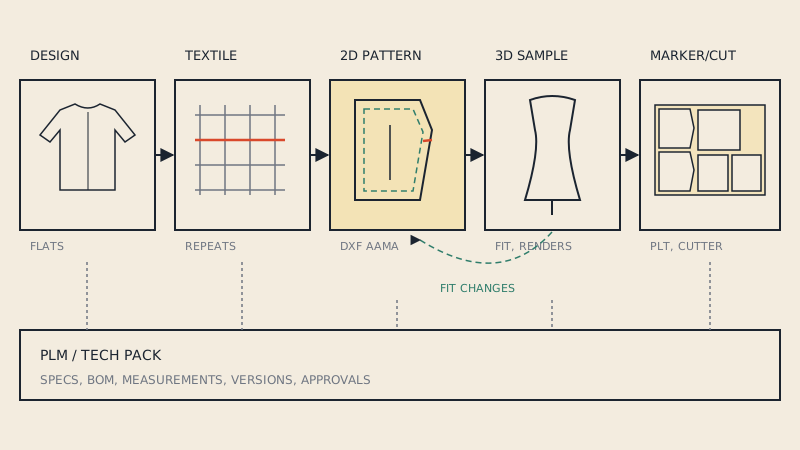
A garment's data travels through roughly six stages. Not every company has every stage, and in small teams one person often covers several.
- Design: sketches, flats (technical drawings), colourways.
- Textile and print: repeats, colour separations, yarn-dyed checks and knit structures.
- Pattern: drafting, fitting changes, seam allowance, notches, grading.
- 3D sampling: virtual fit and look, before or alongside physical samples.
- Production preparation: markers, cutting files, fabric consumption.
- Product data: specifications, bills of materials, measurements and approvals, kept in a tech pack or PLM.
Design CAD: flats and illustrations
Designers draw flats, the precise front and back line drawings that go into a tech pack, mostly in vector programs such as Adobe Illustrator, sometimes with fashion-specific add-ons or brush libraries. Flats are not patterns: they show proportions and details but have no seam allowance, no real scale and no pieces. Mixing the two up is a common cause of confusion when a designer hands "the pattern" to a factory and it turns out to be a drawing.
What design CAD produces: flats, colourway boards, artwork for prints and labels, usually as AI, PDF or PNG files.
Textile CAD
Textile designers use dedicated tools or general image editors to create print repeats, separate colours for printing, and simulate woven or knitted structures. The output goes to the mill or the printer, and increasingly into 3D software as fabric textures. For pattern makers, textile CAD matters mostly for one reason: the repeat size of a stripe or check decides how pieces must be placed in the marker.
2D pattern CAD
This is the core of technical fashion CAD and the part this blog deals with most. Pattern CAD treats a pattern as pieces: closed outlines with seam allowance, notches, grain lines, internal lines and labels. Its main jobs:
- Drafting blocks and styles, or editing digitized and imported patterns.
- Pattern engineering: truing seams, walking seam lengths, adding seam allowance with correct corners.
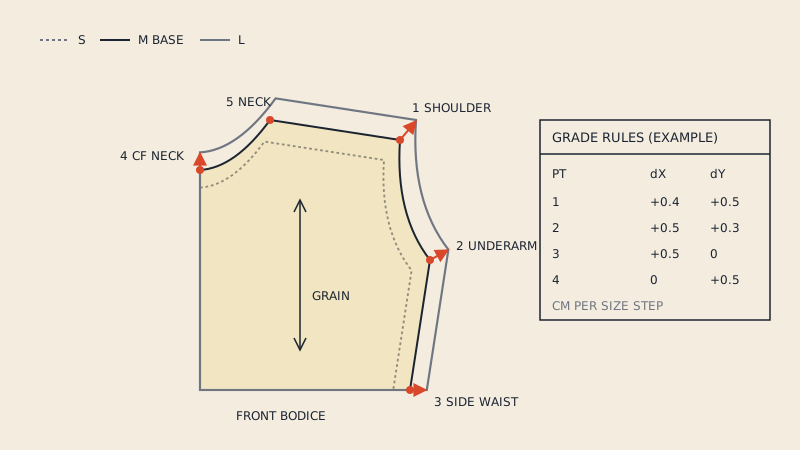
- Grading into a size range with rules; see grading by hand vs in CAD.
- Output: plotter files, print PDFs, DXF AAMA or ASTM for exchange.
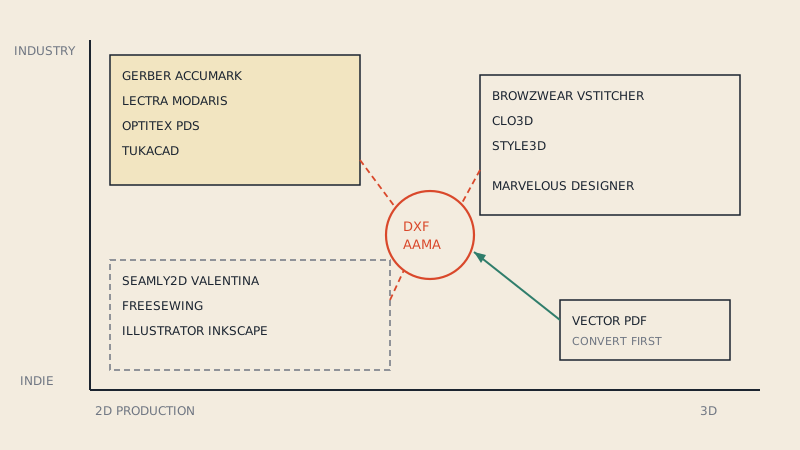
Industry systems (Gerber AccuMark, Lectra Modaris, Optitex, TUKAcad and others) dominate factories; open-source parametric programs such as Seamly2D and Valentina serve independents and made-to-measure. A criteria-based overview is in the pattern making software comparison.
3D CAD: virtual sampling
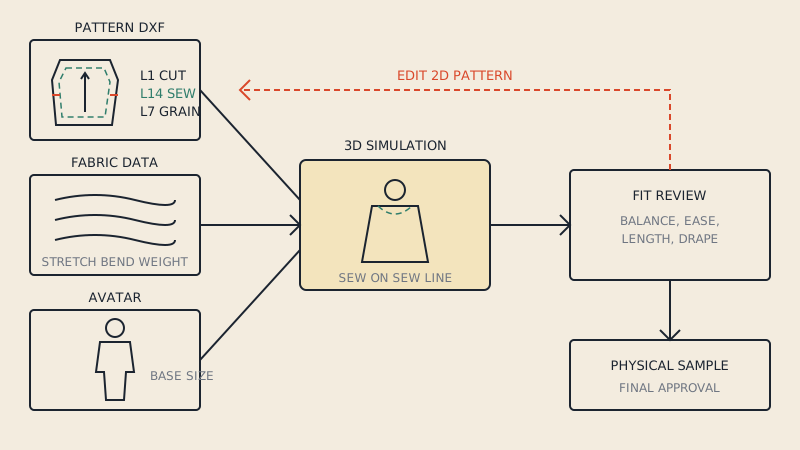
3D garment software (CLO3D, Marvelous Designer, Browzwear VStitcher and others) takes 2D pattern pieces, sews them virtually and drapes them on an avatar with fabric physics. Fashion teams use it to:
- Check fit and balance before cutting a physical sample.
- Review styles in meetings with realistic renders.
- Produce images for line sheets or e-commerce before samples exist.
- Communicate fit comments to the factory visually.
3D software needs accurate 2D patterns, which usually arrive as DXF AAMA files from pattern CAD. If you are starting out, 3D sampling for small brands explains what you need, and importing DXF into CLO3D covers the most common first step.
Production CAD: markers and cutting
Before fabric is cut in quantity, the pieces of all sizes in an order are nested into markers that use the fabric efficiently while respecting grain, nap and pattern matching. Marker CAD calculates fabric consumption, which feeds back into costing. The marker then goes to a plotter as a paper guide or straight to an automatic cutter. The marker making basics and marker making software articles cover this stage.
PLM and the tech pack
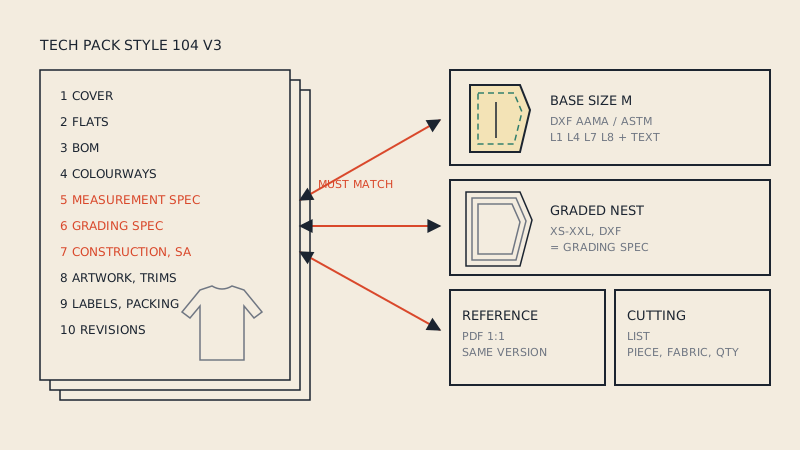
Product lifecycle management (PLM) systems store everything about a style in one place: flats, bill of materials, measurement specs, grading, supplier comments, approvals and versions. PLM is not a drawing tool; it is the record that links the outputs of the others. Small brands get the same benefit, at small scale, from a well-organized tech pack and a consistent folder structure. What goes into one, and which pattern files belong with it, is the subject of tech packs and pattern files.
Who uses what
| Role | Main CAD | Typical outputs | Files they pass on |
|---|---|---|---|
| Designer | Vector design tools | Flats, colourways, artwork | AI, PDF |
| Textile designer | Textile and image tools | Repeats, separations, textures | TIFF, PNG, mill formats |
| Pattern maker | 2D pattern CAD | Pieces, seam allowance, notches | DXF AAMA/ASTM, native CAD, PDF |
| Grader | 2D pattern CAD | Graded nest | DXF AAMA/ASTM |
| 3D designer | 3D garment software | Virtual samples, renders | Native 3D, images, DXF back to 2D |
| Marker maker | Marker CAD | Markers, consumption | PLT/HPGL, cutter files, PDF |
| Technical designer / product developer | PLM or tech pack tools | Specs, BOM, measurement charts | PDF, spreadsheets, PLM records |
The column that matters most for collaboration is the last one. The formats people pass between roles decide how much gets lost on the way. DXF AAMA is the common language between pattern CAD, 3D and production precisely because it carries pieces with their layers; see what is DXF AAMA.
Where small teams start
A two-person brand cannot run six systems and does not need to. A sensible order:
- Flats in a vector program. You need them for any factory conversation.
- A digital pattern master. Either learn a 2D pattern tool, work with a freelance pattern maker who delivers DXF AAMA, or convert existing vector PDF patterns that you have the right to use.
- A tech pack template. A structured PDF or spreadsheet replaces PLM for a long time.
- 3D when samples become the bottleneck. If you spend more on sampling rounds than on a software subscription, 3D starts to pay.
- Markers last. Most factories make their own markers from your patterns.
The common failure is the reverse order: buying 3D software first, then discovering that there are no clean 2D patterns to put into it.
When your patterns are PDFs
Many small teams already have their patterns as vector PDFs, exported from a pattern maker's program or bought for use in their own production. Those PDFs print well but do not open as pieces in pattern CAD or 3D. A pattern-aware conversion bridges that gap; our converter turns vector PDF patterns into DXF AAMA with cut line, grain line, notches and piece names, which is the input both 3D software and factories expect.
What CAD does not replace
- Fitting on real bodies. 3D is good at catching balance and proportion problems; fabric behaviour and comfort still need sewn samples.
- Pattern knowledge. CAD makes changes fast; it does not know whether a change is right.
- Communication. A clean file with no notes still leaves the factory guessing. Label pieces, sizes and quantities, and say whether seam allowance is included.
FAQ
What is CAD used for in fashion?
CAD is used for flats and illustrations, textile and print design, 2D pattern making and grading, 3D virtual sampling, and marker making for cutting. PLM systems link the data from all of these for each style.
Is CAD in fashion the same as 3D design?
No. 3D garment software is one part of fashion CAD. Most technical work still happens in 2D pattern CAD, and 3D tools depend on accurate 2D patterns as input.
Which fashion CAD should a small brand learn first?
Start with a vector program for flats and a reliable way to get digital pattern files, either 2D pattern CAD or a pattern maker who delivers DXF AAMA. Add 3D once sampling costs justify it.
What file format connects pattern CAD, 3D software and factories?
DXF AAMA or ASTM is the common exchange format. It stores each pattern piece with layers for cut line, grain line, notches and internal lines, plus piece text.
Do I need PLM software as a small brand?
Usually not at first. A consistent tech pack template and an organized folder of pattern files cover the same needs until you manage many styles, suppliers and versions at once.