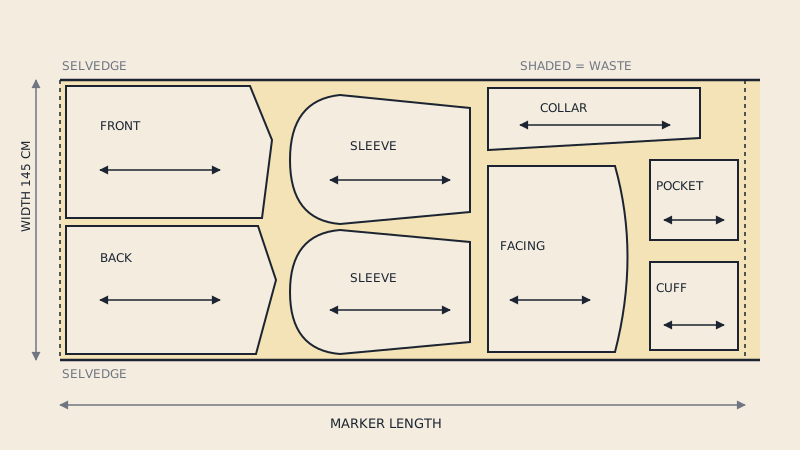
Marker making software arranges digital pattern pieces on a rectangle the width of your fabric and calculates the length and fabric use. It comes in two flavours: interactive tools, where you drag pieces into place with the software checking overlaps and grain, and automatic nesting, where the program tries many arrangements and keeps the shortest. For a small studio, the real question is less which brand to buy and more whether your pattern files are ready for any of them, and whether you make enough markers to justify the software at all.
If you are new to markers themselves (width, efficiency, nap, plaids, size ratios), start with marker making basics. This article is about the tools.
What marker software actually does
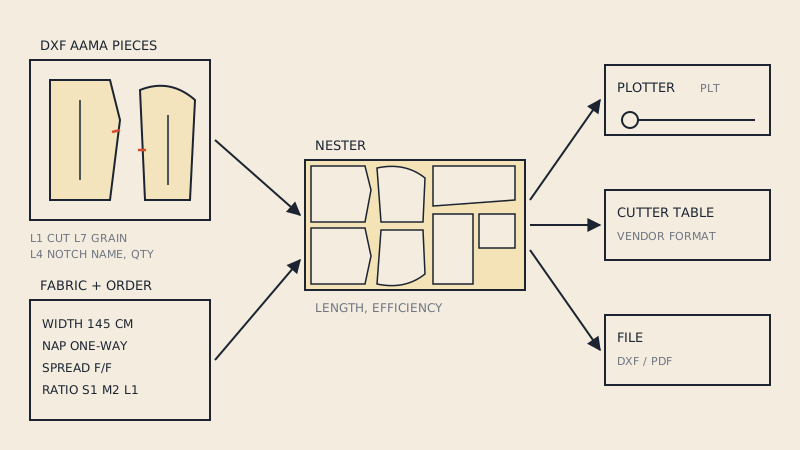
Every marker program, from industry CAD to a free nesting utility, performs the same jobs:
- Imports pieces with their outlines, grain lines and quantities.
- Applies fabric rules: usable width, allowed rotations, nap, flipping (face down) allowed or not.
- Places pieces, either under your control or automatically.
- Checks for overlaps, minimum gaps, pieces off the fabric and missing pieces.
- Reports marker length, efficiency and often fabric consumption per garment.
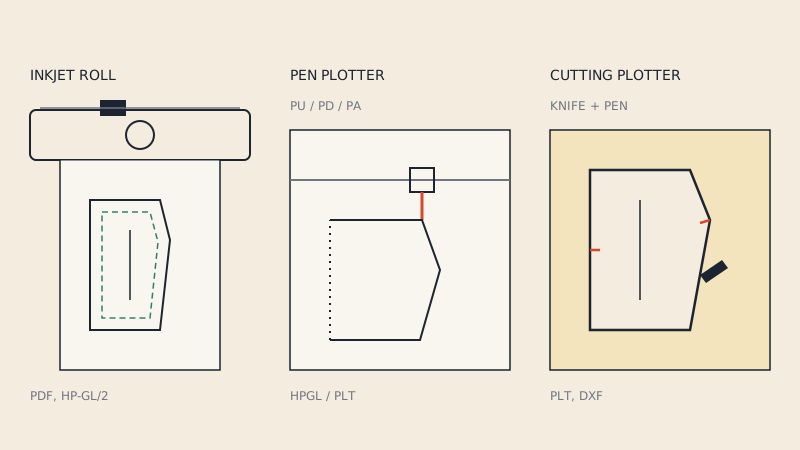
- Outputs the marker to a plotter (paper marker), a cutting table, or a file such as PLT/HPGL, DXF or PDF.
The difference between tools lies in how well they do steps 2, 3 and 6, and in how they fit into the rest of a CAD system.
Interactive vs automatic nesting
Interactive placement
You pick pieces from a list or a "menu bar" of unplaced pieces and drop them on the marker. The software snaps them against the selvedge or neighbouring pieces, keeps rotation within the fabric rules, and warns on overlap. An experienced marker maker can get very good results this way, because they see opportunities a program may miss: a small piece fitted into the hollow of a neckline, a pair of sleeves turned to interlock.
Automatic nesting
The program tries many placements and returns the best one it finds within a time limit. Industrial systems usually let you run the nester longer for a better result, or run several markers in parallel. Automatic nesting saves time on large orders with many sizes; it is not always better than a skilled person, and many teams use it to get a first layout that they then improve by hand.
Which you need
- Samples and small runs: interactive placement is enough, and is often faster than setting up nesting rules.
- Repeated styles, many sizes, fabric costing for quotes: automatic nesting earns its keep.
- Laser or CNC cutting of flat shapes (accessories, leather goods, felt): general-purpose nesting tools work, as long as you handle grain and pairs yourself.
The types of software available
Below is an overview by category. Features and licensing change with each release, so check the vendor's current material; we do not quote prices.
| Category | Examples | Strengths | Limits for a small studio |
|---|---|---|---|
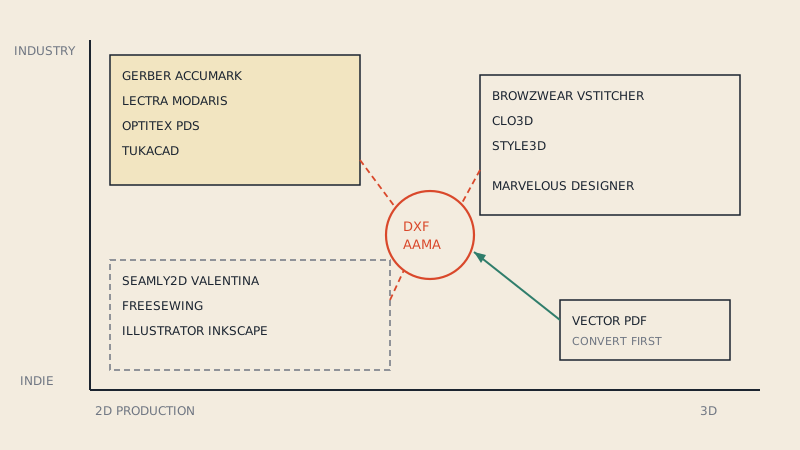
| Industry apparel CAD marker modules | Gerber AccuMark marker making and AccuNest, Lectra Diamino, Optitex Marker, Tukatech TUKAmark (with SMARTmark for automatic nesting) | Apparel rules (nap, plaids, size ratios, pairs), cutter and plotter output, links to the pattern module | Licensing cost, training, usually tied to that vendor's pattern system |
| Pattern CAD with layout tools | Seamly2D and Valentina layout mode, other indie pattern programs | Free or low cost, arrange pieces on sheets or rolls for printing | Built for print layouts, limited apparel marker rules |
| General nesting tools | Deepnest (open source, DXF and SVG input), nesting modules of laser and CNC software | Good automatic nesting of flat shapes | No grain, nap or size-ratio logic; pairs and orientation must be prepared by hand |
| Marker service bureaus | Freelance marker makers, CAD service companies, factories | No software to buy | Per-job cost, turnaround, you depend on someone else for every change |
A few notes on the categories:
- Industry CAD is the only category that understands apparel-specific constraints natively. If you work with a factory, ask which system they use before you buy anything; often the factory makes the markers itself from your pattern files.
- Pattern CAD layout tools are excellent for what they are designed to do, laying out pieces on paper for printing, but they are not production marker systems. The Seamly2D and Valentina DXF guide covers their export side.
- General nesting tools are worth knowing for studios cutting with a laser, where a nested DXF goes straight to the machine. Deepnest's original repository notes that it is no longer maintained, though forks exist; test your own files before relying on any of them.
Inputs: what the software needs from your pattern files
Whatever you choose, marker quality starts with the pieces. Marker programs need:
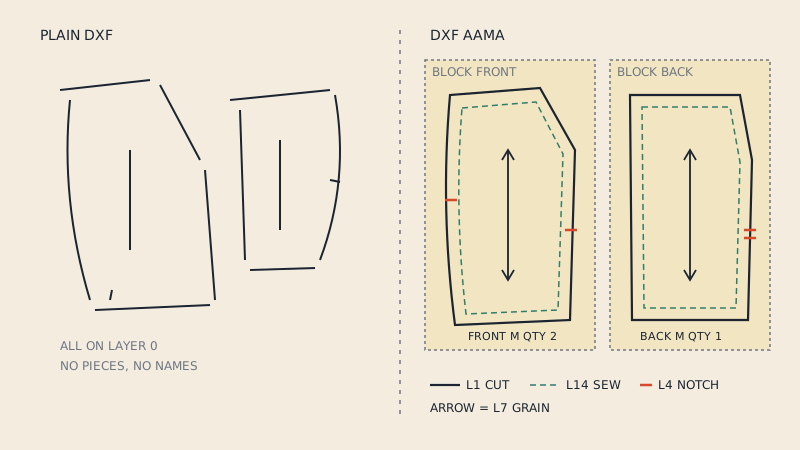
- Closed cut lines. An open outline cannot be nested, and some programs silently skip it.
- The right line as the outline. If the pattern includes seam allowance, the outline must be the cut line (layer 1 in DXF AAMA), not the sew line.
- Grain lines, so the program knows how each piece may rotate. In DXF AAMA this is layer 7.
- Piece names and quantities, so the marker contains "Sleeve x 2" and not one sleeve.
- Mirror lines for pieces cut on the fold, if the program should open them.
- Correct units. A pattern imported 25.4 times too large gives a nonsense marker; see DXF units.
DXF AAMA or ASTM is the common exchange format because it carries all of this in a predictable structure: each piece as a block, with layers for cut line, grain, notches and internal lines, plus annotation text for name and quantity. The what is DXF AAMA article explains the structure.
If your patterns are PDFs
Many small studios have their patterns only as vector PDFs: their own exported files, or patterns licensed for production. Marker software cannot nest a PDF page; it needs pieces. A pattern-aware conversion turns each piece into a closed outline with grain line, notches and name. Our PDF to DXF converter does this for vector PDFs, one size per file, with a free preview of the detected pieces before you pay. It does not make markers; it produces the DXF that marker software can import.
Outputs: getting the marker out
Check that the software can produce what your next step needs:
- Plotter output for paper markers: commonly HPGL/PLT, or a driver for an inkjet roll plotter. See PLT/HPGL pattern files for what that format does and does not contain.
- Cutter output for automatic cutting tables, in the cutter vendor's format.
- DXF for laser cutters or for sending the nested layout to another system.
- PDF for a printed reference or for a copy shop with a wide-format printer.
- Reports: marker length, efficiency and consumption per garment, which you need for costing.
If you only need a paper marker occasionally, you can lay out the pieces once, export a 1:1 PDF and have it printed on a roll at a copy shop. The pattern plotter guide describes the hardware side.
A sensible path for a small studio
- Start by hand. For samples, lay paper patterns on the fabric. Record fabric use per style.
- Get your patterns digital. Whatever comes next, you will need clean DXF files.
- Ask your factory. If they make markers, send them good pattern files and fabric data instead of buying a marker system.
- Try free tools for print layouts and laser work. Pattern CAD layout modes and general nesting tools are free to test.
- Buy into industry CAD when volume demands it: many styles, many sizes, in-house cutting, costing that depends on accurate consumption.
The broader pattern making software comparison is useful when that last step comes, since the marker module is usually bought together with the pattern system.
Common mistakes with marker software
- Nesting without grain constraints in a general-purpose tool, then cutting pieces off grain.
- Forgetting pairs: a left front placed twice instead of a left and a right in single-ply cutting.
- Using the wrong width: the fabric's nominal width instead of the measured usable width.
- Nesting the sew line of a pattern that should be cut with seam allowance.
- No gap between pieces, so the cutting knife nicks neighbours.
- Trusting efficiency figures across different styles: a trouser marker and a jacket marker are not comparable.
FAQ
What is marker making software?
It is software that arranges digital pattern pieces on a rectangle the width of the fabric, following grain, nap and quantity rules, and reports the marker length and fabric efficiency. It outputs the marker to a plotter, a cutter or a file.
Is there free marker making software?
There are free tools that nest flat shapes, such as the open-source Deepnest, and free pattern programs with layout modes. They lack apparel rules such as nap, size ratios and plaid matching, so you must handle those by hand.
What file format do marker programs import?
Apparel marker modules commonly import DXF AAMA or ASTM, or the vendor's own pattern format. General nesting tools usually take DXF or SVG.
Is automatic nesting better than manual marker making?
Automatic nesting is faster for large orders with many sizes, and can run several markers at once. An experienced marker maker often still improves an automatic result, which is why many teams combine both.
Do I need marker software if a factory cuts my garments?
Usually not. Most factories make their own markers from your pattern files, so the priority is sending clean DXF AAMA patterns with grain lines, piece names and quantities, plus the fabric width and nap information.