If your goal is a real garment that will be cut and sewn, choose CLO3D. If your goal is a digital garment for animation, games or renders, choose Marvelous Designer. Both come from the same company and share the same core cloth simulation, but CLO adds the production tools (pattern documentation, grading, tech packs, production-oriented pattern export) that garment work depends on, while Marvelous Designer focuses on what 3D artists need.
That is the short answer. The longer one depends on what you do with patterns, so this article compares the two by criteria rather than by a verdict.
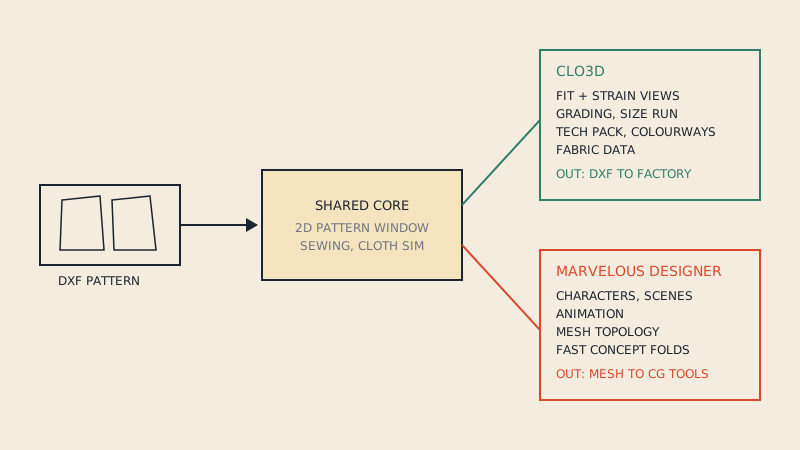
Same core, different audiences
CLO Virtual Fashion develops both programs. Its own support pages describe the core technology as the same, with Marvelous Designer used mainly in the CG, animation and gaming industries and CLO in fashion. In practice the 2D pattern window, the sewing tools and the simulation will feel familiar if you switch from one to the other.
The difference is what each one wraps around that core:
- CLO3D wraps it in a fashion workflow: realistic fabric data, trims and hardware, colourways, measurement and fit tools, tech pack output, and pattern exchange with 2D production CAD.
- Marvelous Designer wraps it in a CG workflow: getting clothing onto characters, animation and simulation for scenes, and exporting meshes that behave well in other 3D software.
Comparison by criteria
| Criterion | CLO3D | Marvelous Designer |
|---|---|---|
| Main audience | Fashion designers, pattern makers, brands, manufacturers | 3D artists in games, film, animation |
| DXF pattern import | Yes, AAMA/ASTM | Yes, AAMA/ASTM |
| Pattern output for production | Designed for it: DXF for pattern CAD | Not its focus |
| Grading across a size run | Built in | Not built for size runs |
| Tech pack / specification output | Yes | No |
| Fabric realism | Fabric library and measured fabric data for real materials | Focus on visual behaviour in scenes |
| Mesh export for game/film pipelines | Available, not the focus | Core feature, with topology tools aimed at CG |
| Animation | Basic, for presentation | Core feature |
| Licensing | Subscription, with options for individuals, teams and education | Subscription, with options for individuals and studios |
Feature sets change between versions, so check the current release notes for anything your decision depends on. The table above is about where each product puts its weight, which has stayed stable for years.
Pattern accuracy: what matters if you sew
Both programs simulate a pattern you give them. The pattern itself is only as accurate as what you import or draft. Where they differ is what happens around that pattern.
Importing real patterns
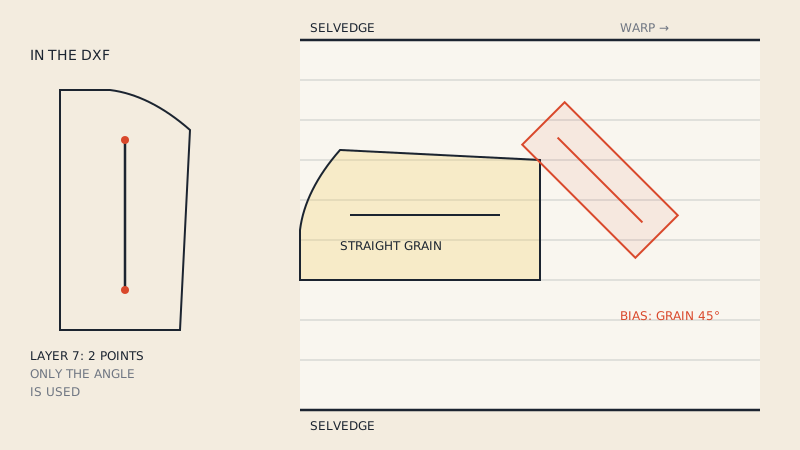
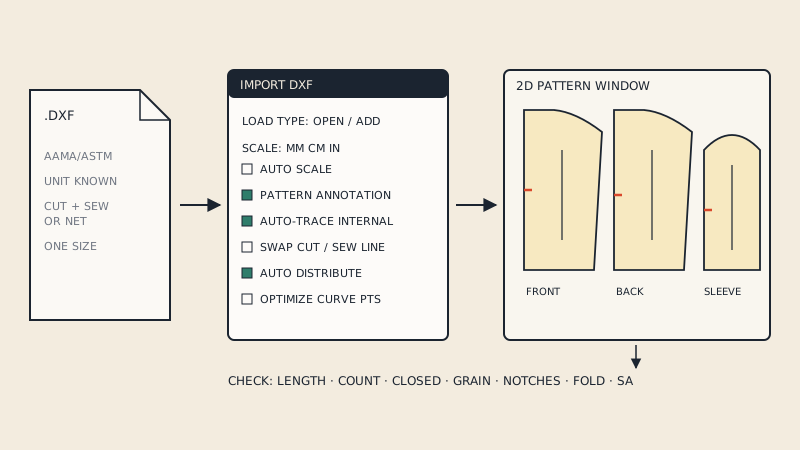
Both import DXF AAMA/ASTM, so a pattern from 2D CAD or a converted PDF pattern can go into either. The import flow for each is covered separately: importing a DXF into CLO3D and importing a DXF into Marvelous Designer. In both, piece text, grain lines and notches help: the grain line sets fabric direction, and notches make sewing faster and more accurate. Why the grain layer matters so much for drape is explained in grain lines in DXF patterns.
Measurement and fit
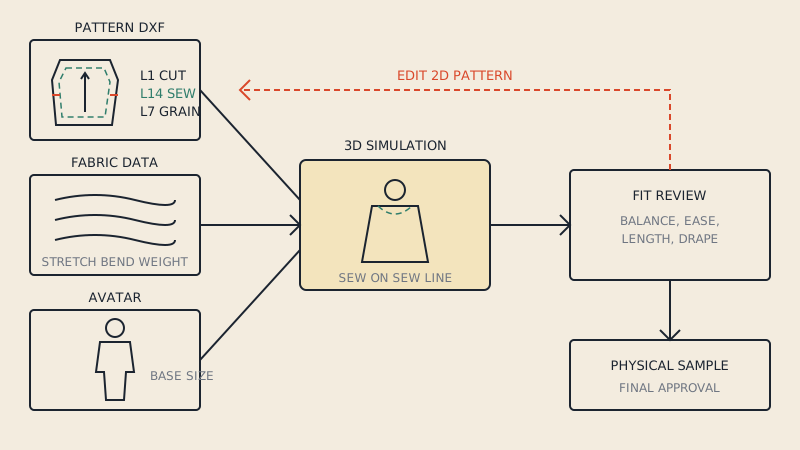
For garment work, you need to measure the pattern and the avatar, compare seam lengths, and read where the garment is tight. CLO is built around that workflow, including fit and strain views and avatar measurements meant to match real size charts. Marvelous Designer can show you how cloth behaves, but it is not built to answer "will this fit a size 12 customer".
Getting the pattern back out
This is the decisive point for most sewists and brands. After editing a pattern in 3D you want the changes back in your pattern, either as a DXF your pattern CAD or factory can use or as a printable pattern. CLO treats that round trip as a core feature. In Marvelous Designer the 2D pattern is mostly a means to a 3D mesh.
When Marvelous Designer is the right choice
Marvelous Designer is not a "lite" CLO. It is the better tool when the output is a 3D asset:
- clothing for game characters, where mesh topology and polygon budget matter more than seam allowance;
- costumes for film and animation, where the garment must move convincingly in a scene;
- concept art and illustration, where you need believable folds quickly;
- 3D artists who sew as a hobby and already work in a CG pipeline.
If you work in those areas, using a real sewing pattern as the starting point in Marvelous Designer is still a good idea: real patterns produce real-looking folds. You just won't send the result to a factory.
When CLO3D is the right choice
CLO3D fits when the 3D garment represents something that will exist:
- small brands replacing some physical samples with virtual ones (see 3D sampling for small brands);
- pattern makers testing fit changes before cutting a toile;
- designers who need tech packs and colourways along with the 3D sample;
- anyone who must send patterns to a manufacturer after editing them.
Licensing in general terms
Both are sold mainly as subscriptions, with different plans for individuals, teams or studios, and educational arrangements. Prices and plan details change and differ by region, so check the official sites before budgeting. Two practical points:
- try before you commit; CLO has offered free trials, and it is worth confirming what the current trial includes;
- if you are a student, ask your school; educational licensing is common for fashion programs.
Switching between them
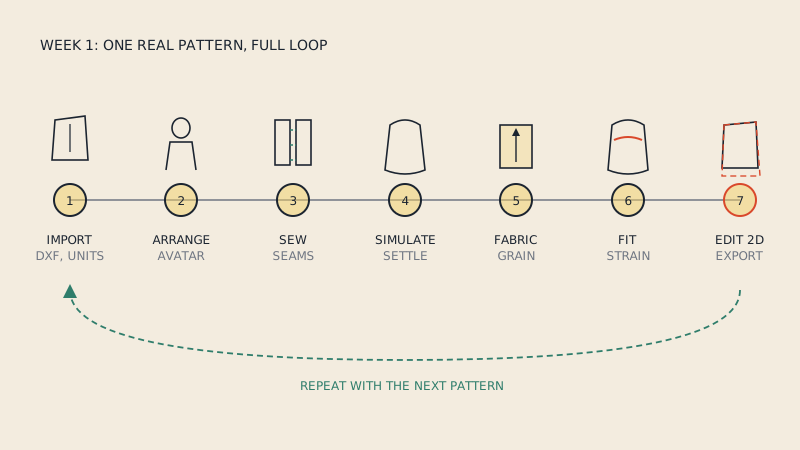
Because the core is shared, skills transfer well. Arranging pieces, sewing seams and reading a simulation work much the same way in both, so a 3D artist moving into garment work, or a pattern maker moving into CG, does not start from zero. The new learning is in the surrounding tools: production documentation and fit in CLO, animation and mesh preparation in Marvelous Designer. If you are new to both, the learning path in CLO3D for beginners applies to either.
Where both fit in a bigger toolset
Neither replaces 2D pattern CAD entirely for production at scale, and neither replaces sewing a physical sample for a new fabric or a new block. They sit between drafting and sampling. For the wider landscape, including 2D industry systems and free tools, see pattern making software compared.
Whichever you choose, you need patterns in DXF to start from something real. If your patterns are vector PDFs, converting them to DXF AAMA gets them into either program with grain lines, notches and piece names intact.
FAQ
Is CLO3D the same as Marvelous Designer?
They are made by the same company and share the same core cloth simulation. CLO3D is aimed at fashion design and production, while Marvelous Designer is aimed at CG, games and animation.
Can I use Marvelous Designer for sewing patterns?
You can import and simulate sewing patterns in Marvelous Designer, and real patterns give realistic folds. It is not built for grading, tech packs or sending patterns to production, so CLO3D suits garment work better.
Do both CLO3D and Marvelous Designer import DXF patterns?
Yes, both import DXF AAMA/ASTM pattern files. Grain lines, notches and piece names in the DXF make arrangement and sewing easier in either program.
Which is better for fashion design students?
For fashion design and pattern making, CLO3D is the more relevant tool because it covers fit, fabrics, grading and tech packs. Ask your school about educational licences before buying.
Which is better for game or film characters?
Marvelous Designer is built for that work, with a focus on animation, scene simulation and exporting meshes into CG pipelines.