If you want to print a pattern, project it onto fabric or trace it onto paper, you need a PDF. If you want to open the pattern in pattern CAD, sew it on an avatar in CLO3D, grade it, make a marker or send it to an automatic cutter, you need a DXF, ideally DXF AAMA. Many people end up needing both, and each can be produced from the other.
The difference is not quality or accuracy. Both formats can hold the same lines at the same true size. The difference is what the file knows about those lines.
What each file actually contains
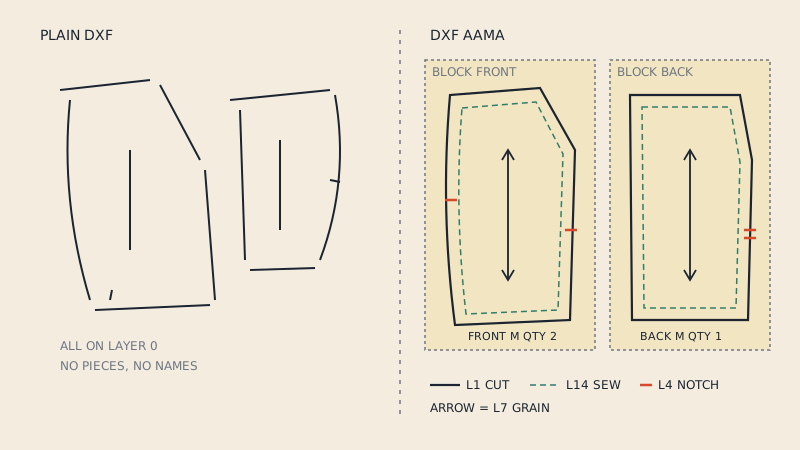
A PDF pattern is a page description. It says "draw this curve here, this text there, on a sheet of this size". It does not know that one closed curve is a sleeve and another is the seam allowance of a cuff. A PDF is built for a printer and for human eyes.
A DXF AAMA pattern is a set of pieces. Each piece is a separate block with its outline, its notches, its grain line and its name stored on agreed layers. Software can read it and know "this is the back, cut 2, grain runs this way". If you want the full anatomy, see what a DXF AAMA file is.
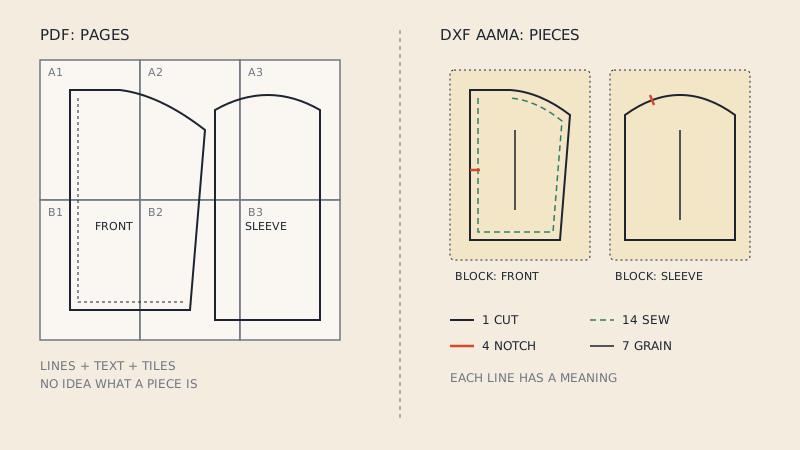
Side by side
| PDF pattern | DXF AAMA pattern | |
|---|---|---|
| Made for | Printing, projecting, reading | Pattern CAD, 3D, markers, cutters |
| Opens in | Any PDF reader, browser, copy shop software | Pattern CAD, CLO3D, Marvelous Designer, general CAD |
| Structure | Pages with drawings and text | One block per piece, layers by meaning |
| Scale | True size when printed at 100 % | True size when imported with the right unit |
| Multiple sizes | Usually nested, often on PDF layers | Usually one size per file, or a graded set |
| Instructions, cutting layouts | Often included | Not included |
| Tiles, page numbers, match marks | Yes, for print-at-home files | No |
| Editable as a pattern | No (only as a drawing) | Yes |
| Typical buyer | Home sewist | Pattern maker, 3D designer, brand, factory |
When a PDF is the right file
Choose a PDF when the end of the line is paper or fabric on a table:
- Printing at home on A4 or US Letter and taping the tiles.
- Copy shop printing on A0 (841 × 1189 mm) or a 36" (91 cm) roll.
- Projector sewing, where a projector file draws the lines straight onto the fabric.
- Tracing onto pattern paper so you can alter and keep the original.
The PDF is also the human reference. Even a factory that cuts from DXF likes a PDF of the pattern and the tech pack to look at. Printing well is its own skill; our guide to printing PDF sewing patterns covers home, copy shop and projector routes.
When a DXF is the right file
Choose a DXF when software has to understand the pieces:
- 3D sampling. CLO3D, Marvelous Designer and Browzwear build garments from pieces, so they need closed outlines and ideally grain lines and notches. A PDF cannot be sewn on an avatar.
- Pattern CAD. Altering, truing seams, adding seam allowance, grading and walking seams in Gerber, Lectra, Optitex, TUKAcad and similar programs starts from a DXF AAMA import.
- Markers and cutting. Nesting pieces on fabric width and sending them to an automatic cutter needs pieces with grain constraints, not page tiles.
- Handing over to a factory that works in CAD. Many will ask for DXF AAMA plus a PDF reference.
When you need both
The most common real situation is two audiences for one pattern:
- A small brand develops a style in CLO3D (DXF) and also sells it as a home-sewing pattern (PDF).
- A pattern maker digitises a style for a factory (DXF) and prints a paper pattern for the sample room (PDF).
- A home sewist bought a PDF, wants to try it in 3D first (DXF), then prints it (PDF) once the fit looks right.
In each case one file is the master and the other is produced from it. Keeping them in sync is easier if you always change the master and re-generate the other, rather than editing both.
Converting between them
PDF to DXF
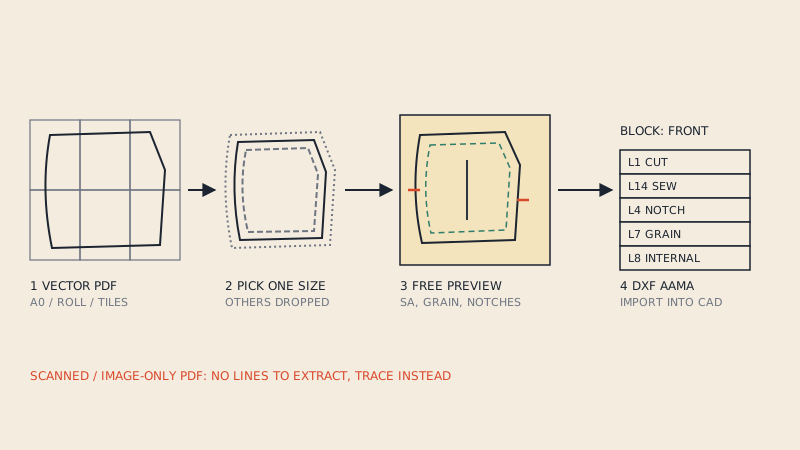
A vector PDF holds exact lines, so it can become a DXF without redrawing. The hard part is structure: separating pieces from page tiles, text and other sizes, closing outlines, and putting notches and grain lines on the right layers. Generic PDF-to-DXF tools usually skip that part and give you loose lines; this article explains why. The full process is in how to convert a PDF sewing pattern to DXF.
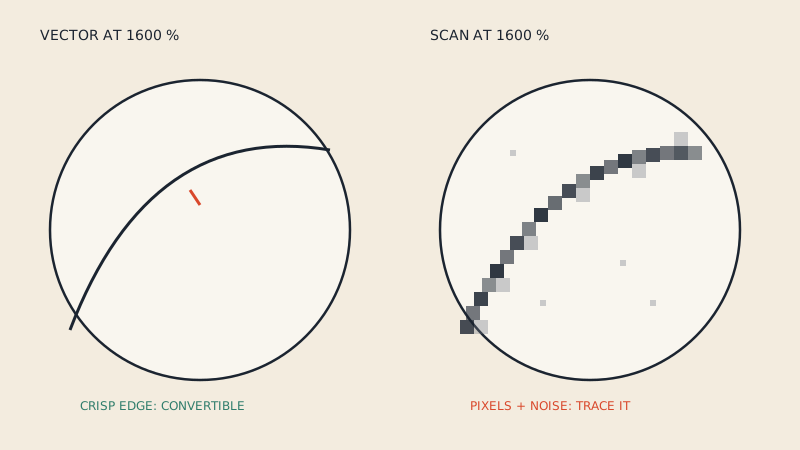
Before you start, check that the PDF is vector at all. A scanned or photographed pattern is an image and needs digitising, not converting. The 30-second vector check tells you which you have.
DXF to PDF
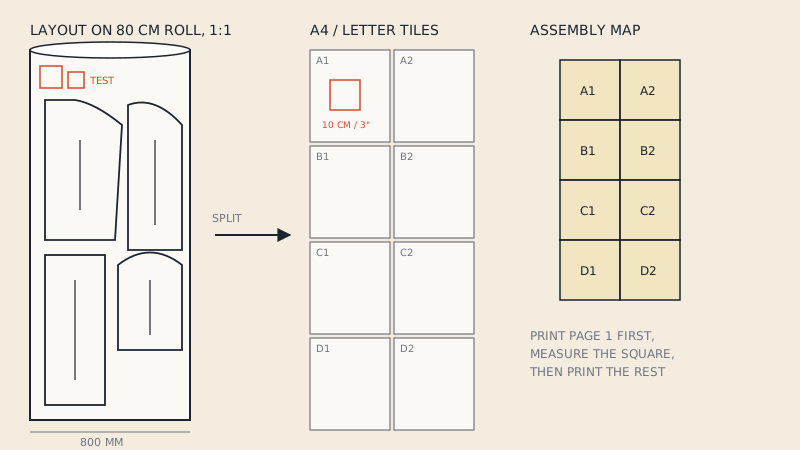
Going the other way is about layout: the pieces have to be placed on a sheet or a roll at 1:1, then split into printable formats with test squares and an assembly map. That is covered in how to print a DXF pattern.
Our converter does both directions for patterns you own: a vector PDF to DXF AAMA (€15 per pattern file, with a free preview of every detected piece), and print files from a PDF or a DXF (€5 for one-page, A0 to A4 and US Letter formats).
What you lose and keep in each direction
| Information | PDF → DXF | DXF → PDF |
|---|---|---|
| Cut line, sew line | Kept, if vector and distinguishable | Kept |
| Notches | Kept if drawn as recognisable marks | Kept as drawn marks |
| Grain line | Kept, moved to layer 7 | Kept as an arrow |
| Piece name, size, quantity | Read from the piece labels | Printed as text |
| Other sizes | Usually one chosen size | Only sizes in the DXF |
| Instructions, fabric layouts | Not part of a DXF | Not created |
| Tiles, page numbers | Removed | New tiles and map created |
A quick way to decide
Ask what the next tool in your workflow is.
- A printer, plotter, projector or tracing table: PDF.
- Pattern CAD, a 3D program, nesting software or a cutter: DXF AAMA.
- Both, now or later: keep the DXF as the editable master if you work in CAD, or the PDF if you only sew, and generate the other when needed.
If someone sends you a DXF and you only want to sew, you do not need CAD; you need it laid out for printing. If someone sends you a PDF and you want to fit it in 3D, you do not need to redraw it; you need it converted.
FAQ
Is DXF more accurate than PDF for sewing patterns?
Not inherently. A vector PDF made for 1:1 printing and a DXF of the same pattern hold the same dimensions. DXF is more useful for software because it knows which lines form which piece, not because its lines are more precise.
Can I print a DXF pattern directly?
Most home printers and copy shops print PDFs, not DXFs. You need to lay the DXF pieces out at 1:1 and save that layout as a PDF, either from CAD or with a conversion service, before printing.
Can CLO3D open a PDF sewing pattern?
Not as ready-made pattern pieces in the usual sense. 3D programs build garments from closed pieces, which a DXF AAMA file provides; a PDF pattern with tiles, text and nested sizes needs converting first.
Which file should a pattern designer sell?
Home sewists expect PDFs (A4, US Letter, A0 and often a projector file). Pattern makers, 3D designers and small brands increasingly ask for DXF AAMA as well. Offering both covers both audiences.
Do I need DXF if I only sew at home?
No. A PDF printed at 100 % is all you need for home sewing. DXF becomes useful only if you want to edit the pattern in CAD, try it in 3D software or use a cutter.