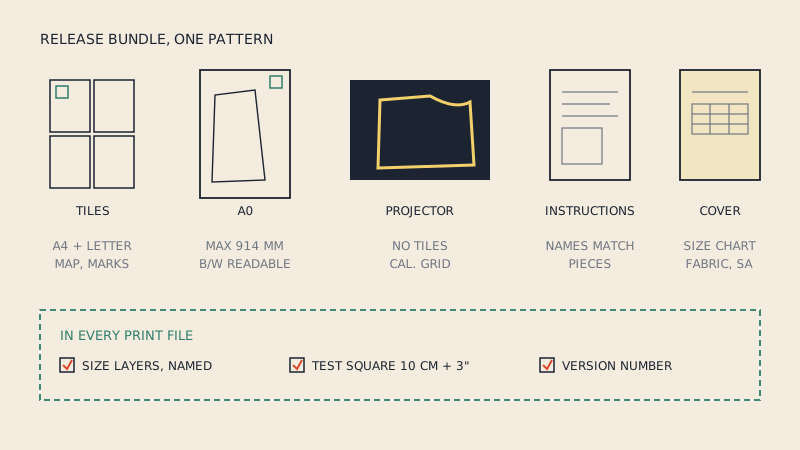
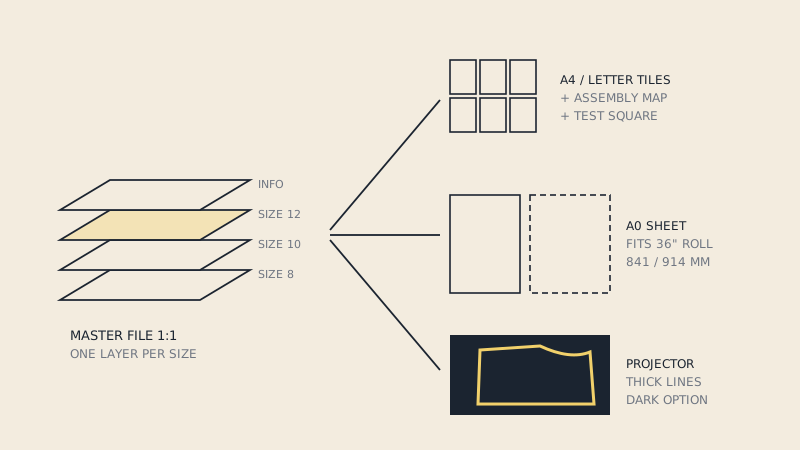
To make a PDF sewing pattern to sell, start from a tested, graded pattern, build one vector master file at 1:1 with each size on its own layer, and produce three outputs from it: print-at-home tiles that work on both A4 and US Letter, a large-format sheet for A0 or a 36" roll, and a projector file. Every print file gets a test square and the tiled file gets an assembly map. The instructions booklet is a separate document.
This guide covers the production of the files. What buyers expect to find in the finished bundle, as a checklist to run before release, is in the PDF pattern file checklist for indie designers.
Step 1: a pattern worth digitizing
The PDF is a container. If the pattern inside has unmatched seams or missing notches, a beautiful file won't save it. Before any layout work:
- Draft and sew a sample, then correct the pattern.
- Grade the size range and sew at least one size at each end of it.
- Walk the seams in every size and check notch counts.
- Decide seam allowance: included (most PDF patterns today) or not, and the width per seam.
Get the pattern into vector form at this stage. If you draft in pattern CAD, export from there. If you draft on paper, digitize carefully, because every error is now copied into every sale.
Step 2: build one master file
Work at 1:1 in millimetres (or inches, but pick one) in a vector program or CAD. The master holds every piece in every size, all labels and all markings. All print outputs are made from it, so a correction made once reaches every format.
A practical structure for the master:
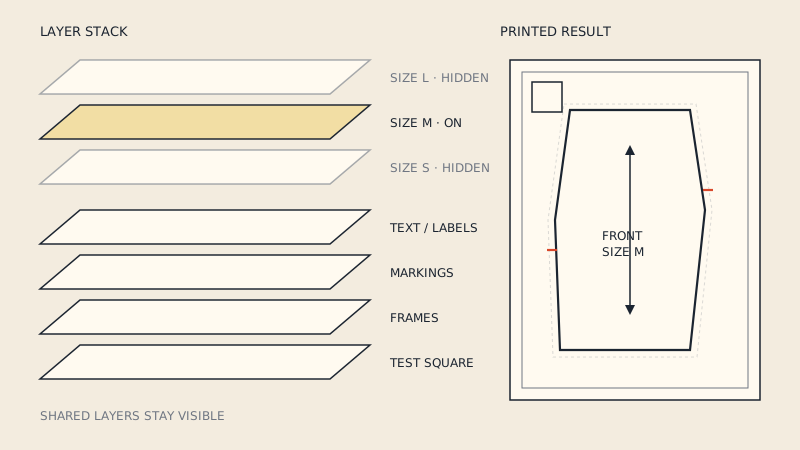
| Layer | Contents |
|---|---|
| One layer per size | Cut lines, notches and size-specific markings for that size |
| Common markings | Grain lines, fold lines and labels shared by all sizes |
| Info | Piece names, cut quantities, pattern name, version |
| Page furniture | Test square, tile grid, page numbers, match marks (print files only) |
Give each size a distinct line style as well as its own layer. Not every buyer's reader shows layers, and colour alone fails on a black-and-white printer, so combine colour with dash patterns. How buyers use the layers to print a single size is explained in PDF pattern layers; your job is to name them clearly ("Size 12", not "Layer 7").
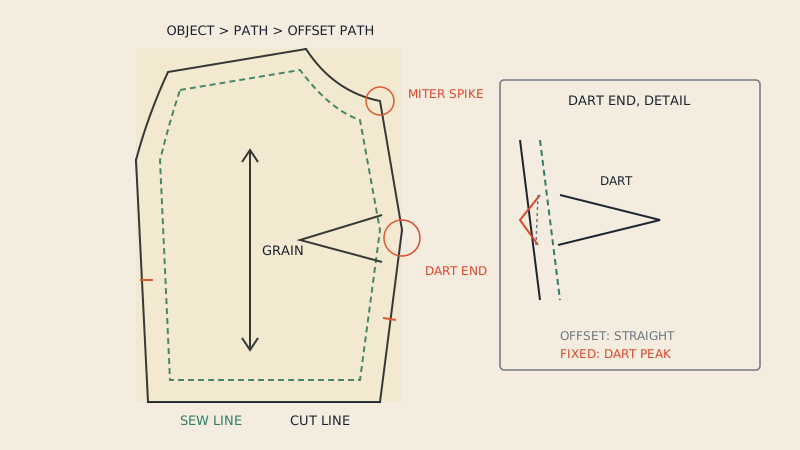
If you build patterns in an illustration program, the specific pitfalls (artboards, offset paths, export) are covered in making sewing patterns in Adobe Illustrator.
Step 3: lay out the pieces
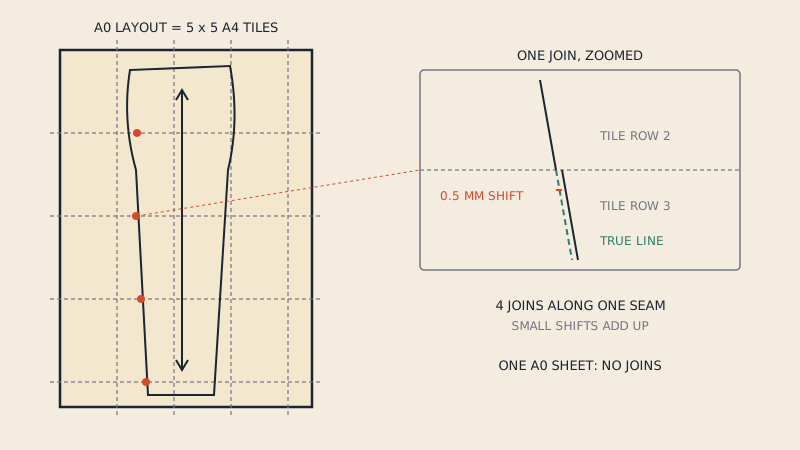
Arrange the pieces for the large-format sheet first, since it constrains you most. Keep grain lines parallel to the long edge of the sheet where possible; it makes tracing and cutting from the print easier. Leave a few centimetres between pieces so labels and notches don't collide.
Then decide the sheet sizes:
- A0 is 841 × 1189 mm (33.1 × 46.8"). Several A0 sheets are common for larger patterns.
- 36" roll is 914 mm wide, a little wider than A0. A layout that fits A0 width fits a 36" roll; the reverse is not true.
- Copy-shop rolls in other widths exist, but A0 and 36" cover most buyers.
Step 4: tile for home printing
The tiled file is where most buyer complaints come from, so plan it carefully.
Choose a tile that fits A4 and Letter
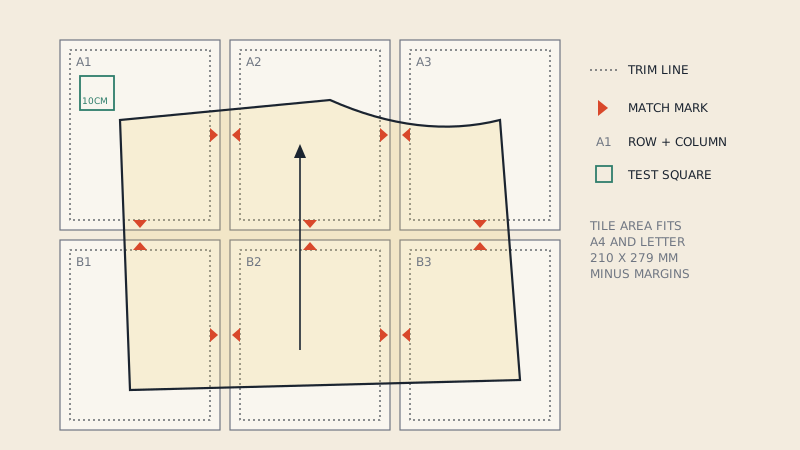
A4 is 210 × 297 mm; US Letter is 216 × 279 mm (8.5 × 11"). A tile grid based on the overlap of the two (210 mm wide by 279 mm tall, minus printer margins) prints on both, so one file serves every country. Many home printers can't print right to the edge, so keep content roughly 10 mm inside the paper.
Overlap or trim
Two common systems:
- Trim lines: each tile has a border; buyers cut one or two edges and butt the pages together.
- Overlap: tiles share a strip of content; buyers lay one page over the next and match the lines.
Both work. Pick one, draw it consistently, and explain it on the first page.
Match marks and labels
Each tile edge gets match marks (often a half-diamond or a letter-number pair) that line up with the neighbouring tile. Label every tile with its row and column (A1, A2, B1…) as well as a page number, so a dropped page can be placed without counting.
The assembly map
Include a small map of the full grid showing which tiles contain pattern pieces. Mark tiles that are blank so buyers can skip printing them.
Step 5: the projector file
A projector file is the pattern on one continuous canvas, without tiles or page furniture, designed to be projected onto the cutting table. Common features:
- thicker lines than the print files, because thin lines disappear on fabric;
- an option for light lines on a dark background, which is easier to see in projection;
- a calibration grid or a large test rectangle for scaling;
- the same size layers as the print files.
What a projector file is and how sewists use one is explained in what is a projector file.
Step 6: test squares
Every print output needs a test square, and the tiled file needs one on the first page so buyers check scale before printing everything. Offer both 10 cm and 3" (or 1"), since buyers measure with whatever ruler they own. Label it with its intended size. Why the square matters, and what a small scale error does to fit, is in the test square.
Step 7: export settings
When exporting the PDFs:
- export as vector, not as a flattened image;
- keep layers (optional content groups) in the export;
- embed or outline fonts so labels don't change on the buyer's computer;
- set the page size explicitly for each file (A4/Letter tile, A0, projector canvas);
- name files so the format is obvious:
patternname_A4-Letter.pdf,patternname_A0.pdf,patternname_projector.pdf.
Then open each file on a computer that doesn't have your fonts, in at least two PDF readers, and print a page at 100 %.
A shortcut if your pattern lives in CAD
If your pattern is in pattern CAD and you can export DXF AAMA, you can upload the DXF and get it laid out at 1:1 and split into A0, A1, A2, A3, A4 and US Letter sheets, each starting with test squares and an assembly map, plus a one-page copy-shop file (€5 per pattern). That covers the print layouts; size layers, cover pages and instructions are still yours to add.
Step 8: test with real people
Before release, give the files to testers who print in different ways: a home printer on A4, one on Letter, a copy shop on A0 or a 36" roll, and someone with a projector. Ask them to report scale (measure the test square), assembly problems and anything confusing. Fix the master, regenerate all outputs and bump the version number.
How the A4 and A0 routes compare for buyers, so you can explain the choice on your product page, is in A0 vs A4 PDF patterns.
FAQ
What software do I need to make PDF sewing patterns?
You need a vector program or pattern CAD that works at 1:1 scale, supports layers and exports vector PDF. Many designers draft in pattern CAD and lay out print files in a vector editor.
What page size should PDF pattern tiles be?
Design the tile grid to fit both A4 (210 × 297 mm) and US Letter (216 × 279 mm), with about 10 mm margins, so one file prints correctly in every country.
Should a PDF pattern include an A0 file?
Yes, most buyers expect one. Make sure the layout also fits the 914 mm (36") rolls common in North America, which are slightly wider than A0.
How do I add size layers to a PDF pattern?
Put each size's lines on its own named layer in your master file and keep layers when exporting the PDF. Also use distinct line styles, because not every reader displays layers.
Do I need a projector file to sell PDF patterns?
It is not required, but many buyers now expect one. It is a continuous canvas without tiles, with thicker lines and usually a calibration grid.