Sewing patterns travel in a handful of file formats, and each was made for a different job. PDF is for printing and selling; DXF AAMA or ASTM is for moving pattern pieces between CAD, 3D software and cutters; PLT/HPGL is for plotters; SVG and AI are general vector graphics; native CAD files hold the full working pattern but only open in the program that made them; and JPG, PNG or TIFF scans are pictures of a pattern rather than the pattern itself. Knowing which is which tells you what you can do with a file and what will be lost when you convert it.
The one question that sorts every format
Ask: does the file know what a pattern piece is?
- Structured pattern formats (DXF AAMA/ASTM, native CAD) store pieces: a closed cut line, a grain line, notches, internal lines, a name, a size, a quantity.
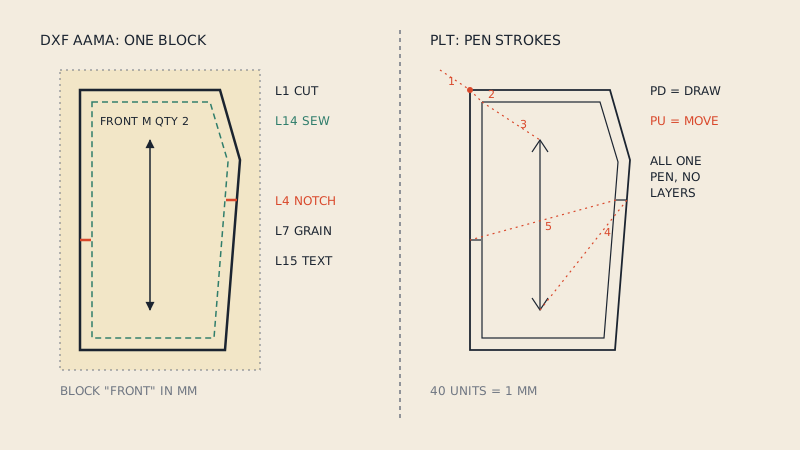
- Vector graphics formats (PDF, SVG, AI, EPS, plain DXF, PLT) store lines and text. A human sees pieces; the software sees strokes.
- Raster formats (JPG, PNG, TIFF, scanned PDF) store pixels. Even the lines are gone; there are only dots of colour.
Conversions are easy downhill (structured to vector, vector to raster) and hard uphill. Going up needs either a person or software that understands patterns.
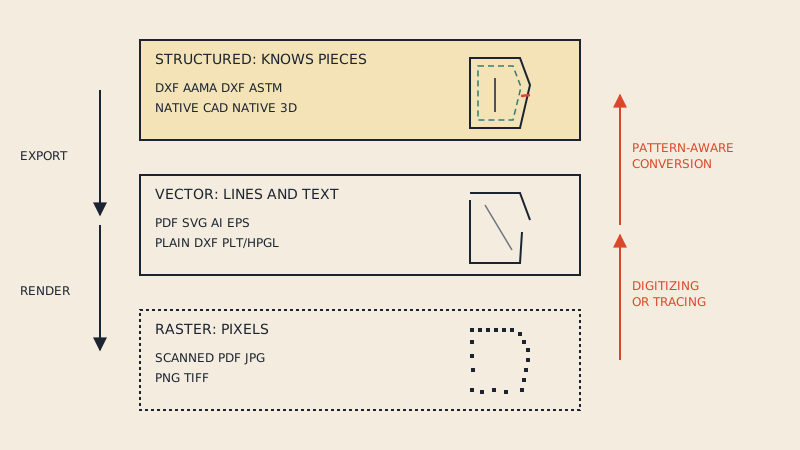
The formats at a glance
| Format | Extension | Tier | Made for | Keeps pieces? | Opens in |
|---|---|---|---|---|---|
| PDF (vector) | Vector | Printing, selling, projector files | No, only lines and text | Any PDF reader, vector editors | |
| PDF (scanned) | Raster | Archiving paper patterns | No, only pixels | Any PDF reader | |
| DXF AAMA | .dxf | Structured | Exchange between pattern CAD, 3D, cutters | Yes, one block per piece with layers | Pattern CAD, CLO3D, Marvelous Designer, many cutters |
| DXF ASTM | .dxf | Structured | Same, later standard (ASTM D6673) | Yes | Most pattern CAD and 3D software |
| Plain DXF | .dxf | Vector | General CAD drawings | No | AutoCAD-type programs, LibreCAD, Inkscape |
| PLT / HPGL | .plt, .hpgl | Vector | Driving plotters and cutters | No | Plotters, some CAD and viewers |
| SVG | .svg | Vector | Web graphics, Inkscape, craft cutters | No | Browsers, Inkscape, Illustrator |
| AI | .ai | Vector | Adobe Illustrator working files | No | Illustrator, some other vector apps |
| EPS | .eps | Vector | Older print exchange | No | Vector apps |
| Native 2D CAD | e.g. .sm2d (Seamly2D), .val (Valentina), .mdl (Lectra Modaris), .pds (Optitex) | Structured | Working pattern files | Yes, plus history and grading | Only the program that made them |
| Native 3D | e.g. .zprj, .zpac (CLO3D) | Structured | 3D garment projects and patterns | Yes, plus fabrics and sewing | That program family |
| Raster image | .jpg, .png, .tiff | Raster | Photos, scans, previews | No | Image viewers and editors |
A note on native files: some systems, Gerber AccuMark for example, keep data in their own storage areas and exchange it as exported archives rather than single files. Ask the sender which program and version a native file comes from before trying to open it.
Each format, briefly
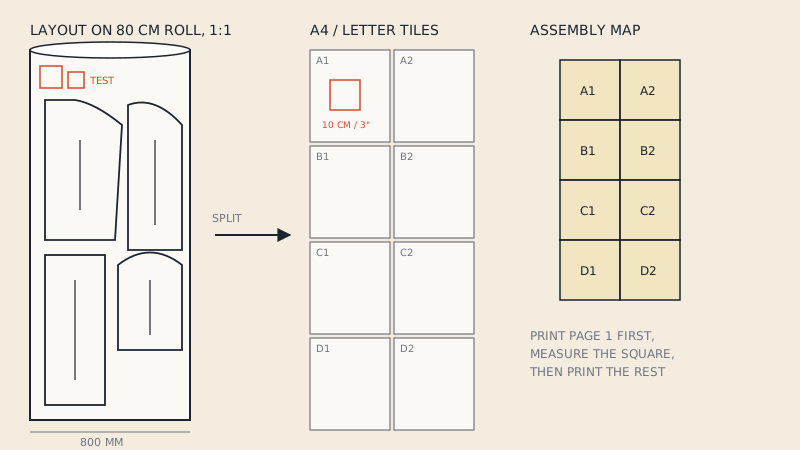
The format of home-sewing patterns. A vector PDF holds precise lines, text and often layers for sizes, laid out on A4, US Letter, A0 or a roll width. It is perfect for printing at 100 %, and it is the input most pattern conversions start from. A scanned PDF looks similar but contains only an image; is my PDF pattern vector or scanned shows how to tell in 30 seconds.
DXF AAMA and DXF ASTM
The exchange formats of the apparel industry. Both are DXF files with a strict convention: each piece is a block, and numbered layers carry meaning (1 cut line, 4 notches, 7 grain line, 8 internal lines, 14 sew line and more). AAMA came first; ASTM D6673 builds on it. For the differences and which to export, read DXF AAMA vs ASTM. The key point here: a "DXF" from a general vector program is not an AAMA DXF, even though the extension is the same.
PLT / HPGL
A plotter language: instructions to move a pen or knife. Apparel CAD still exports PLT for printing and cutting markers. It has lines, sometimes text, and no notion of pieces. More in PLT/HPGL pattern files.
SVG
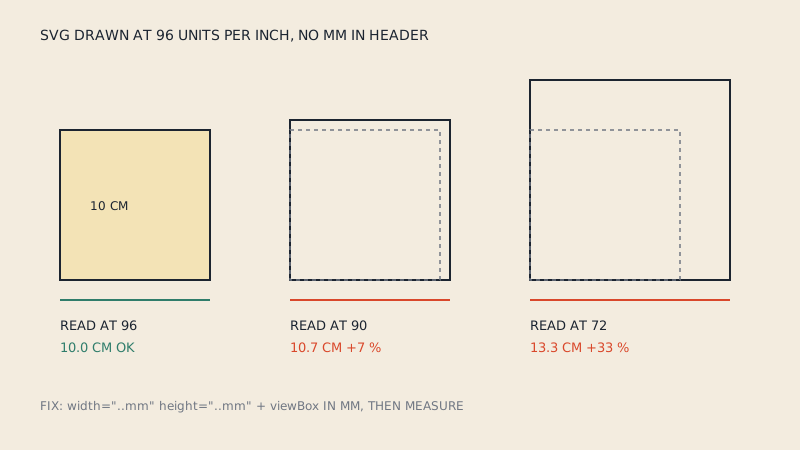
The vector format of the web and of Inkscape. Good for illustrations, online pattern previews and craft cutters; awkward for production because units and scale can shift between programs. The SVG sewing patterns article covers when it makes sense.
AI and EPS
Illustrator's working format and its older exchange cousin. Many indie designers draft in Illustrator and export PDF; the AI file is their master. It is still a drawing, not a pattern file, which is why getting Illustrator patterns into CAD takes care.
Native CAD formats
The richest files: they keep construction history, measurements, grading rules, seam allowance settings. They are also the least portable. For anything leaving your studio, export DXF AAMA or ASTM as well.
Raster scans and photos
JPG, PNG and TIFF capture the look of a paper pattern. They are useful as a record and as a background to trace from, but no software can measure or cut from them reliably without digitizing. See how to scan a sewing pattern.
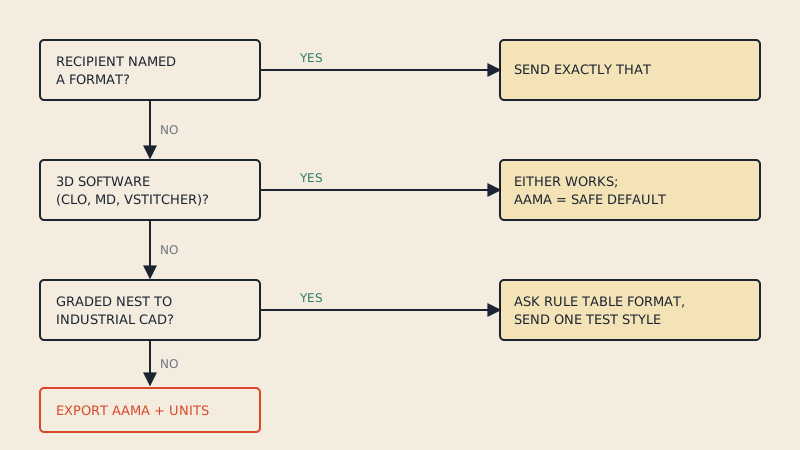
Which format for which job
| You want to | Use |
|---|---|
| Print at home or at a copy shop | Vector PDF (A4/Letter tiles, or A0 / roll width) |
| Project onto the cutting table | Projector PDF |
| Import into CLO3D or Marvelous Designer | DXF AAMA or ASTM |
| Send patterns to a factory | DXF AAMA or ASTM, plus a reference PDF |
| Plot a marker | PLT/HPGL or the plotter's driver from your CAD |
| Cut on a laser or craft cutter | DXF or SVG, depending on the machine software |
| Edit and grade | Native CAD, with DXF as backup |
| Show a pattern online | SVG or PNG preview |
| Archive a paper original | High-resolution scan, plus a digitized version if you use it |
Conversion paths
Easy conversions (downhill)
- Native CAD to DXF AAMA/ASTM: an export function in every pattern CAD.
- DXF to PDF: lay out the pieces at 1:1 and print to PDF, or tile for home printers. Our DXF to PDF guide covers the steps.
- DXF or native CAD to PLT: plot to file.
- Any vector format to PDF, SVG or PNG: export or print.
Harder conversions (uphill)
- Vector PDF to DXF AAMA: the lines are there, but they must be grouped into pieces, the cut line found, grain lines and notches identified, tile frames and text removed. Generic PDF-to-DXF tools output loose lines; why generic converters fail explains the gap. A pattern-aware converter such as our PDF to DXF service builds AAMA pieces from vector PDFs, including tiled A4 and Letter files, one size at a time.
- PLT to DXF: possible for the lines, but piece structure has to be rebuilt.
- SVG or AI to DXF AAMA: export to plain DXF, then assign layers and build pieces in pattern CAD.
- Scan to anything structured: needs digitizing, by hand or with tracing tools.
Things that are lost in conversion
- Going from structured to vector: piece identity, layers, grading, sometimes notches (they become plain lines).
- Going from vector to raster: everything measurable.
- Between native CAD programs: construction history, grading rules and special attributes; DXF transfers the geometry and the basic attributes.
Good habits with pattern files
- Keep one master per style in a structured format.
- Export a DXF AAMA or ASTM copy whenever the pattern changes.
- Name files consistently: style, size or size range, version, date.
- State whether seam allowance is included in the file name or piece text.
- Never edit the PDF or PLT as if it were the master; regenerate them.
FAQ
What file formats are sewing patterns sold in?
Home-sewing patterns are mostly sold as vector PDFs in A4, US Letter, A0 and sometimes projector layouts. Some designers also offer DXF files for CAD and 3D software.
What is the best file format for pattern making?
For working on a pattern, your CAD program's native format is best because it keeps grading and history. For sharing with other software or factories, DXF AAMA or ASTM is the standard.
Is a DXF file the same as a DXF AAMA file?
No. Any CAD program can write DXF, but an AAMA DXF follows a convention with one block per piece and numbered layers for cut line, notches, grain line and more. Pattern CAD and 3D software rely on that structure.
Can I convert a PDF sewing pattern to DXF?
A vector PDF can be converted into DXF AAMA pieces with a pattern-aware converter. A scanned PDF contains only an image and must be digitized instead.
Which format do I need for CLO3D?
CLO3D imports DXF patterns in AAMA or ASTM format through File, Import, DXF. It cannot use a PDF pattern as pieces directly.