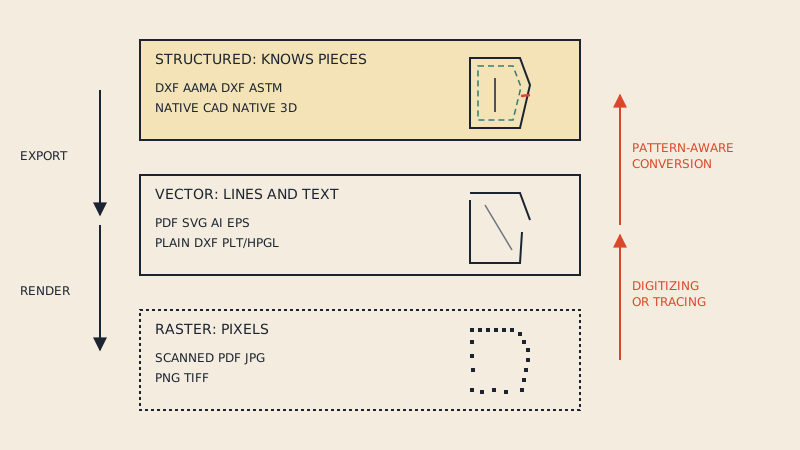
You can convert a vector PDF pattern to SVG in a few minutes: Inkscape opens PDF pages directly, and command-line tools convert them in bulk. SVG makes sense when the next step is Inkscape editing, a craft or laser cutter that reads SVG, or a pattern preview on a website. It makes less sense when the next step is pattern CAD, 3D software or a factory, because SVG, like PDF, stores lines rather than pattern pieces, and its scale is easy to lose between programs. The trick is to know which job you have and to check the scale every time.
What SVG is, in pattern terms
SVG (Scalable Vector Graphics) is the vector format of the web. An SVG file is XML text describing paths, shapes and text. Browsers display it natively, and vector programs such as Inkscape use it as their working format.
For a pattern, an SVG can hold:
- Every line of the pattern as paths, at precise coordinates.
- Text labels, and fills or colours for different sizes.
- Groups and layers, if the program that wrote it made them.
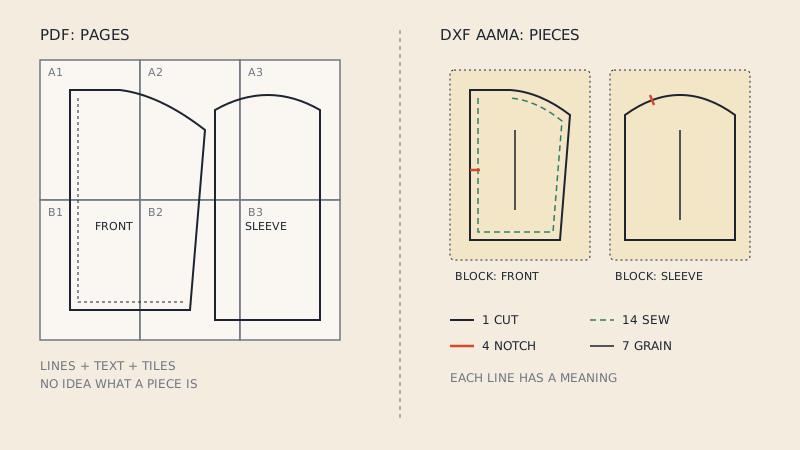
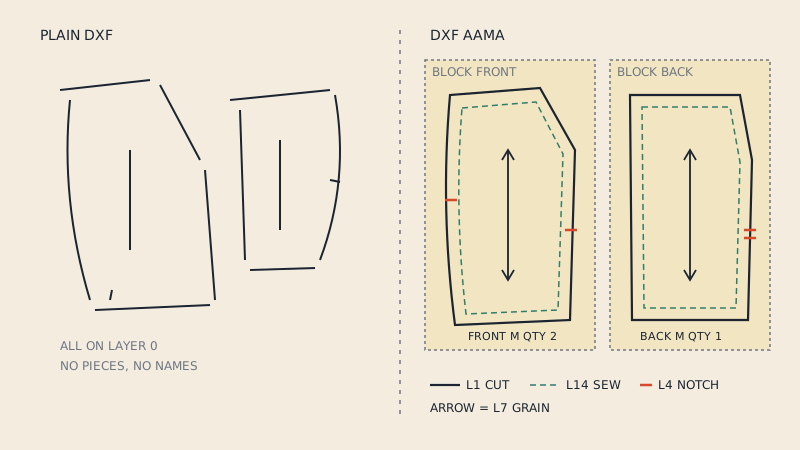
It cannot, by itself, say "this closed path is the cut line of the front, this line is its grain line, cut 2". That meaning lives in naming conventions you invent, not in the format. That is the difference from DXF AAMA, covered in what is DXF AAMA.
When SVG is the right choice
| Job | SVG works well? | Why |
|---|---|---|
| Editing a pattern in Inkscape | Yes | It is Inkscape's native format |
| Cutting on a craft cutter | Often | Many craft-cutter apps import SVG |
| Laser cutting templates or small parts | Often | Many laser programs import SVG or DXF |
| Pattern previews on a website or shop | Yes | Browsers display SVG sharply at any size |
| Line drawings for instructions | Yes | Small files, crisp at any zoom |
| Importing into CLO3D or pattern CAD | No | These expect DXF AAMA or ASTM pieces |
| Sending to a factory | No | Factories expect DXF AAMA/ASTM plus a PDF reference |
| Printing at home or copy shop | Possible, but PDF is safer | Print scaling from SVG depends on the program |
The pattern file formats overview puts SVG in context with the other formats.
How to convert a PDF pattern to SVG
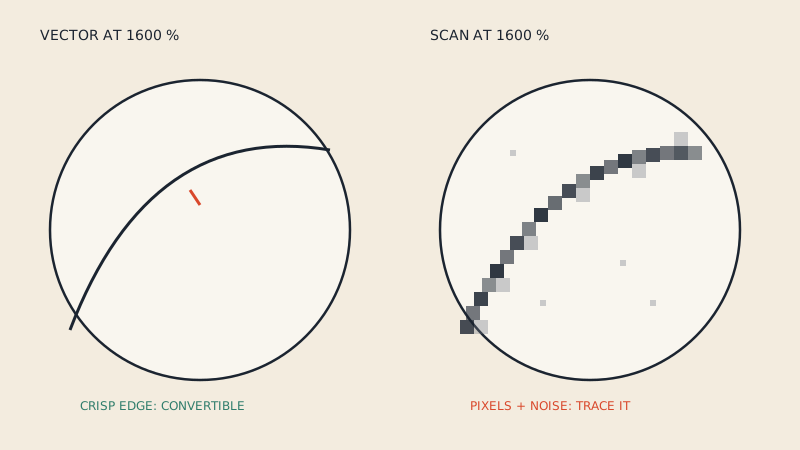
First, make sure the PDF is vector, not a scan; is my PDF pattern vector or scanned shows the 30-second check. A scanned PDF converted to SVG is still just an embedded image.
With Inkscape
- Open the PDF in Inkscape. It asks which page to import and how to handle text and fonts.
- Import one page at a time. Each page of a tiled A4 or Letter pattern becomes a separate drawing.
- Check the document size in the document properties: it should match the PDF page (for example 841 x 1189 mm for A0).
- Ungroup as needed. PDF imports often arrive as nested groups, and lines may be split into many short segments.
- Delete what you do not need: tile frames, page numbers, the legend.
- Save as Inkscape SVG (keeps Inkscape's extra data) or plain SVG (more portable).
With command-line tools
Tools such as pdf2svg or MuPDF's mutool convert each PDF page to an SVG file. This is handy for many pages, but you still get one SVG per page and still need to clean up.
What does not survive
- PDF layers (optional content groups, often used for sizes) are usually flattened. All sizes end up in one drawing; you separate them by colour or line style afterwards. The PDF pattern layers article explains how those layers work in the PDF.
- Tiling: a pattern printed on 30 A4 pages becomes 30 SVGs. To get whole pieces you have to assemble the tiles, aligning them on their match marks.
- Fonts: text may be converted to paths or substituted.
If your goal is whole pattern pieces rather than page drawings, converting tiles to SVG and stitching them by hand is the slow route. A pattern-aware conversion assembles A4 and Letter tiles automatically and outputs whole pieces as DXF AAMA; our converter does that, and can also produce a one-page print file from tiles. DXF imports into Inkscape too, if Inkscape is where you want to work.
Keeping the scale exact
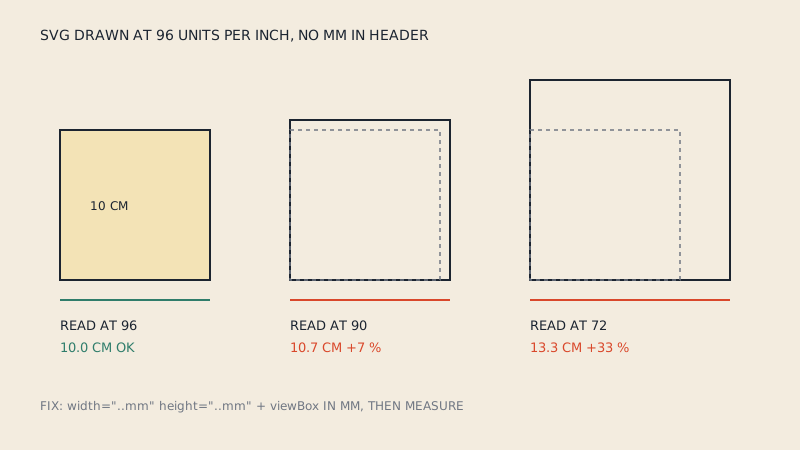
Scale is where SVG patterns go wrong most often. SVG coordinates are in "user units", and how a program maps them to real millimetres depends on the file header and on the program's assumptions.
The pixel problem
- CSS and current Inkscape define 96 pixels per inch.
- Older Inkscape versions (before 0.92) used 90 pixels per inch.
- Illustrator treats one pixel as one point, 72 per inch.
If an SVG has no real-world width and height, each program falls back on its own pixel size. A pattern drawn at 72 units per inch and read at 96 comes out at 75 % of its size; the other way round, at 133 %. A 2 % error is already visible in fit; a 33 % error is a different garment.
The fix: real units in the header
A safe pattern SVG states its physical size and a matching viewBox:
<svg xmlns="http://www.w3.org/2000/svg"
     width="841mm" height="1189mm"
     viewBox="0 0 841 1189">
Here one user unit equals one millimetre, regardless of the program's pixel assumptions. In Inkscape, setting the document units and scale in document properties produces this kind of header.
Always test
Add a 10 cm (or 4") test square to every pattern SVG and measure it after every import, export and print. The test square article covers tolerances.
Craft cutters and lasers
SVG is popular with craft-cutter users for appliqué shapes, templates and small pattern pieces. Points to watch:
- Cutting area. Craft cutters cut a limited width, so large pattern pieces must be split or cut on a larger machine.
- Paths, not strokes. The cutter follows path geometry; stroke width is ignored. Very thin features may need adjusting.
- Closed paths. An outline with a tiny gap may cut as a line rather than a shape.
- Seam allowance. Decide whether you cut the cut line or the sew line. For appliqué you may want neither, but a turned-under allowance.
- Kerf on lasers. The beam removes a small width of material; for precise templates you may offset paths.
SVG vs DXF for patterns
| SVG | DXF AAMA | |
|---|---|---|
| Native home | Web, Inkscape | Pattern CAD, 3D, cutting rooms |
| Pattern pieces | No, only paths and groups | Yes, one block per piece |
| Grain, notches, internal lines | Only as drawn lines | On numbered layers with meaning |
| Units | User units, physical size optional | Millimetres or inches, ideally declared |
| Display in browser | Yes | No |
| Import into CLO3D, Optitex, AccuMark | No | Yes |
For the CAD side, DXF vs PDF for sewing patterns explains the jobs DXF does. If you work in Inkscape and later need CAD files, using Inkscape for sewing patterns covers its DXF export and its limits.
Practical tips
- Keep the original PDF; regenerate SVGs from it rather than editing the SVG and losing track of which is current.
- Put each size on its own layer or in its own group, named clearly.
- Name pieces with a text label inside each piece; it survives most conversions.
- Remove hidden or clipped content left over from the PDF before cutting.
- Respect the pattern's licence: converting a pattern you bought for your own use is generally fine, sharing the SVG is not. See sewing pattern copyright for general information (not legal advice).
FAQ
How do I convert a PDF sewing pattern to SVG?
Open the vector PDF in Inkscape and import one page at a time, or use a command-line tool such as pdf2svg or mutool. Then check the document size, remove tile frames and save as SVG.
Why is my SVG pattern the wrong size?
The file probably has no physical width and height, so each program applies its own pixels per inch (72, 90 or 96). Set the width and height in millimetres with a matching viewBox, and check a test square.
Can I import an SVG pattern into CLO3D?
Not as pattern pieces. CLO3D and pattern CAD expect DXF AAMA or ASTM files, where each piece is a block with cut line, grain line and notches on layers.
Is SVG good for cutting patterns on a Cricut or laser?
For small pieces and templates, yes, since many cutter programs import SVG. Make sure outlines are closed paths, the scale is correct and the piece fits the machine's cutting area.
Do PDF size layers survive conversion to SVG?
Usually not as separate layers. All sizes tend to end up in one drawing, and you separate them afterwards by colour or line style.