Most problems with printing PDF sewing patterns come from a short list of mistakes: a reader that scales the page, the wrong paper size, skipping the test square, printing every size, and taping tiles out of order. Each one is cheap to prevent and expensive to discover after cutting fabric. Below are the twelve we see most often, with the fix for each.
If you want the complete process from the start, read how to print PDF sewing patterns first. This list is for checking your own routine.
Before you press Print
1. Letting the reader "fit to page"
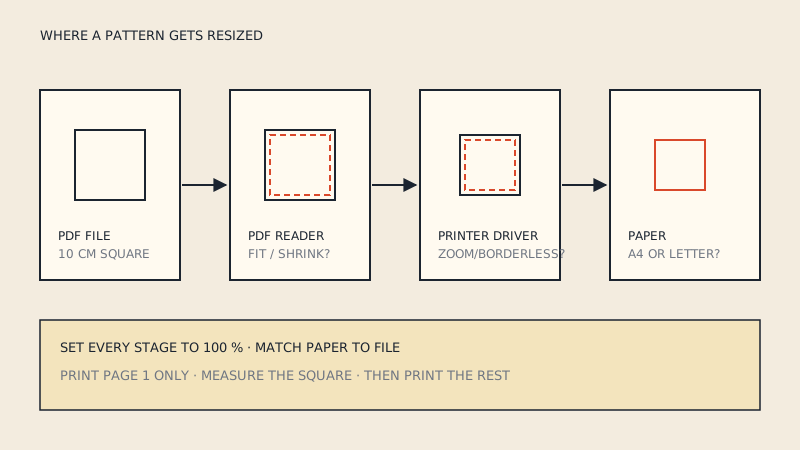
The single most common mistake. Many PDF readers and browser viewers default to "Fit", "Shrink oversized pages" or "Scale to fit". On a home printer this usually shrinks the pattern by a few percent to fit inside the printer's margins.
Fix: in the print dialog choose "Actual size", "100 %" or "Custom scale: 100". Check it every time; some readers reset it. Platform-specific settings are covered in PDF pattern not printing to scale.
2. Printing from a browser or a phone
Browser PDF viewers and phone print dialogs often have fewer options, ignore layers, and may scale silently. Fix: download the file and open it in a full desktop PDF reader that shows layers and an explicit scale setting.
3. Using the wrong paper size
A file made for A4 printed on US Letter, or the other way round, either gets scaled or loses part of each page at the edge. The two sizes look alike but are not interchangeable; the difference and what to do about it are in US Letter vs A4. Fix: check the page size in the PDF's document properties and match it to the paper in the tray. Many designers ship both versions.
4. Skipping the test page
Printing all 40 pages and then checking the test square on page 1 means 40 wasted sheets if something was wrong. Fix: print only the page with the test square first, measure it, then print the rest with exactly the same settings.
5. Measuring the test square carelessly
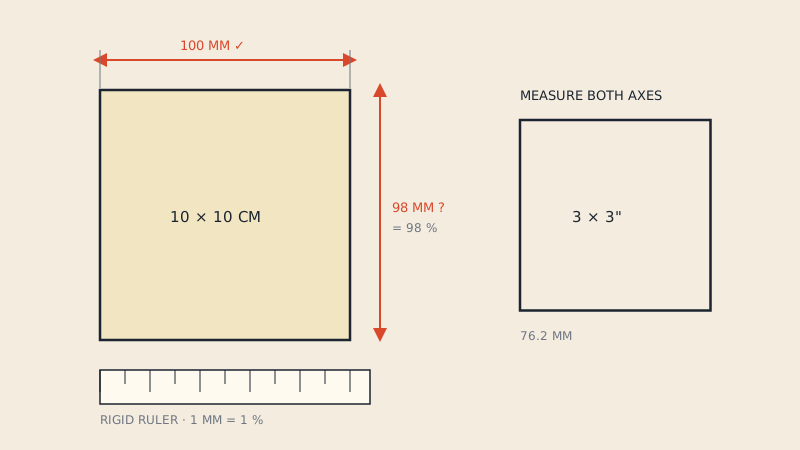
A square that "looks about right" is not a check. A 2 % error is about 2 mm on a 10 cm square, but on a 100 cm hip it is 2 cm, enough to change the fit. Fix: measure both sides with a rigid ruler, not a tape, from the outside edge of the line to the outside edge. The test square guide explains tolerances.
While printing
6. Printing every size
A multi-size pattern prints all sizes by default, often in colour. That wastes ink and makes it easy to cut along the wrong line. Fix: open the layers panel and hide the sizes you are not making. If you blend sizes, keep both visible. If the file has no layers, print in colour once and highlight your line before cutting.
7. Printing in colour on a nearly empty cartridge
Colour-coded size lines need colour to stay distinguishable; once a cartridge runs low, two sizes can print in the same washed-out grey. Fix: either print one size in black, or check the colour of each line against the legend before cutting.
8. Printing pages you don't need
Many patterns contain several views, and the instructions list which pages hold which pieces. Fix: read the page map, print only the pages for your view, and keep the map with the sheets so you know which are missing on purpose.
After printing
9. Taping tiles in the wrong order or with overlap
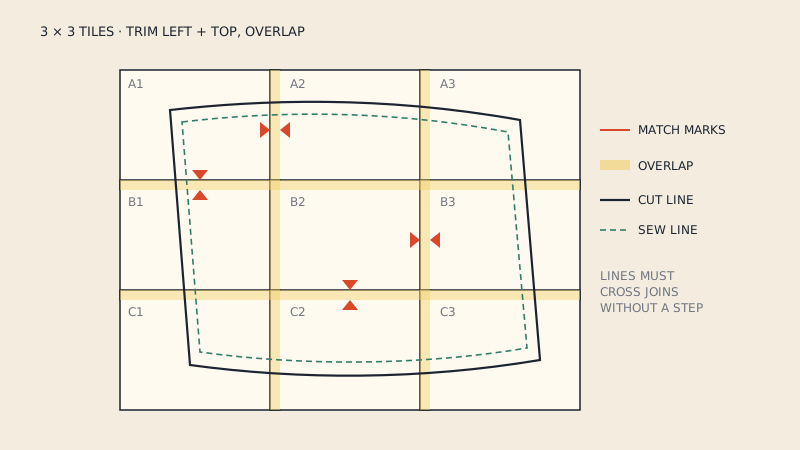
Tiles taped slightly overlapped or with a gap add or remove a few millimetres at every join. Across five tiles that is easily 5–10 mm. Fix: follow the designer's method (trim one edge, or overlap to the frame line), align the match marks, and tape in rows before joining rows. The assembly guide goes through it step by step.
10. Mixing up pages from two printings
Reprinting a single page later with different settings, or on a different printer, can give one tile that is a fraction larger than the others. Fix: if you reprint a page, check its test square or a known dimension against its neighbours, or reprint the whole row.
11. Ignoring the seam allowance note
The print can be perfect and the garment still wrong if you add seam allowance to a pattern that already includes it, or cut a pattern without it. Fix: check the instructions and the pattern for a seam allowance note before cutting. Our guide on whether seam allowance is included shows how to tell when the note is missing.
12. Taking a tile file to the copy shop
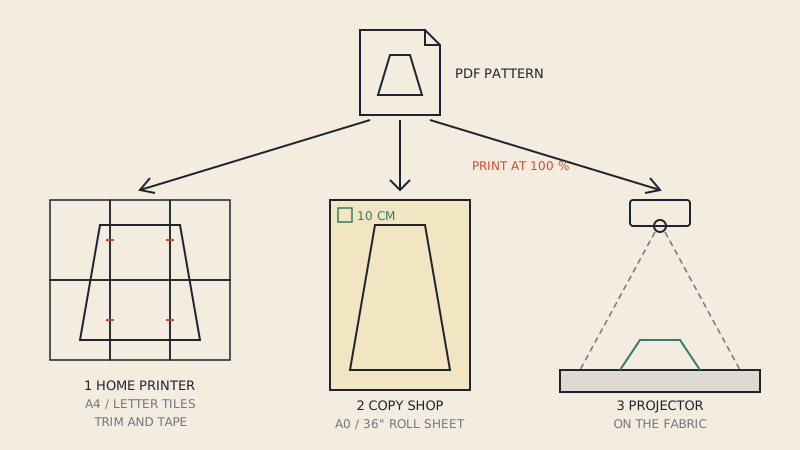
Copy shops print large sheets on a roll; a file with 30 A4 pages does not become a single sheet at the counter. Fix: take a copy-shop file (A0 or 36" wide). If the pattern only came as tiles, convert the tiles into a One Page sheet and A0 splits before you go.
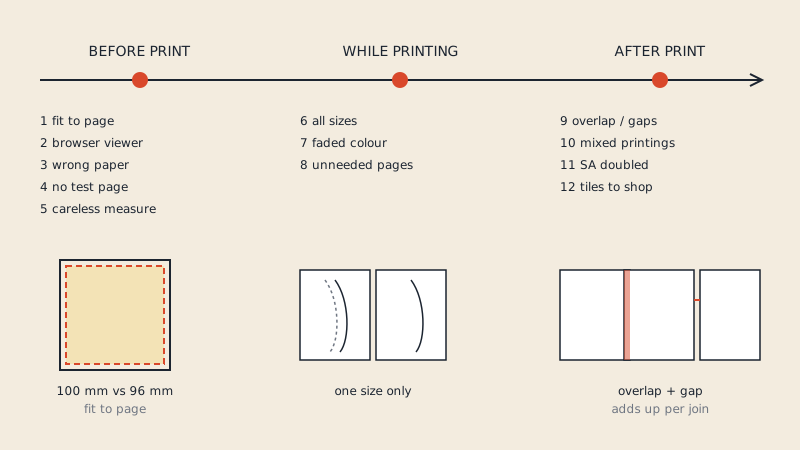
The mistakes at a glance
| # | Mistake | Stage | Symptom | Fix |
|---|---|---|---|---|
| 1 | Fit to page | Before | Test square 2–6 % small | Actual size / 100 % |
| 2 | Browser or phone viewer | Before | No layers, silent scaling | Desktop PDF reader |
| 3 | Wrong paper size | Before | Cut-off edges or scaling | Match file to paper |
| 4 | No test page | Before | Whole stack wrong | Print page 1 first |
| 5 | Careless measuring | Before | Fit off by centimetres | Rigid ruler, both sides |
| 6 | All sizes printed | During | Wrong line cut | Hide layers |
| 7 | Faded colour | During | Size lines look the same | Black for one size |
| 8 | Unneeded pages | During | Wasted paper | Use page map |
| 9 | Overlap or gaps | After | Pieces too long or short | Align match marks |
| 10 | Mixed printings | After | One tile slightly off | Check, reprint row |
| 11 | Seam allowance doubled | After | Garment too big or small | Read SA note |
| 12 | Tiles to copy shop | After | Shop cannot print it | One-page file |
Build a checklist you actually use
The best defence is a short routine done every time. Keep this near the printer:
- Correct file for my paper (A4 or Letter)?
- Desktop reader, Actual size, 100 %?
- Only my size(s) visible?
- Only my pages selected?
- Test page printed and both sides measured?
- Tiles assembled to match marks, in rows?
- Seam allowance included? How wide?
Seven questions take two minutes and prevent nearly every failure on the list.
When the print is right but the pattern still seems off
If the test square is exact and the pieces still do not match each other, the problem is probably not printing. Walk the seams: measure matching seam lines, such as front and back side seams, and check that notches line up. A mismatch there is a drafting or tracing issue, not a printer issue.
FAQ
Why is my printed PDF pattern smaller than it should be?
The print dialog was almost certainly set to fit or shrink the page to the printable area. Reprint the test page with Actual size or 100 % scale and measure the square again.
Should I print PDF sewing patterns in colour?
Only if you need colour to tell sizes apart. If you print a single size, hide the other layers and print in black, which saves ink and avoids faded lines.
How accurate does the test square need to be?
Aim for an exact match, within about 1 mm on a 10 cm square. Larger errors add up across a garment and change the fit.
Can I print a multi-page PDF pattern at a copy shop?
A copy shop prints large sheets on a roll, so it needs a copy-shop file with one large page, such as A0. Tiles meant for A4 or Letter should be joined into one sheet first.