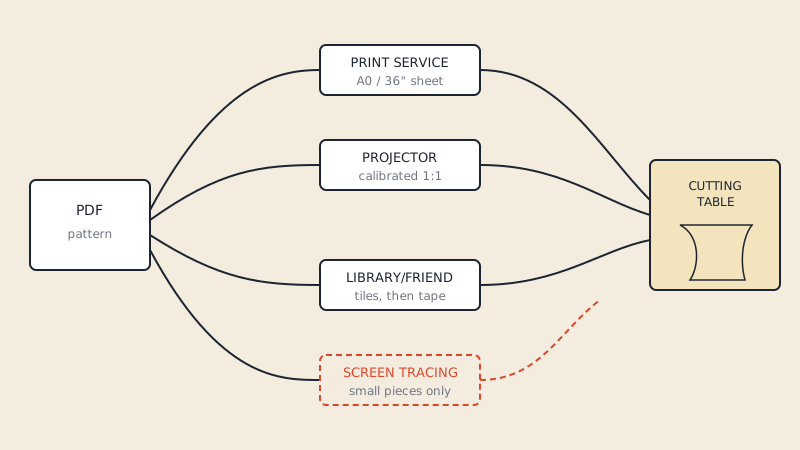
You do not need a printer at home to sew from a PDF pattern. The four practical options are: send the file to an online or local print service, use a projector over your cutting table, borrow a printer at a library or makerspace, or have someone else print the tiles for you. Tracing straight off a laptop or tablet screen is possible for tiny pieces but is not accurate enough for a whole garment.
Which route suits you depends on how often you sew, how big the pattern is and how much space you have. Below is what each one needs and where it goes wrong.
Option 1: a print service sends you the sheets
This is the closest thing to buying a paper pattern. You upload the file, a plotter prints it on a roll, and you collect it or get it in the post. It works best with a single large sheet rather than dozens of tiles.
What you need:
- A copy-shop file: one sheet per page, usually A0 (841 × 1189 mm) in Europe or a 36" (91 cm) wide sheet in North America
- An email address or upload page for the service
- A ruler to check the test square when the print arrives
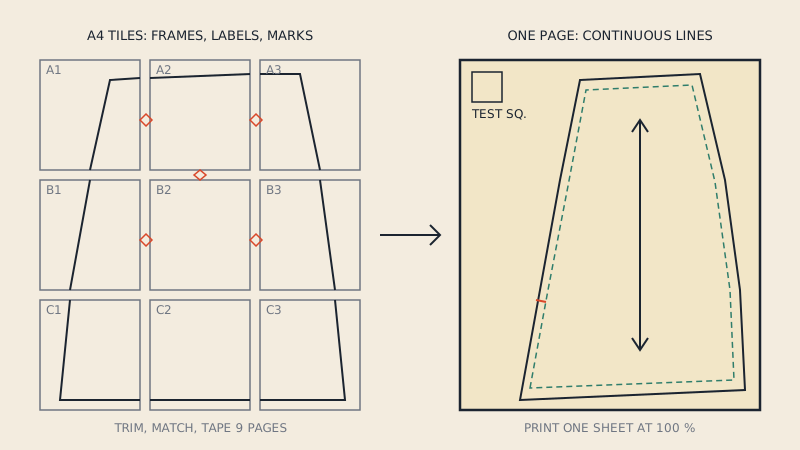
If the pattern only came as A4 or US Letter tiles, a plotter cannot help much until the tiles are joined into one sheet. You can convert tiles into a copy-shop file with our service; the result is a One Page sheet plus splits into A0 and smaller sizes. How the joining works is explained in one-page PDF patterns, and choosing a shop is covered in where to print sewing patterns.
Pros: accurate, nothing to tape, reusable sheet. Cons: costs per print, waiting time for postal orders.
Option 2: a projector instead of paper
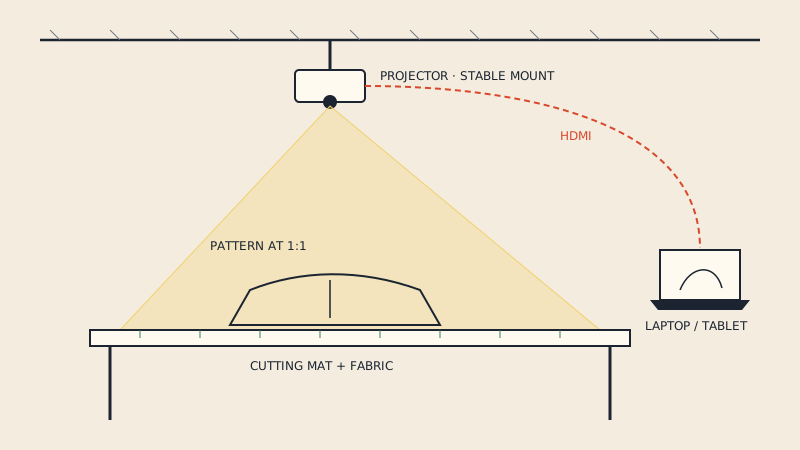
Projector sewing skips paper completely. A projector mounted above the cutting table shines the pattern at 1:1 scale onto the fabric, and you cut or mark directly along the projected lines.
What you need:
- A projector mounted above the table, usually on a ceiling bracket or a tall stand
- A laptop or tablet connected to it
- A projector file of the pattern, or a normal PDF you can open at the right zoom
- A cutting mat with a known grid for calibration
Getting the size exactly right is the hard part: the projector has to be calibrated so that 10 cm on the screen is 10 cm on the table, across the whole area. The projector calibration guide walks through it, and the beginner's guide to projector sewing covers equipment.
Pros: no paper, no printing costs once set up, fast for repeat sewing. Cons: upfront cost and setup, needs a fixed space, large pieces may need to be projected in sections.
Option 3: borrow a printer
A public library, university, workplace or makerspace may let you print. Even a basic office printer at the library turns a pattern into tiles you can tape at home, and some places have a plotter that prints a large sheet in one go.
Before you go:
- Save the PDF to a USB stick and to cloud storage, in case one does not work.
- Note which pages you actually need. Many patterns list pages per piece, and if you only make one view you may skip some.
- Turn off unused sizes in the PDF layers panel at home and save a copy, because shared computers often use simpler PDF viewers without a layers panel.
- Check the print dialog for "Actual size" or 100 % scale, not "Fit". Public computers are often set to shrink to fit.
Pros: low cost, close to home. Cons: limited paper sizes, booking or queueing, little control over printer settings.
Option 4: ask a friend or a local sewing group
It sounds obvious, but it is how many sewists start. Someone with a home printer prints the tiles, you tape them. Send them a PDF with only your size visible and the page list, and ask them to print one page first so you can measure the test square together.
Why tracing from a screen rarely works
It is tempting to hold tracing paper against a monitor or tablet, set the zoom to 100 % and trace. For a garment, it fails for several reasons:
- Screen zoom of 100 % is not real size. A PDF reader's 100 % depends on the screen's pixel density and the operating system's scaling; on many screens it is off by 10–40 %.
- A screen is far smaller than a pattern piece, so you have to scroll and re-align dozens of times, and each re-alignment adds error.
- Pressing on a screen can damage it, and the glass makes the paper shift.
If you want to try it for a small piece such as a pocket or a facing, calibrate first: draw or display the pattern's test square and adjust the zoom until it measures exactly 10 cm (or 3") with a ruler held against the screen. Re-check after every scroll. For anything larger, use one of the four options above.
Which option fits you
| Situation | Best option | Why |
|---|---|---|
| Sewing a few garments a year | Print service | Pay per pattern, no equipment |
| Sewing every week | Projector | Running costs near zero after setup |
| Small pattern, tight budget | Library or friend | Tiles at basic printing cost |
| Long pieces (coats, gowns, trousers) | Print service on a roll | One sheet, no long taped strips |
| No space for a fixed setup | Print service | Sheets roll up for storage |
| Need it today | Local copy shop or library | No postage wait |
Getting the file ready, whichever route you choose
All routes start from the same digital file, and a few minutes at the computer avoid most problems:
- Open the pattern in a full PDF reader and look at the page size in the document properties. A4 or Letter means tiles; A0 or a size around 914 mm (36") wide means a copy-shop sheet.
- Read the designer's instructions for which pages belong to which view.
- Hide sizes you are not making, if the PDF has layers.
- Decide what to keep: the printed sheet, a traced copy, or both. Tracing your size off a printed multi-size sheet keeps the original intact for later; see how to store printed patterns for keeping both.
FAQ
Can I use a PDF sewing pattern without a printer?
Yes. You can send it to an online or local print service, use a projector over your cutting table, or print at a library or makerspace. Each route works from the same PDF file.
Can I trace a sewing pattern from my laptop screen?
Only for very small pieces, and only after you calibrate the zoom against the pattern's test square with a ruler. Screen zoom at 100 % is rarely real size, and constant scrolling adds alignment errors.
What file should I send to an online pattern printing service?
Send a copy-shop file with one large sheet per page, such as A0 or a 36" wide sheet. If you only have A4 or US Letter tiles, join them into a single sheet first.
Is a projector worth it if I don't have a printer?
It is worth considering if you sew often and have a fixed space above a table. For a few patterns a year, a print service is usually cheaper and simpler.